
- TI nspire
[TI-nspire] 행렬의 입력 & 계산 - 확장 라이브러리 Matrix Library
-

- 2024.10.21 - 14:56 2015.01.13 - 22:45 19219 12
1. 라이브러리 설명
행렬의 입력 및 계산을 도와주는 확장 라이브러리입니다.
Matrix pieces Arithmetic function & Cofactor Expansion Program TI-Nspire
By creeras
Ver 1.5 (2024-10-21)
---
Usage
Function_name(matrix1,matrix2,row_number,column_number)
: For overwrite(), add(), subtract(), multiply(), divide()
Dim(matrix1) have to be bigger than dim(matrix2), and have to put all matrix2 elements opon matrix1 elements to calculate it.
Function_name(matrix,row_number,column_number)
: For insert(), insertrow(), insertcol(), minor(), cofactor()
Function_name(matrix,r or c,index)
: For coex()
Function_name(matrix)
: For adjoint(), rank(), lunp()
Caution
Result of Function() is not stored to original matrix. So store it to original matrix variable or new matrix variable.
2. 함수 (및 프로그램) 설명
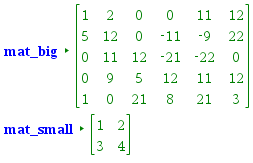
- add(matrix1,matrix2,row_number,column_number) : 행렬을 일부분만 더함
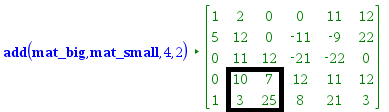
ㄴ mat_big 행렬에 mat_small을 더함. 4행 2열 ~ 5행 3열 부분만
subtract(matrix1,matrix2,row_number,column_number) : 행렬을 일부분만 뺌
multiply(matrix1,matrix2,row_number,column_number) : 행렬을 일부분만 곱함
divide(matrix1,matrix2,row_number,column_number) : 행렬을 일부분만 나눔 - overwrite(matrix1,matrix2,row_number,column_number) : 행렬을 일부분만 덮어쓰기 ; 기존 값은 무시되고, 새로운 함수의 값이 덧쓰입니다.
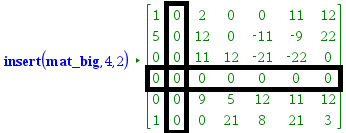
- insert(matrix,row_number,column_number) : 행 또는 열을 추가합니다. (0으로 채워져 있음)
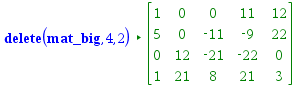
delete(matrix,row_number,column_number) : 행 또는 열을 삭제합니다(=소행렬)
- Insertrow(matrix,row_number,column_number) : 1행(만)의 이동.
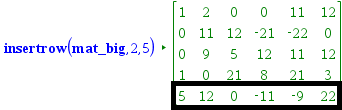
ㄴ 나머지 행들간의 순서변화 없음.
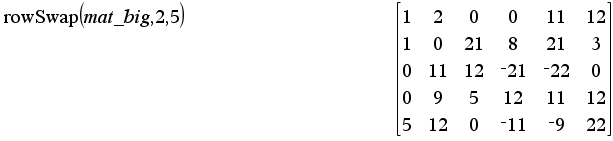
ㄴ 내장함수 rowSwap( )은 2행 사이의 위치 교환
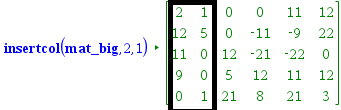
Insertcol(matrix,row_number,column_number) : 1열(만)의 이동. (나머지 열들간의 순서변화 없음.)
- minor(matrix,row_number,column_number) : "소행렬식", 부호를 고려하지 않은 소행렬의 행렬식. \( M_{ij} \)
cofactor(matrix,row_number,column_number) : 여인자, 부호를 고려한 소행렬식. \( C_{ij} = (-1)^{i+j} M_{ij} \)
adjoint() : 딸림행렬 = 수반행렬 - lunp() : permutation 없이 LU 분해하는 프로그램. // v1.4에서 추가됨. (다른 것들은 다 함수인데, 이것은 프로그램입니다)
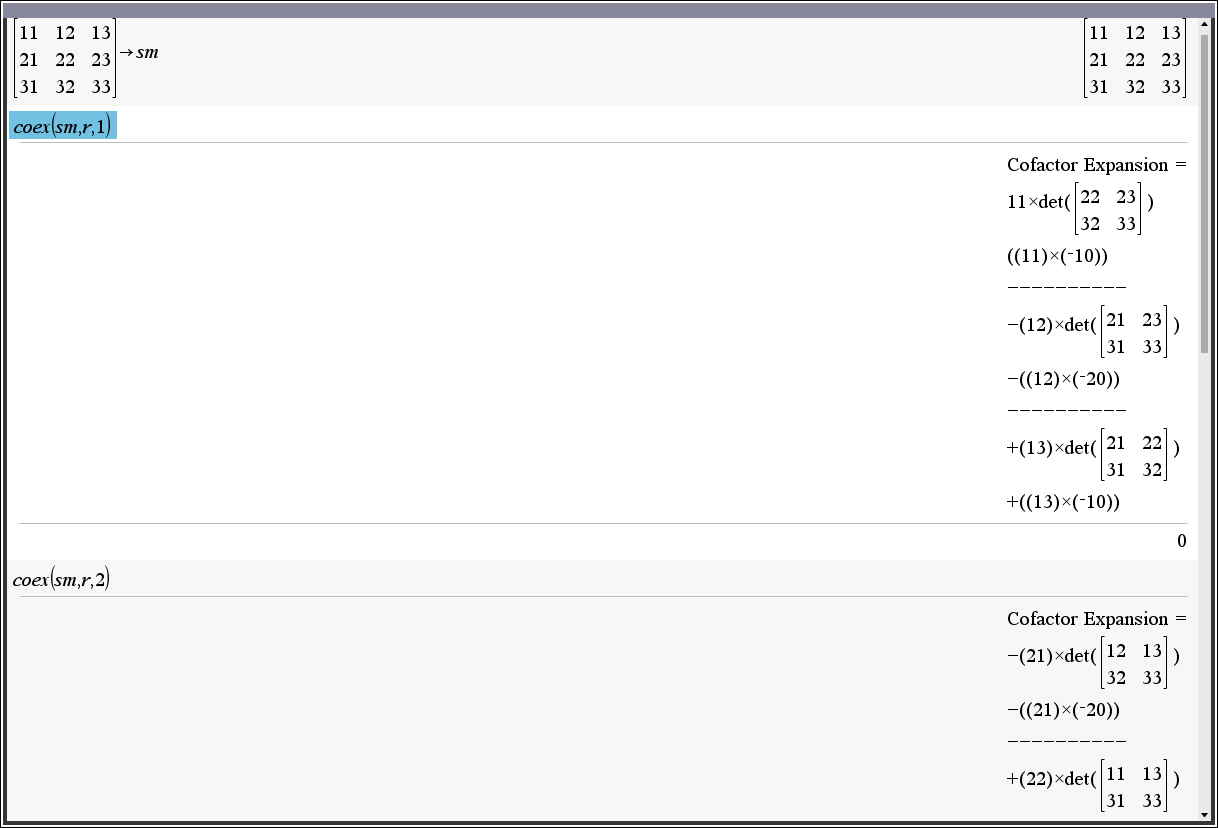
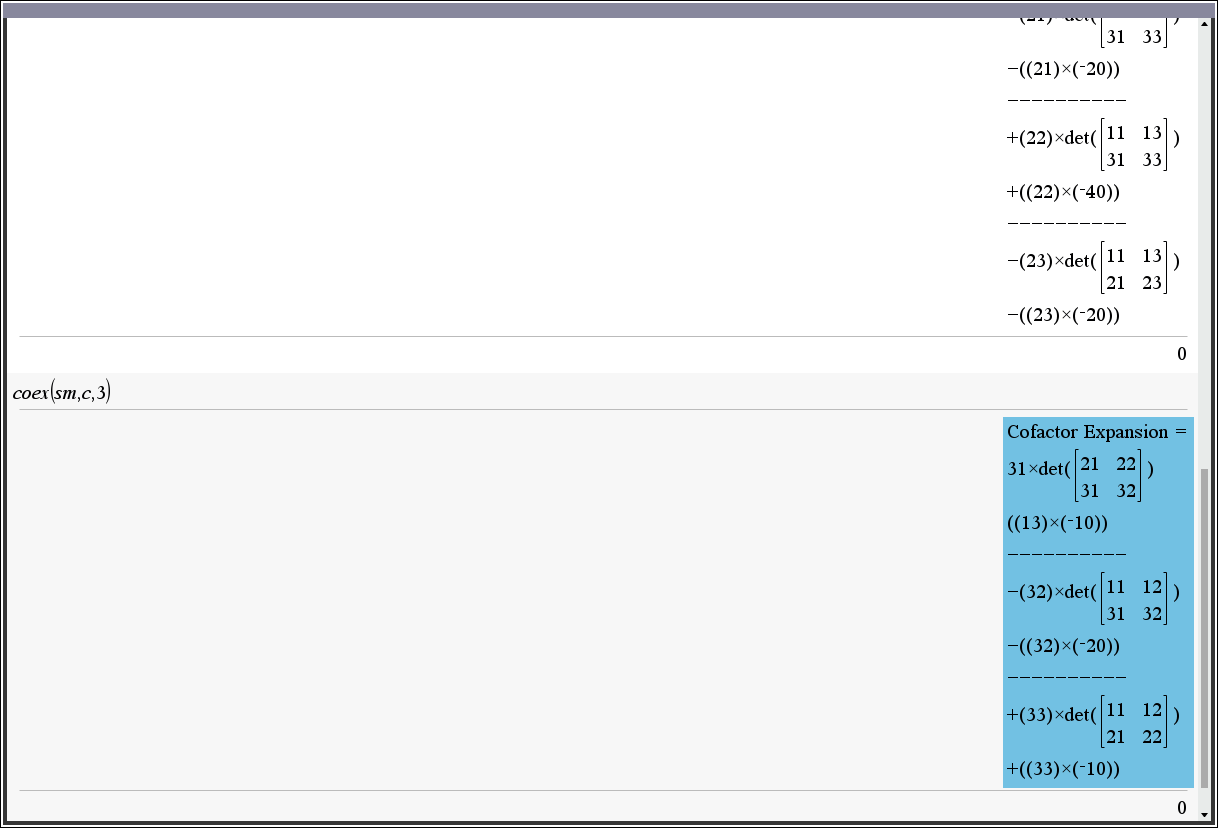
https://allcalc.org/9593#comment_49292 - coex(matrix,r or c,index) : 여인자 전개 // v1.5 에서 수정됨.
3. 사용 방법
3-1. 라이브러리를 다운로드 : matrix.tns
3-2. TI-nspire의 MyLib 폴더에 옮겨 넣고
3-3. refresh Library : 【Doc】 【6】 상세 설명은 다음 링크 확인 https://allcalc.org/35636
사용하시면 됩니다.
4. 동영상 설명
5. 업데이트 내역
V1.31 (2015-11-22)
근사(approx)계산시 rank 오류 해결
V1.40 (2024-10-07)
lunp() 추가 // permutation 없이 LU 분해함.
V1.50 (2024-10-21)
coex() 수정 // 기존에 열선택할 수 없던 문제, 그리고 step-by-step 확인하지 못하던 문제 해결
-
25
댓글12
- 1
- 1
- 2
- 1
- 1
- 2
-
세상의모든계산기
여인자 전개 프로그램 수정 V1.5
Define LibPub coex(mat1,choice,index)=
Func
:© coex(matrix,r or c,index)
:© Initialize
:Local mat1_dim,i,j,co.result,minormat,sgn
:dim(mat1)→mat1_dim
:newMat(mat1_dim[1],2)→co.result
:
:©Main Body
:Disp "Cofactor Expansion ="
:
:If string(choice)="r" Then
:  If 1≤index≤mat1_dim[1] Then
:    For j,1,mat1_dim[2]
:[mat1[index,j],cofactor(mat1,index,j)]→co.result[j]
:      minormat:=delete(mat1,index,j)
:      sgn:=(−1)^(index+j)
:      If j=1 Then
:        If sgn=1 Then
:        Disp string(mat1[index,j])&"×det(",minormat,")"
:        Disp "(("&string(mat1[index,j])&")×("&string(minor(mat1,index,j))&"))"
:        Else
:          Disp "-("&string(mat1[index,j])&")×det(",minormat,")"
:          Disp "-"&"(("&string(mat1[index,j])&")×("&string(minor(mat1,index,j))&"))"
:        EndIf
:      Else
:        Disp "----------"
:        If sgn=1 Then
:          Disp "+("&string(mat1[index,j])&")×det(",minormat,")"
:          Disp "+"&"(("&string(mat1[index,j])&")×("&string(minor(mat1,index,j))&"))"
:        Else
:          Disp "-("&string(mat1[index,j])&")×det(",minormat,")"
:          Disp "-"&"(("&string(mat1[index,j])&")×("&string(minor(mat1,index,j))&"))"
:        EndIf
:      EndIf
:    EndFor
:  Else
:    Disp "Invalid Row Index"
:  EndIf
:
:ElseIf string(choice)="c" Then
:  If 1≤index≤mat1_dim[2] Then
:    For i,1,mat1_dim[1]
:[mat1[i,index],cofactor(mat1,i,index)]→co.result[i]
:      minormat:=delete(mat1,i,index)
:      sgn:=(−1)^(index+i)
:
:      If i=1 Then
:        If sgn=1 Then
:          Disp string(mat1[index,i])&"×det(",minormat,")"
:          Disp "(("&string(mat1[i,index])&")×("&string(minor(mat1,i,index))&"))"
:        Else
:          Disp "-("&string(mat1[index,i])&")×det(",minormat,")"
:          Disp "-"&"(("&string(mat1[index,i])&")×("&string(minor(mat1,index,i))&"))"
:        EndIf
:
:      Else
:        Disp "----------"
:        If sgn=1 Then
:          Disp "+("&string(mat1[index,i])&")×det(",minormat,")"
:          Disp "+"&"(("&string(mat1[index,i])&")×("&string(minor(mat1,index,i))&"))"
:        Else
:          Disp "-("&string(mat1[index,i])&")×det(",minormat,")"
:          Disp "-"&"(("&string(mat1[index,i])&")×("&string(minor(mat1,index,i))&"))"
:        EndIf
:
:      EndIf
:    EndFor
:  Else
:    Disp "Invalid Column Index"
:  EndIf
:Else
:  Disp "Invalid Choice : Input ""r"" or ""c"" for 2nd argument"
:EndIf
:
:© Finalize
:Return det(mat1)
:EndFunc
사용 예시
세상의모든계산기 님의 최근 댓글
2) 고정기준값 41에 대한 오차 제곱합 계산방법 이건 통계메뉴에서는 딱히 방법이 떠오르지 않네요. 질문하신 것과 같이 적은 갯수의 data라면 직접 입력하시는게 최선입니다. 하지만 DATA 갯수가 수십개 이상이라면? ㄴ 스프레드시트 기능을 이용하시는게 좋겠습니다. 【MENU】【8】 A열에 DATA 입력하고 B로 이동한 후 OPTN 【1】 Fill Formula 【ALPHA】키 방향키 숫자키 등을 이용해 수식 완성 C로 이동후 Formula 수식 입력 D의 빈공간으로 이동 후 OPTN 방향키 아래 누르다보면 Sum 보임 ALPHA 키 이용해서 수식 완성. : 기호는 MENU 버튼 바로 아래 있음 (ALPHA키로 입력) 【=】입력하면 최종결과 확인 * 주의 (B열, C열과 달리) D1 셀은 계산 결과인 951이 직접 입력된 상태이므로 DATA 수정후 recalculation 하여도 자동계산되지 않음. 자동계산을 위해서는 formula 형식으로 입력해야 함. 2026 10.27 1) 통계적 편차제곱합(평균 50.25기준) 입력 방법 【MENU】 【6】 【1】 로 1-var Stat 모드로 진입하여 【48】 【=】 【66】 【=】 【32】 【=】 【55】【=】 DATA 입력 【OPTN】 【3】 【▼】 【▼】 fx-570EX 기종에도 편차제곱합을 바로 보여주진 않습니다. 본문에 나온 것처럼 앞서 계산되어 저장된 각종 변수를 이용해 계산합니다. 【AC】【OPTN】【4】Statistics Calc 이 화면에서 다시 OPTN 하고 (메뉴가 3개로 줄어 있죠?) 여기서 화살표 아래를 내려보면 추가 메뉴가 있습니다. 4개 메뉴에는 각각 아래 하위 메뉴가 있습니다. 이 중에서 필요로 하는 것을 골라 계산하시면 되겠습니다. Variable 에 있는 값을 이용하면 다른 공식을 쓰셔도 됩니다. 2026 10.27 질문자님, 48,66,32,55 네 개 DATA 의 평균은 50.25라서 41은 평균이 아닙니다. 그래서 식을 두 가지로 나눠서 봐야 합니다. 1) 통계적 편차제곱합(평균 50.25기준)이면 답은 608.75 입니다. 2) 만약 41이라는 고정 기준값에 대한 제곱합을 구하시는 거면 식은 (48-41)²+... 이고 답은 951입니다. 원문에 +로 쓰신 건 -의 오타로 보입니다. 2026 10.27 본문의 변환 위젯에 사용된 전서체 폰트는 대만의 최고 학술 연구 기관인 중앙연구원(Academia Sinica)에서 제공하는 ‘숭희전체(崇羲篆體)’로 전통 한자 서체인 소전(小篆)을 현대 컴퓨터 폰트(글꼴)로 구축한 오픈소스 프로젝트로 개발되었습니다. https://xiaoxue.iis.sinica.edu.tw/chongxi/download.htm 2026 10.20 예제1) 예제2) 예제3) 추가옵션 2026 10.18