
- TI nspire
TI-nspire CAS Student Software 다운로드 링크

6.0 버전부터는 기간 구독형으로 바뀌어서 비용 부담이 될 수 있으니,
5.4 이전 라이센스를 가지고 계시면 5.4 이전 버전을 다운받아 사용하시는 걸 추천드립니다.
>>> 기존에 인증받은 상태는 유지가 되지만,
새로 설치해서 인증시도할 경우에 기존(영구?) 라이센스를 버전과 관계없이 인증받을 수 없고,
4년짜리 계정 인증 방식으로 변경하지 않으면 사용할 수 없다고 합니다.
(인증을 하지 않는 trial 버전의 사용은 trial 기간 내 사용 가능합니다)
이래도 되나?? Don't be EVIL!
1. 공홈
TI-nspire 의 공홈에 가면 Student Software를 다운로드 받을 수 있는데,
구버전은 별도의 링크가 없어 다운로드 받기 어렵게 되어 있습니다.
기존 링크가 있으면 다운받을 수도 있는데, 링크가 죽는 경우도 간혹 있습니다.
TI-Nspire™ CX II CAS Handheld Operating System
6.0
https://education.ti.com/en/software/details/en/36BE84F974E940C78502AA47492887AB/ti-nspirecxcas_pc_full
trial 버전 없음?
5.4 CAS
https://education.ti.com/en/software/details/en/B4F6E4EE05B94D75AAB4DFE24B2720AE/ti-nspirecxcas_pc_trial
Version 4.5.5.79
https://education.ti.com/en/software/update/ti-nspire-software-update/nspire-download?q1=cx-cas-hh&count=1
3.9 CAS and Non-CAS
https://education.ti.com/en/software/details/en/7B013AEB82F34269B8A346313F5334F6/ti-nspirefamilyupdate
3.9 Non-CAS
https://education.ti.com/en/software/details/en/D8BE316924FF4ABE82CDB03522365CE2/student-nspire
2. TI-planet
여긴 프랑스어 기반이라 사용이 약간 불편할 수도 있는데요.
https://tiplanet.org/forum/archives_list.php?cat=Utilitaires+PC+Nspire
여기로 가셔서 아래로 내리면 검색창(돋보기 아이콘)이 있습니다. 검색어(예 5.4)로 검색하시면 목록이 뜹니다.
premium 이라고 나온 것은 teacher 버전이구요.
그냥 노멀하게 생긴거 CAS/non-CAS 구분해 들어가셔서
다운로드 Télécharger 하시면 됩니다.
예) TI-Nspire CAS 3.2.0.1219 enseignant PC
https://tiplanet.org/forum/archives_voir.php?id=5940
-
 25
25
댓글8
-
1
세상의모든계산기
그렇네요.
https://www.reddit.com/r/TI_Calculators/comments/18hx2at/account_required_on_a_calculator/TBH the computer software is way more than a calculator. But anyway that's not the issue here. A month or two ago they finally disabled the old licensing thing so there's no possibility anymore (other than continuing to use the same old computers where it's installed and previously activated).
https://www.reddit.com/r/calculators/comments/162g08l/i_just_got_my_ti_nspire_cx_ii_cas_and_its_having/
All calculators before December 2023 had Single User License (Perpetual),
No, TI had been issuing time-limited subscription licenses quite some time before December 2023. My CX II CAS unit, sold in November 2022, came with a 1-year license card.
What has changed is, people who already had a perpetual license card (probably from a unit that was originally sold more than a year ago) will no longer be able to activate their software. If they'd already activated it, then it will keep on working on that machine but they won't be able to re-activate it in the future. And if they hadn't activated it at all yet, then they won't be able to do so under the original terms.
기존 제품으로 인증받은 상태는 계속 유지가 가능한데,
새로운 영구 인증 시도는 차단되고, 4년짜리 account 기반으로 변경하라고 강제하는 것 같습니다.
좀 더 정보를 찾아봐야겠네요.부정확한 정보를 올려 혼란을 드렸습니다. 죄송합니다.
-
세상의모든계산기
https://education.ti.com/en/customer-support/knowledge-base/sofware-apps/computer-software-installation-activation/31671
Solution 31671: TI-Nspire™ CX Premium Teacher, TI-Nspire CX Student, TI-Nspire CX CAS Student, TI-SmartView CE, or TI-SmartView™ for MathPrint Software Activation Returns an Error A14.
How do I resolve error A14 that occurs during activation?
The error A14 occurs because this license type is discontinued. Converting to a new, account-based license is required to use the software.
If you own the TI-SmartView CE Software or TI-Nspire CX Premium Teacher Software you can request a new 16-character activation key for an 8-year subscription to replace your existing valid license.
If you own the TI-Nspire CX Student Software or TI-Nspire CX CAS Student Software you can request a new 16-character activation key for a 4-year subscription to replace your existing valid license.
If you own the TI-SmartView for MathPrint Software you can receive a new 8-year subscription for each valid license you own free of charge by contacting TI-Cares.
For any other questions, please contact TI-Cares.
Last updated: 8/26/2024
- 1
-
세상의모든계산기
나중에 포맷해야 할 상황에 대비해
혹시나 PC to PC 앱 옮겨주는 앱(EasyUS Todo)으로 되나 시도해봤는데,

역시나 인증이 안되네요.

-
세상의모든계산기
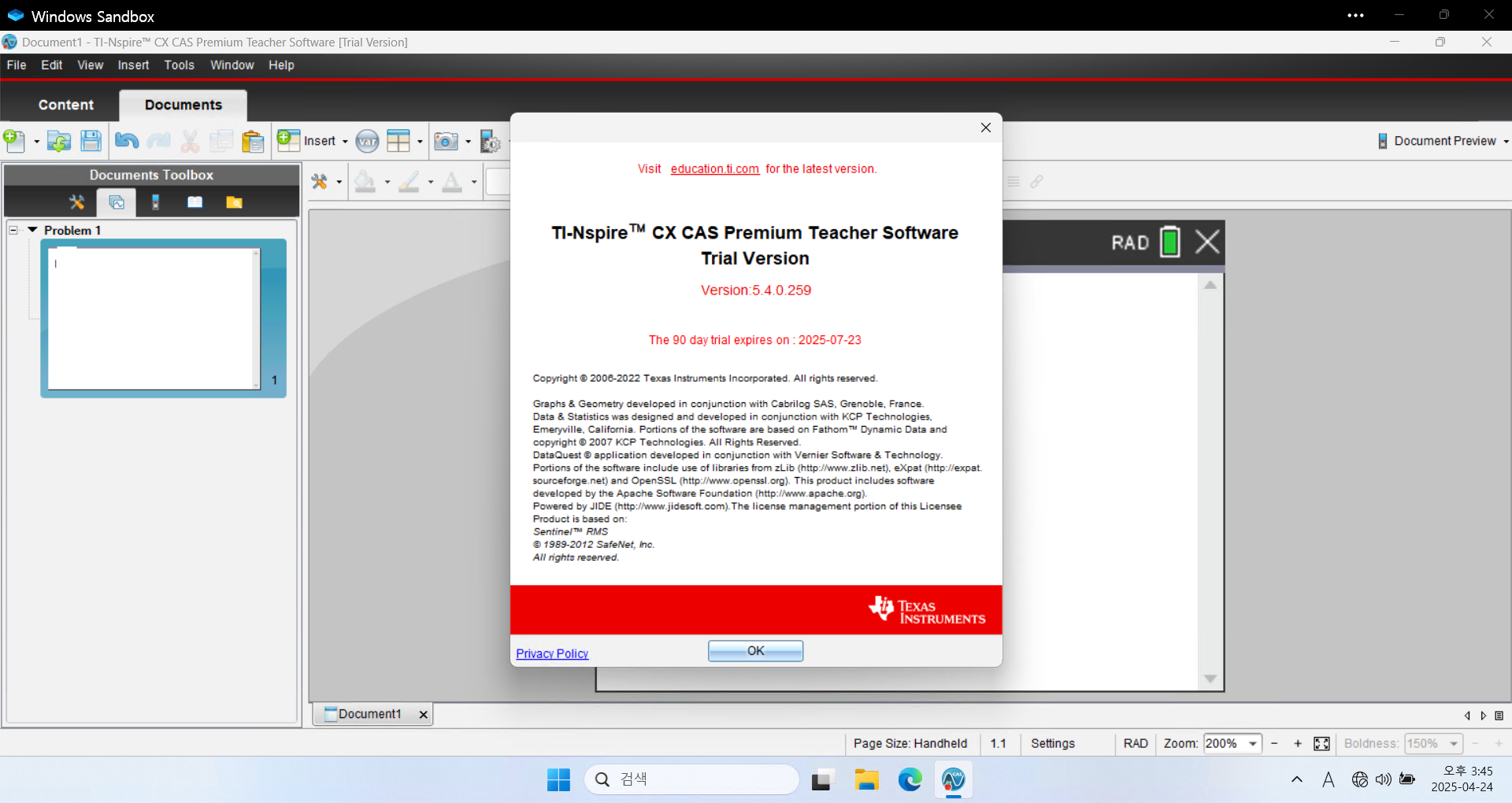
Teacher software 가 90일 trial 이니까
3개월에 한번씩 OS 리셋(포맷)하는게 귀찮지 않으시다면
3달에 한번씩 새로 설치하는 것도 방법이겠습니다.ㄴ 단순히 설치된 trial 버전을 uninstall 하고 re-install 하는 식으로는 날짜가 갱신되지 않습니다.
TI-Nspire™ CX / TI-Nspire™ CX CAS Teacher Software for Windows (EXE) 4.5.0.1180 584,715 https://education.ti.com/en/software/details/en/34934BB615F04ADE8B08D2A511DBB305/teacher-nspireCX-trial
TI-Nspire™ CX Premium Teacher Software for Windows (EXE) 5.4 631 602 https://education.ti.com/en/software/details/en/CF315257D3A6421EAE9D344A7DC49ACD/ti-nspirecx-tps_sda-5x?sc_lang=de-AT
세상의모든계산기 님의 최근 댓글
예제1) 예제2) 예제3) 추가옵션 2026 10.18 PC 소프트웨어에서 script Editor 로 소스코드를 쉽게 복사 -> AI에게 문의/개선요청 할 수 있습니다. 잘 되거나, 잘 안되는 부분이 있으면 대댓글 남겨주세요. 2026 10.16 AI로 딸깍하니까, lua 프로그램으로 바꿔주네요. 세상 참... 본문의 ti-basic 기반으로 만들었고, 서로 문제를 일으킬 수 있을 듯 하여 별개의 파일로 작성하였습니다. 1.1 Page : 설명 1.2 Page : 그래프 1.3 Page : Calculator 사용법 Root Locus 1+K*N/D=0 EX: (6s^2+5s+2)/(6s^3(s^2+7s+16)) INPUT (Calculator page 1.3 ): rl_num:={6,5,2} rl_den:={6,42,96,0,0,0} or num(6s^2+5s+2) den(6s^3(s^2+7s+16)) optional: rl_T:=10 rl_D:=1 Coeffs are descending powers of s. Back on graph page it refreshes itself, else press [r] or [enter]. KEYS: [+] [-] Kmax zoom, [0] reset, [r] reload MARKS: x=pole, o=zero, red line=real axis, gray dash=asymptote, box=break pt, diamond=j-cross VARS: rl_Kmax rl_sigma rl_r rl_JK rl_Jw 첨부파일 rlocus_lua.tns 2026 10.16 링크가 깨졌다고 하시니 404 에러가 나는 아래 링크를 말씀하시는 것 같은데 https://digilander.libero.it/fpirozzi/fourier.zip 이것은 TI-89 / TI-92 용 파일이며 [TI-92][TI-89] Fourier Transform Library https://allcalc.org/52455 링크의 Attached files + 안에 있습니다. 2026 09.11 본문에 사용된 nspire 용 파일은 본문 하단에 Attached files + 안에 있습니다. 클릭하면 표시됩니다. 2026 09.11