
- TI nspire
[TI-nspire] 계산기 초기화 Reset, Document / Problem / Page / Variables 도큐먼트에서 변수까지
-

- 2024.07.13 - 10:39 2015.10.25 - 11:01 23510 11 1
1. TI-nspire 의 특징
TI-nspire 는 간단하게 계산할 수 있는 Scratchpad  모드가 있고, 정식?으로 계산할 수 있는 Document
  모드가 있습니다.
설명: Document, Problem, Page의 관계
문서(Document)
- 정의: Document(문서)는 하나의 File(파일)로 볼 수 있습니다.
- 특징: 하나의 문서에는 여러 개의 문제(Problem)를 포함할 수 있습니다.
문제(Problem)
- 정의: 문제는 문서 안에 생성되는 개별 단위입니다.
- 특징: 각 문제는 독립적이며, 다른 문제와 변수나 계산 결과를 공유하지 않습니다.
- 하위 단위: 각 문제는 여러 개의 페이지(Page)를 포함할 수 있습니다.
페이지(Page)
- 정의: 페이지는 문제 안에 생성되는 하위 단위입니다.
- 특징: 같은 문제 안의 페이지들은 서로 변수를 공유합니다.
- 제한: 계산 결과(ans)는 페이지들 간에 공유되지 않습니다.
Document (File)
├── Problem 1
│ ├── Page 1
│ ├── Page 2
│ └── Page 3
├── Problem 2
│ ├── Page 1
│ ├── Page 2
│ └── Page 3
└── Problem 3
├── Page 1
├── Page 2
└── Page 3
관계 요약
- Document는 여러 Problem을 포함.
- 각 Problem은 서로 독립적이며, 변수나 계산 결과를 공유하지 않음.
- Problem 내부의 Page는 변수를 공유하지만, 계산 결과(ans)는 공유하지 않음.
여러 단계로 구분된만큼 DATA를 초기화하는 단계도 다양합니다. 원하는 수준으로 초기화하고 새로운 계산을 하는 것은 DATA를 관리하는데 중요한 일입니다.
예를 들어
현재 계산과정은 보존한 채 변수를 공유하는 다른 작업을 하고 싶으면 새 Page를 만들고,변수가 섞이면 안되는 다른 작업을 하고 싶으면 새 Problem 이나 새 Document 를 만들면 됩니다.
ㄴ 작업간 유사성이 있다면 New Problem 으로 하나의 파일에 저장시켜두는 것이 유리하겠죠.
2. 초기화
1. 계산기 전체 초기화
* 효과
: 메모리에 저장되어 있는 (Mylib 폴더를 포함한) 모든 file들을 삭제하고 공장 초기화 상태에 가깝게 돌립니다.
* 방법 :

 = My Document 파일 관리자 화면

 = DELETE All
 = OK 재확인
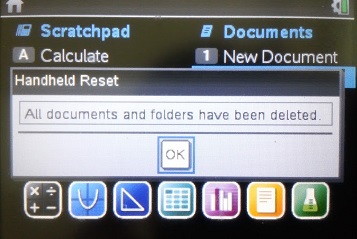
※ 시험을 위한 초기화에 적합합니다. 되돌리기 명령 
 이 통하지 않습니다.
시험 감독관이 위의 명령을 직접 시행하는 것이 가장 좋고, 아니면 최소한 아래의 화면을 확인하여야 합니다.
2. Document 삭제 & 새 Document 생성
* 새 Document 생성 : 
ㄴ 이 때 기존 작업중이던 Document 를 저장할 것인지 묻는데, No 를 선택하면 자동으로 삭제되는 효과를 얻습니다.
* 기존 Document 삭제 : 해당 파일 선택 후 
 주의
주의
다만 삭제 직후에 
 = 되돌리기 기능을 사용하면 파일삭제 명령을 되돌릴 수 있습니다.
따라서 완벽한 초기화를 하려면 'My Document' 만 보고 판단하지 말고, 『1. 계산기 전체 초기화』 명령을 반드시 확인하여야 합니다.
3. 현재 Problem 삭제 or 새 Problem 생성
* 새 Problem 생성 : 
 = Insert
 = Problem
* 현재 Problem 삭제 :  = Page Sorter 로 이동
방향키로 삭제할 Problem 을 (검정색) 하이라이트시키고 
4. 현재 Page 삭제 or 새 Page 생성
* 새 Page 생성 : 또는 
ㄴ 둘 다 같은 효과
* 현재 Page 삭제 : = Page Sorter 로 이동
방향키로 삭제할 Page에 (테두리) 하이라이트시키고
ㄴ 선택한 Page가 속한 Problem 의 모든 Page가 삭제되면 Problem 도 같이 삭제됨
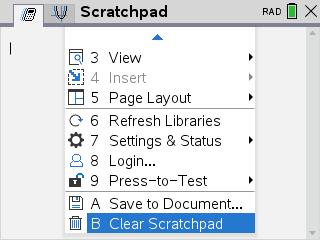
스크래치 패드에서는  Clear Scratchpad 가 같은 기능을 합니다.
5. 변수만 삭제
* ClearAZ : 
ㄴ a에서 z까지 영문자 1글자로만 이루어진 변수(함수)만 삭제.
ㄴ 삭제되지 않는 변수(함수)명 예시 : a1, ab, f1()
* delvar 변수명(들) : 
ㄴ 변수들은 컴마(,)로 구분하여 입력
6. 현재 Page 내 모든 entry 청소
모든 작업 과정 제거 :  = Clear History
ㄴ 작업의 결과로서 변수에 저장된 내용 등이 삭제되는 것은 아님
-
25
댓글11
- 1
- 1
- 1
-
1
세상의모든계산기
1-1. 최초 mylib 폴더 안에는 linalgcas.tns 와 numtheory.tns 라이브러리가 들어 있습니다. (이 댓글에 첨부합니다)
linalgcas library
TABLE OF CONTENTS
Part1: Linear Algebra
ceigenvals(Matrix)- symbolic complex eigenvalues of a matrix
clearmat()- delete temporary matrices
cofactor(Matrix,i,j) - cofactor of a matrix
comatrix(Matrix) - comatrix of a matrix (matrix of cofactors)
diagonalization(Matrix)- matrix diagonalization
dn(Matrix)- Jordan–Chevalley decomposition of a matrix M, where M=D+N, N·D=D·N
eigenvals(Matrix)- symbolic real eigenvalues of a matrix
eigenvects(Matrix,λ)- symbolic basis of the eigenspace of a matrix related to eigenvalue λ.
expmat(Matrix)- symbolic matrix exponential, ^(t·Matrix).
gausstep(Matrix)- step-by-step row matrix reduction.
help()- displays syntax info for functions and programs from library linalgcas.
inversestep(Matrix)- step-by-step matrix inverse computation.
kernelbasis(Matrix)- basis of kernel (null space) of a square matrix
kernelvectors(Matrix)- kernel (null space) vectors of a matrix
pwrmat(Matrix)- symbolic matrix power,Matrix^(n)
rank(Matrix)- rank of a matrix
simultstep(aMatrix, bVector)- step-by-step version of simult().
Part2: System of Linear Differential Equations
desystem(A,B)- solve system of differential equations in the form X'(t)=A·X(t)+B(t)
desysinitcond(A,B,t0,X0)- solve above system with initial condition X(t0)=x0.
desysnewcond(t1,X1)- solve the previously solved system of linear differential equations again, but with new initial conditions X(t1)=X1
numtheory library (en/fr/ge) - version 1.00 (2009-02-17)
Public functions for arithmetic
bezout(a,b) - (u,v,d)such that ua+bv=d, with d=gcd(a,b)
contfrac2real(list)- converts the continued fraction list to a real number
divisors(n)- list of divisors of n
factorstep(n)- step-by-step factorization of integer n
gcdstep(a,b)- step-by-step gcd
listprimediv(n)- list of prime divisors
nextprime(n)- first prime psuch that n≤p
phi(n)- number of positive integers not exceeding n and relatively prime to n
prevprime(n)- last prime psuch that p≤n
primecount(a,b)- counts the primes between aand b
primelist(a, b)- generates the list of primes between aand b
pwrmod(a,n,b)- compute a^(n) mod b(even for large values of aand n)
real2contfrac(num,k)- generates a list of the first k convergents for the continued fraction of a real number num.
Public functions for study of permutations
randperm(n)- generate a random permutation of {1,2,3,...,n}
signature(σ)- signature of a permutation defined by the list {σ(1),σ(2),...}
signaturestep(σ)- step-by-step signature of a permutation, with intermediate steps (with display of the decomposition in disjoint cycles)
Others tools included in this library
select(List,"boolean_expr(x)")- selects elements of a list with a specified property
select_range(n1,n2,"boolean_expr(x)")- selects integers elements between n1and n2with a specified property
sort_asc(ListNum)- sorts a list of numeric values in ascending order
sort_desc(ListNum)- sorts a list of numeric values in descending order
Private functions
These functions are not shown in the catalog, but they may however be used in other documents, if they are called by their long names.
numtheory\is_perm(List)- tests if a list does define a permutation: elements must be integers from 1 to n (number of elements of the list) and each must appear exactly once.
- 2
- 3
세상의모든계산기 님의 최근 댓글
- claude AI는 l-c*r^2 을 1-c*r^2 으로 잘못 읽고 표시하고 있습니다. - TI-nspire CAS 계산기에 l-c*r^2 ≥0 을 조건에 추가해 계산해 보아도 결과는 바뀌지 않습니다. 2026 07.20 ⚠️ 경고가 바로 두 번째 방법이 "성공"한 이유와 정확히 연결되어 있습니다. 경고의 의미 "Domain of the result might be larger than the domain of the input"는 CAS가 절댓값(모듈러스)을 계산하는 과정에서 원래 식보다 정의역이 더 넓은 형태로 단순화했다는 뜻입니다. 구체적으로 이 계산은 내부적으로 대략 이런 과정을 거칩니다. $$\left|\frac{er}{e\cdot r}\right| = \sqrt{\left(\frac{er}{e\cdot r}\right)\cdot\overline{\left(\frac{er}{e\cdot r}\right)}}$$ 즉 원래 식(복소수)과 그 켤레복소수를 곱해서 실수부·허수부 제곱합을 만들고, 거기에 다시 제곱근을 씌우는 과정입니다. 이 과정에서 √(x²) → x 또는 √a·√b → √(ab) 같은 규칙들이 쓰이는데, 이런 규칙들은 x가 실수이고 0 이상일 때만 엄밀하게 성립합니다. CAS는 이 조건들을 일일이 다 추적하지 않고 넘어가면서, 원래는 (e≠0, r+l·ω·i ≠ 0 등) 복소수 특유의 좁은 정의역을 가진 식을, r, l, ω가 어떤 실수여도(부호 무관하게) 정의되는 1/√(r²+l²·ω²)라는 더 넓은 정의역의 식으로 바꿔버린 것입니다. CAS는 이 손실을 감지하고 경고를 띄운 것입니다. 이게 왜 조건 대입 성공과 연결되는가 정리하면, 이 경고는 사실상 이런 뜻입니다. "나는 이 결과를 만들면서 원래 식이 가지고 있던 정의역 제약 정보(부호 조건, i 관련 조건 등)를 이미 버렸다." 바로 이 "정의역 정보를 버린" 상태가 이후 con_1 대입을 매끄럽게 만드는 원인입니다. 첫 번째 시도에서는 i가 살아있는 원래 식에 조건을 대입했기 때문에, CAS가 √(1-c·r²)이 실수인지(정의역 조건: 1-c·r² ≥ 0) 계속 추적하려고 했고, 그 정보가 con에 없어서 더 이상 정리를 못 하고 멈췄습니다. 두 번째 시도에서는 절댓값 계산 단계에서 이미 그런 세밀한 정의역 추적을 CAS 스스로 포기(단순화)했기 때문에, 이후 ω에 무리식을 대입해도 "이게 실수가 맞나?" 하는 검증 절차 없이 그냥 대수적으로 치환·정리해 버립니다. 그래서 깔끔하게 √c/√l이 나온 겁니다. 한 줄 요약 절댓값 계산 시 뜬 "정의역이 넓어졌을 수 있다"는 경고는, CAS가 그 순간에 원래 식의 엄밀한 조건(정의역)을 놓쳤다는 신호이고, 바로 그 "조건을 놓친 상태"이기 때문에 뒤에 이어지는 조건식 대입이 막힘없이 진행된 것입니다. 다만 그 대가로, 결과인 1/√(r²+l²·ω²)이나 최종 √c/√l이 원래 회로 조건(i≠0이 되는 경계, 분모가 0이 되는 경우 등)에서는 엄밀히 성립하지 않을 수 있다는 점은 감안하셔야 합니다. 실제 물리적으로는 r, l, c > 0이고 결과도 물리적으로 타당한 형태라 문제없어 보이지만, 수학적 엄밀성 측면에서는 "정의역이 넓어진 근사적 결과"라는 꼬리표가 붙어있는 셈입니다. 2026 07.20 Claude AI 답변 TI-Nspire CAS의 | (such that / 조건대입) 연산자는 대입 시점의 수식 형태를 그대로 두고 기호만 치환하는 연산입니다. 대입 후에 처음부터 다시 "실수부/허수부 분리, 유리화" 같은 재간소화를 자동으로 수행하지 않습니다. 이 차이가 지금 보신 결과 차이의 핵심입니다. 첫 번째 경우 (|er/(e·r)| | con_1 and con → 실패) 이 시점의 식은 아직 r + l·ω·i 형태의 복소수 그대로입니다 (i가 살아있음). 여기에 con_1: ω = √(1-c·r²)/(√c·l)을 대입하면, 분모 안에 i · √(1-c·r²) 라는 항이 새로 생깁니다. 문제는 CAS가 √(1-c·r²)이 실수인지(즉 1-c·r² ≥ 0인지) 판단할 근거가 없다는 겁니다. 저장해 두신 con 조건은 c>0, l>0, r>0뿐이고, 1-c·r²≥0이라는 조건은 포함되어 있지 않습니다. 그래서 CAS는 i와 이 무리식을 더 정리(유리화, 실수부·허수부 재결합)하지 못하고 있는 그대로 남겨둡니다. 결과에 여전히 i가 보이는 이유입니다. 두 번째 경우 (결과값 1/√(r²+l²·ω²)에 대입 → 성공) |er/(e·r)| (절댓값/모듈러스) 연산은 그 자체로 이미 "복소수 → 실수" 변환을 완료한 결과입니다. 즉 1/√(r²+l²·ω²)에는 더 이상 i가 없고, 순수하게 r, l, ω로만 이루어진 실수식입니다. 이 식에 ω = con_1을 대입하는 것은 그냥 실수 대수식에 실수 대입하는 것이므로, i와 무리식이 뒤엉키는 문제 자체가 발생하지 않습니다. 그래서 바로 깔끔하게 √c/√l로 정리됩니다. 정리하면 절댓값(모듈러스) 계산은 "이 값들이 실수다"라는 가정을 이미 내부적으로 써서 i를 제거하는 연산입니다. 그 연산을 조건 대입 이전에 해두면, 이후 대입은 단순 실수 대입이라 문제없이 정리됩니다. 반대로 i가 남아있는 식에 무리식을 포함한 조건을 먼저 대입하면, 그 무리식의 실수성/부호에 대한 가정이 없어서 CAS가 i를 소거하는 재간소화를 못 하고 멈춰버립니다. 실용적 팁: 복소식에 조건을 대입해야 할 때는 가능하면 절댓값·실수화(유리화) 등을 먼저 끝내서 i를 없앤 뒤 조건을 대입하거나, 대입 후 결과에 다시 simplify/expand/combine 같은 명령을 한 번 더 걸어주면 (필요한 도메인 조건과 함께) 정리가 되는 경우가 많습니다. 2026 07.19 저도 어림잡아 추측할 뿐이지 정확한 이유를 알지는 못합니다. 질문하신 사진을 그대로 (Gemini 3.5 Flash / ChatGPT / Claude Sonnet 5) AI에 넣어 보니 claude AI 가 제일 합리적인 답변을 주어서 이를 붙여 넣습니다. 2026 07.19 아 그렇네요. 감사합니다. ^^ 2026 04.28