
- TI 89
[TI-92][TI-89] Fourier Transform Library
-

- 2024.11.19 - 00:34 2024.11.15 - 23:18 785 8
오리지널 출처는 모르겠구요. 이곳에서 발견했습니다.
https://helpcalculator.forumfree.it/?t=7760484
파일 다운로드 : https://digilander.libero.it/fpirozzi/fourier.zip
Readme.txt
fourier
-------
Fourier version 3.20 for TI-92/TI-92II and TI-89/TI-92+
This packet contains functions to perform Fourier-/inverse Fourier-
transformation. A function, which can rewrite the output of Fourier/
iFourie to a form that, can be evaluated numerical. A function to
graph the output.
Keep the functions together in a separate folder with the name
"FOURIER" and do not create any variable in it.
Before using iFourier or Fourier set TI-92 MODE
Complex Format to RECTANGULAR
Angle to RADIAN
Exact/Approx to AUTO
You have to do these settings yourself because; the functions cannot
change the mode setting on the calculator.
The package include following programs/functions:
Help online help to programs.
Fourier Fourier transformation
iFourier inverse Fourier transformation
Plot graph expression
eval evaluate expression
Menu custom menu
Other files in the package are all sub functions or data for above functions.
--------------------- Archiving on TI-89 and TI-92+ -------------------------
All variables can be archived on the TI-89 and TI-92+. Functions and programs can also be archived, but first after they have been used one time each. If
the programs have not been run before archiving, the calculator has to
compile them each time they are used, this will slow down the execution time
of the programs.
Before archiving the programs execute following commands from the command
line in the "fourier" folder:
Help() and press 'x'
ifourier(1/w,w)
fourier(1,t)
eval(1)
plot(1,t,0)
---------------------------------------------------------------------
Help
This program will give online information about and demonstrate the
use of functions in this package. When you do not need this program
any longer just delete it and the data file "hlp".
Syntax: Help()
---------------------------------------------------------------------
Function: Fourier(f(var), var ,mode)
Transforms the expression "f(var)" from time domain to frequency domain (Fourier). This function has the ability in the most occasions to perform symbolical transformations, but not in all. It depends on the type of transform.
f(var): can be any expression, which have a Fourier transform.
var : is the name of the variable to transform normally 't', but can be any name.
mode : decide the format of the result.
Mode can be 1 or 2.
In mode 1 the result will be in Ti-92's complex format (exp(i*w) will be rewritten to cos(w)+i*sin(w)). Mode 2 is a special format, where the calculators complex 'i' will be replaced with the letter 'i'.
The results in mode 2 will be exponential functions instead of sine and cosine. The letter 'i' in the results of Fourier is the same as the complex 'i' and can always be replaced with it.
The letter 'i' and 'complex i' will be interpreted as equal.
The expression may contain constants of any kind except constants
containing the letter 's'.
Special transforms:
Unit step function (Heaviside function):
Definition: u(t-a) = 1 for t>=a else 0
Fourier(u(t - a),t,2) = pi*'Delta'(w)-i*exp(-a*i*w)/w
Dirac delta function:
Definition: 'delta'(t - a) = 1 for t=a else 0
fourier('delta'(t - a),t,2) = exp(-a*i*w)
You can get 'delta' by pressing 'green diamond' + G + D on TI-92.
signum function:
Definition: signum(t-a) = 1 for t>=a else -1
Fourier(signum(t - a),t,2) = -i*2*exp(-a*i*w)/w
Some examples:
Fourier(cos(5*t),t,1) = pi*'delta'(w-5)+pi*'delta'(w+5)
Fourier(cos(5*t)*u(t),t,1) =
i*(-1/2*(w+5))-1/(2*(w-5))+pi*'delta'(w-5)+pi*'delta'(w+5)
Fourier(1/(t-i),t,2) = 2*pi*i*exp(w)*u(-w)
---------------------------------------------------------------------
Function: iFourier(F(var), var ,mode)
Transforms the expression "F(var)" from frequency domain to time domain
(inverse Fourier).
F(var): can be any expression, which have an inverse Fourier transform.
var : is the name of the variable to transform normally 'w', but can
be any name. This function has the ability in the most occasions to
perform symbolical transformations, but not in all. It depends on the
type of transform.
mode : decide the format of the result. Mode can be 1 or 2. In mode 1
the result will be in Ti-92's complex format (exp(i*w) will be rewritten
to cos(w)+i*sin(w)). Mode 2 is a special format, where the calculators
complex 'i' will be replaced with the letter 'i'. The results in mode 2
will be exponential functions instead of sine and cosine. The letter 'i'
in the results of iFourier is the same as the complex 'i' and can always
be replaced with it.
The letter 'i' and 'complex i' will be interpreted as equal.
The expression may contain constants of any kind except constants containing the letter 's'.
Special transforms:
Unit step function (Heaviside function):
Definition: u(w-a) = 1 for w>=a else 0
iFourier(u(w - a),w,2) = 'Delta'(-t)/2+i*exp(a*i*t)/(2*pi*t)
Dirac delta function:
Definition: 'delta'(w - a) = 1 for w=a else 0
Fourier('delta'(w - a),w,2) = exp(a*i*t)/(2*pi)
You can get 'delta' by pressing 'green diamond' + G + D on TI-92.
signum function:
Definition: signum(w - a) = 1 for w>=a else -1
Fourier(signum(w - a),w,2) = i*exp(a*i*t)/(pi*t)
Some examples:
iFourier(u(w+1)-u(w-1),w,1) = sin(t)/(pi*t)
iFourier(1/(w+1)^2,w,2) = 2*t*exp(-i*t)*(2*u(-t)-1)
iFourier('delta'(w+5)+'delta'(w-5),t,1) = sin(5*t)/pi
---------------------------------------------------------------------
Function: eval(f(var))
f(var) any function containing Heaviside, dirac delta or signum
This function will replace u(var), 'delta'(var), signum(var) with a
equivalent when-functions. The letter 'i' will be replaced with the
'complex i'.
Example: eval(u(t-a))=when(t-a>=0, 1,0)
To get a numerical result out of a function containing special
functions
eval(f(var))|var=value
---------------------------------------------------------------------
Program: Plot(f(var),var,type)
This program will graph functions containing Heaviside, dirac delta or
signum. It will not change the setting of the calculator and it is
therefore up to you to manage the window settings.
f(var) any function containing Heaviside, dirac delta or signum
var variable to plot
type=0 plot the function f(var)
type=1 plot the amplitude abs(f(var))
type=2 plot phase angle(f(var))
Example:
Plot(u(t)-u(t-4),t,0) plots a pulse
Example:
Plot the amplitude of a complex function
plot(f(war),var,1)
Plot the phase
plot(f(war),war,2)
---------------------------------------------------------------------
Author: Lars Frederiksen
E-mail: LTF@POST8.TELE.DK
PS. Please do not ask for more programs.
-
25
댓글8
-
-
세상의모든계산기
주요 함수들과 그들의 역할
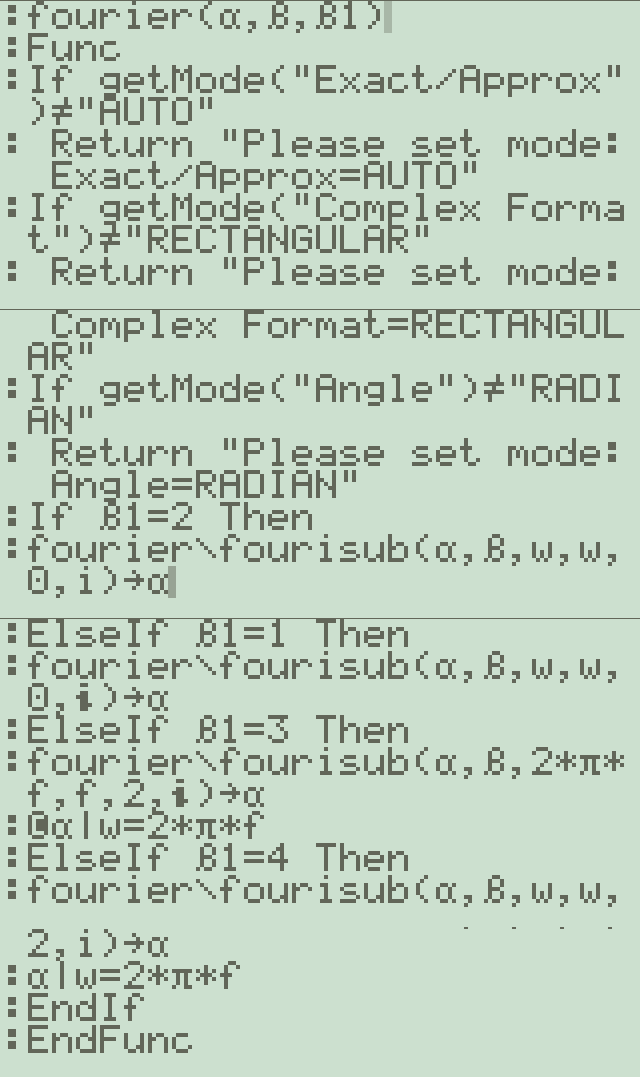
1. fourier(α,β,β1) - 메인 함수
- 모드 체크를 수행합니다 (Exact/Approx, Complex Format, Angle)
- β1 값에 따라 다른 변환 방식을 선택합니다:
- β1=1 or 2: 일반적인 푸리에 변환
- β1=3 or 4: 주파수 도메인(2πf) 변환2. fourisub(α, ββ, β1, β2, β3, βi) - 실제 변환 연산
- 복소수 형태의 푸리에 변환을 계산합니다
- 주요 처리 과정:
- 입력 함수를 파싱하여 항들을 분리
- 각 항에 대해 적분 계산
- 델타 함수(δ), 단위계단 함수(u), 부호 함수(signum) 등의 특수 함수 처리3. eval(x) - 수식 평가 함수
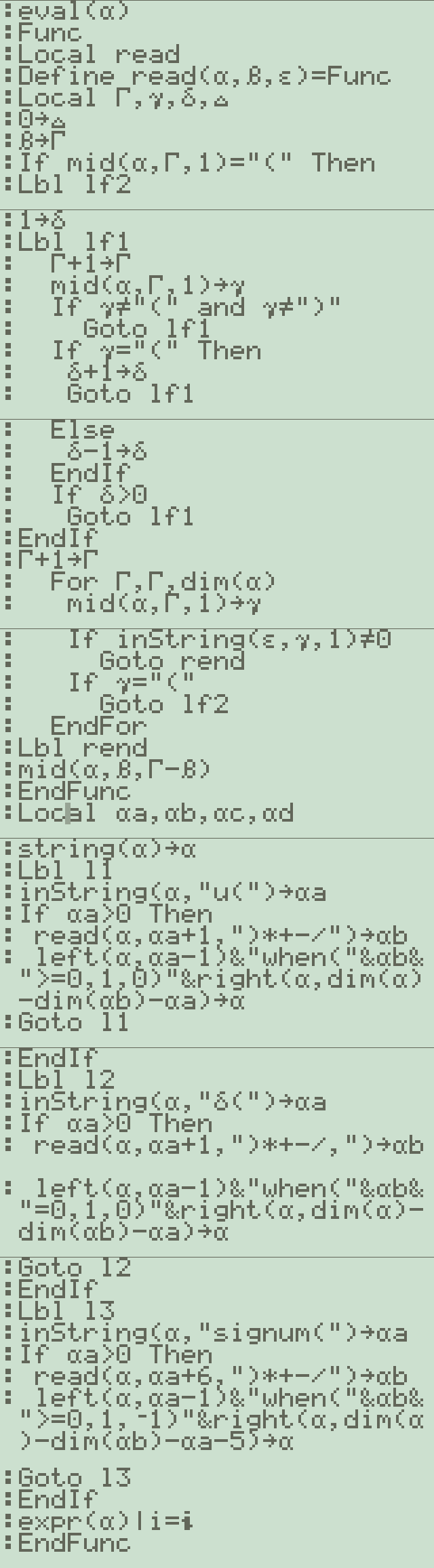
- 특수 함수들을 계산 가능한 형태로 변환:
- u(x) → when(x>=0,1,0)
- δ(x) → when(x=0,1,0)
- signum(x) → when(x>=0,1,-1) -
세상의모든계산기
예시) x(t) = e^(-at)u(t) 처리 과정
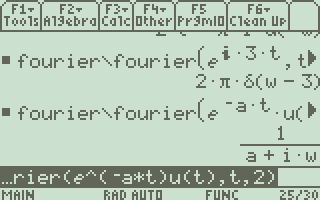
1. 함수 입력 형태와 초기 처리:
# 입력 함수 형태
α = "e^(-a*s)*u(s)" # 여기서 s는 시간 변수# eval 함수에서 단위계단 함수 변환
# "u(s)" → "when(s>=0,1,0)"
inString(α, "u(")→αa # u( 위치 찾기
read(α, αa+1,")*+-/")→αb # 인자 추출 (여기서는 's')
# 변환 결과: "e^(-a*s)*when(s>=0,1,0)"2. fourier 함수에서의 처리:
fourier(α,β,β1)
# β는 변환 파라미터
# β1은 변환 타입 (1 또는 2: 기본 푸리에 변환)# fourisub 호출
fourier\fourisub(α, β, w, w, 0, @i)→α
3. fourisub 함수에서의 주요 변환 과정:
# 1) 입력 함수 파싱
expr(αa)→αk # 수식을 파싱하여 계산 가능한 형태로 변환
getDenom(αk)→βλ # 분모 추출
getNum(αk)→βf # 분자 추출# 2) 지수함수 처리
# e^(-a*s) 부분 처리
inString(αa,"@e^",αj)→αj # 지수함수 위치 찾기
read(αa, αj,"÷−)*/")→αi # 지수 부분 추출# 3) 기본 변환쌍에 대입해 변환
# timeδ 함수와 time 함수가 실제 변환을 처리합니다
timeδ(βρ,β1,β2,β4)→αf # βρ에는 변환할 항의 정보가 담겨있습니다
# 변환 결과들은 누적됩니다
βa+αf/βλ→βa # 부분 결과들의 합산
# 특별한 경우(poles가 있는 경우) 처리
If dim(βγ)>0 Then
# βγ는 극점들의 배열
# 각 극점에 대해 처리하는 루프
For βς,1,dim(βγ)-1
Φα*(s-#("Γ"&char(ord("a")+βς)))→Φα
EndFor
# 4) 결과 조합
β3*(βa+Φw)|i^2=-1→Φw # 최종 결과 생성
수학적 계산 흐름:
1. x(t) = e^(-at)u(t)가 입력됨
2. u(t)가 when(t>=0,1,0)로 변환됨
3. 푸리에 변환 적분 적용:
X(ω) = ∫[e^(-at)u(t)e^(-jωt)]dt
4. u(t)의 특성으로 인해 적분 구간이 0에서 ∞로 변경됨
5. 적분 계산:
X(ω) = ∫[e^((-a-jω)t)]dt, from 0 to ∞
6. 적분 결과:
X(ω) = 1/(a + jω)이 과정이 코드에서 자동으로 처리되며, 특히 주목할 점은:
- 특수함수(여기서는 u(t))의 자동 변환
- 복소수 처리 (i^2=-1 조건 사용)
- 지수함수의 적분 처리
- 최종 결과의 표준화된 형태 제공이는 단순한 예시지만, 코드는 더 복잡한 함수들(예: 델타 함수, 부호 함수 등을 포함하는 함수들)도 처리할 수 있도록 설계되어 있습니다.
-
-
세상의모든계산기
function - fouriersub()
클릭해 프로그램(png) 보기 - 스크롤 주의
details

-
세상의모든계산기 님의 최근 댓글
3×3 이상인 행렬의 행렬식 determinant https://allcalc.org/50536 2025 12.30 답에 이상한 숫자 14.2857142857가 들어간 것은 조건식에 소숫점(.) 이 들어가 있기 때문에 발생한 현상이구요. 100÷7 = 14.285714285714285714285714285714 소숫점 없이 분수로 식이 주어졌을 때와 결과적으로는 동일합니다. 2025 12.30 그럼 해가 무한히 많은지 아닌지 어떻게 아느냐? 고등학교 수학 교과과정에 나오는 행렬의 판별식(d, determinant)을 이용하면 알 수 있습니다. ㄴ 고교과정에서는 2x2 행렬만 다루던가요? 연립방정식의 계수들로 행렬을 만들고 그 행렬식(determinant)을 계산하여야 합니다. 행렬식이 d≠0 이면 유일한 해가 존재하고, d=0 이면 해가 없거나 무수히 많습니다. * 정상적인 경우 (`2y + 8z = 115`)의 계수 행렬: 1 | 1 1 0 | 2 | 1 0 -3.5 | 3 | 0 2 8 | 행렬식 값 = 1(0 - (-7)) - 1(8 - 0) = 7 - 8 = -1 (0이 아니므로 유일한 해 존재) * 문제가 된 경우 (`2y + 7z = 100`)의 계수 행렬: 1 | 1 1 0 | 2 | 1 0 -3.5 | 3 | 0 2 7 | 행렬식 값 = 1(0 - (-7)) - 1(7 - 0) = 7 - 7 = 0 (0이므로 유일한 해가 존재하지 않음) 2025 12.30 좀 더 수학적으로 말씀드리면 (AI Gemini 참고) 수학적 핵심 원리: 선형 독립성(Linear Independence) 3원 1차 연립방정식에서 미지수 x, y, z에 대한 단 하나의 해(a unique solution)가 존재하기 위한 필수 조건은 주어진 세 개의 방정식이 서로 선형 독립(linearly independent) 관계에 있어야 한다는 것입니다. * 선형 독립 (Linearly Independent): 어떤 방정식도 다른 방정식들의 조합(상수배를 더하거나 빼는 등)으로 만들어질 수 없는 상태입니다. 기하학적으로 이는 3개의 평면(각 방정식은 3D 공간의 평면을 나타냄)이 단 한 개의 점(해)에서 만나는 것을 의미합니다. * 선형 종속 (Linearly Dependent): 하나 이상의 방정식이 다른 방정식들의 조합으로 표현될 수 있는 상태입니다. 이 경우, 새로운 정보를 제공하지 못하는 '잉여' 방정식이 존재하는 것입니다. 기하학적으로 이는 3개의 평면이 하나의 선에서 만나거나(무수히 많은 해), 완전히 겹치거나, 혹은 평행하여 만나지 않는(해가 없음) 상태를 의미합니다. 질문자님의 사례는 '선형 종속'이 되어 무수히 많은 해가 발생하는 경우입니다. 2025 12.30 질문하신 연립 방정식은 미지수가 3개이고 모두 1차인 3원 1차 연립방정식입니다. 이상적으로 문제가 없다면 {x,y,z} 에 대한 좌표가 하나 나오게 됩니다. 원하는 답 {52.5, -2.5, 15} 그런데 두개 조건(식)을 그대로 두고 나머지 하나를 변형하다 보니 원하는 답이 나오지 않는 상황이 발생하였다고 질문하신 상황입니다. 3개의 조건식이 주어진 3원 1차 연립방정식은 조건을 변형해서 하나의 변수를 제거할 수 있습니다. 그러면 2개의 조건식으로 주어지는 2원 1차 연립방정식으로 변형할 수 있습니다. (알아보기 더 쉬워서 변형하는 겁니다) 변경하지 않은 조건의 식(con1) 을 이용해 하나의 y & z 1차 방정식을 유도할 수 있는데요. 나머지 방정식이 con1에서 유도된 방정식과 동일해지면 하나의 답이 구해지지 않는 것입니다. 계산기(ti-nspire)는 {x,y,z} 의 답이 하나가 아니고 무수히 많음을 c1 을 이용해서 표현해 준 것입니다. linear_independence_cond12.tns 2025 12.30