
- TI nspire
TI Nspire 로 PC 파일 전송하기 - Student Software 이용
-

- 2025.04.23 - 15:48 2025.04.23 - 15:38 2254
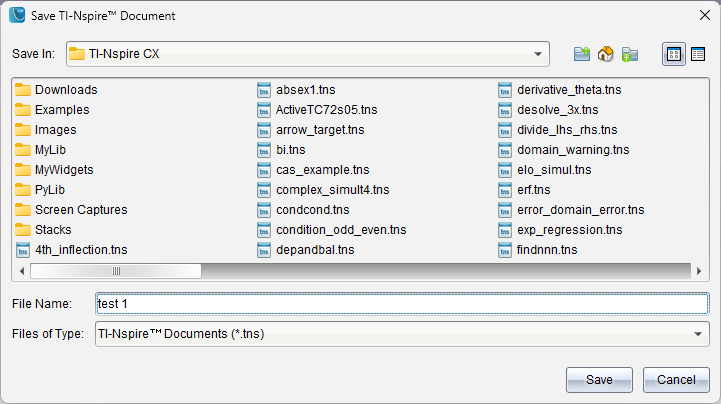
1. PC Student Software 에서 파일 저장하기
단축키 Ctrl+S 또는 마우스로 저장 아이콘인 디스켓 모양을 클릭해서 저장합니다.
계산기에서는 한글 표시가 되지 않기 때문에 영문명으로 작성하세요.
(띄어쓰기는 인식합니다)
2. Contents Explorer 탭으로 이동하기
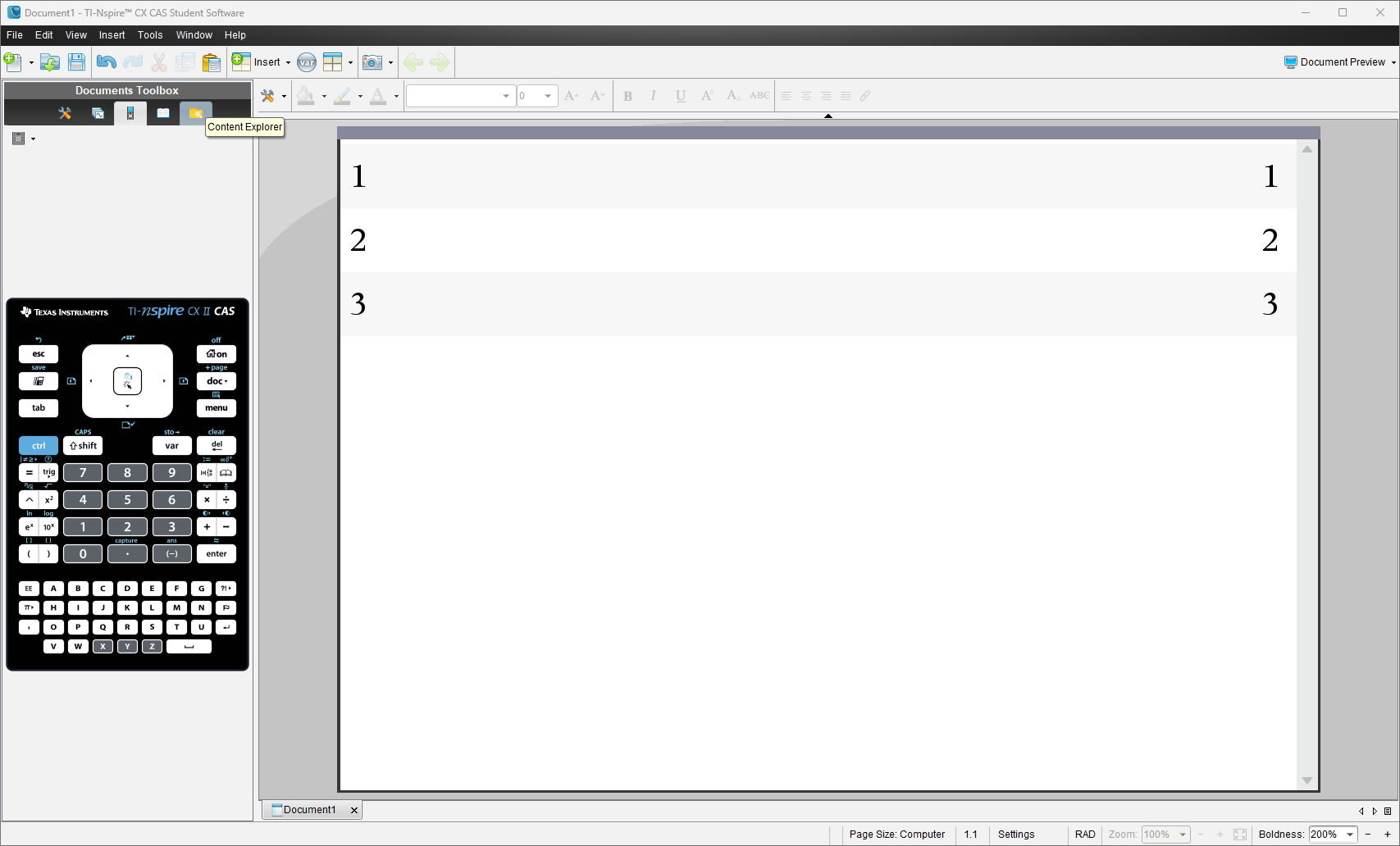
프로그램 왼쪽 위를 보시면 Document Toolbox 가 있고,
그 중에서 5번째 아이콘이 Contents Explorer 입니다.
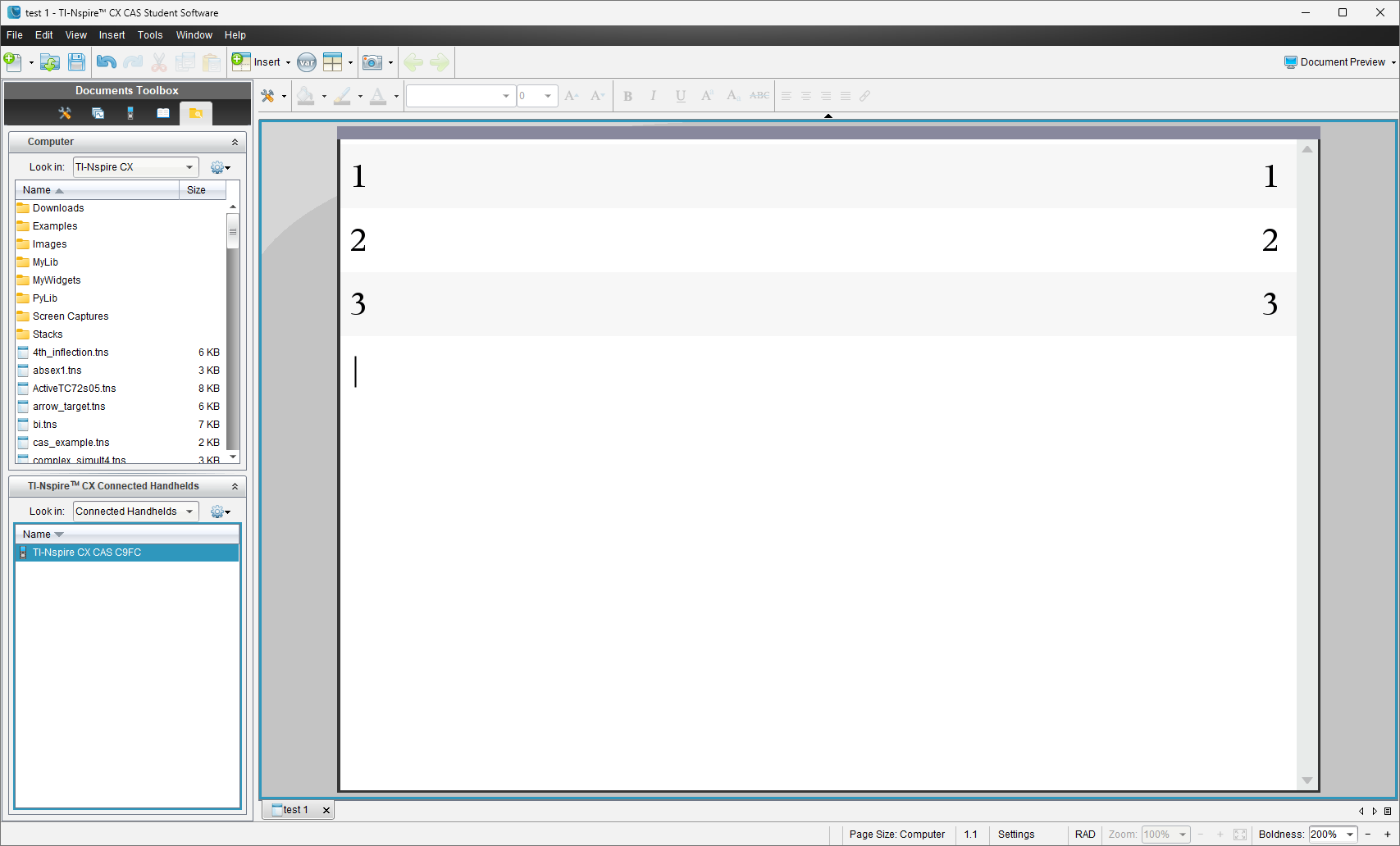
왼쪽(Content Explorer) 목록에서 윗쪽은 PC 아랫쪽은 handheld 계산기를 나타냅니다.
왼쪽 위 목록에서 옮기려는 파일을 찾고, 마우스로 드래그해서 아래 계산기로 옮기면 복사가 끝납니다.
3. 계산기 내의 특정 위치에 저장하고 싶다면
아래 계산기 Ti-Nspire CX CAS C9FC 로 표시된 부분을 더블클릭하면
계산기 내부 파일 목록이 표시됩니다.
(C9FC 는 계산기를 구분하기 위한 이름입니다. 계산기마다 다 제각각 다르게 표시됩니다.)
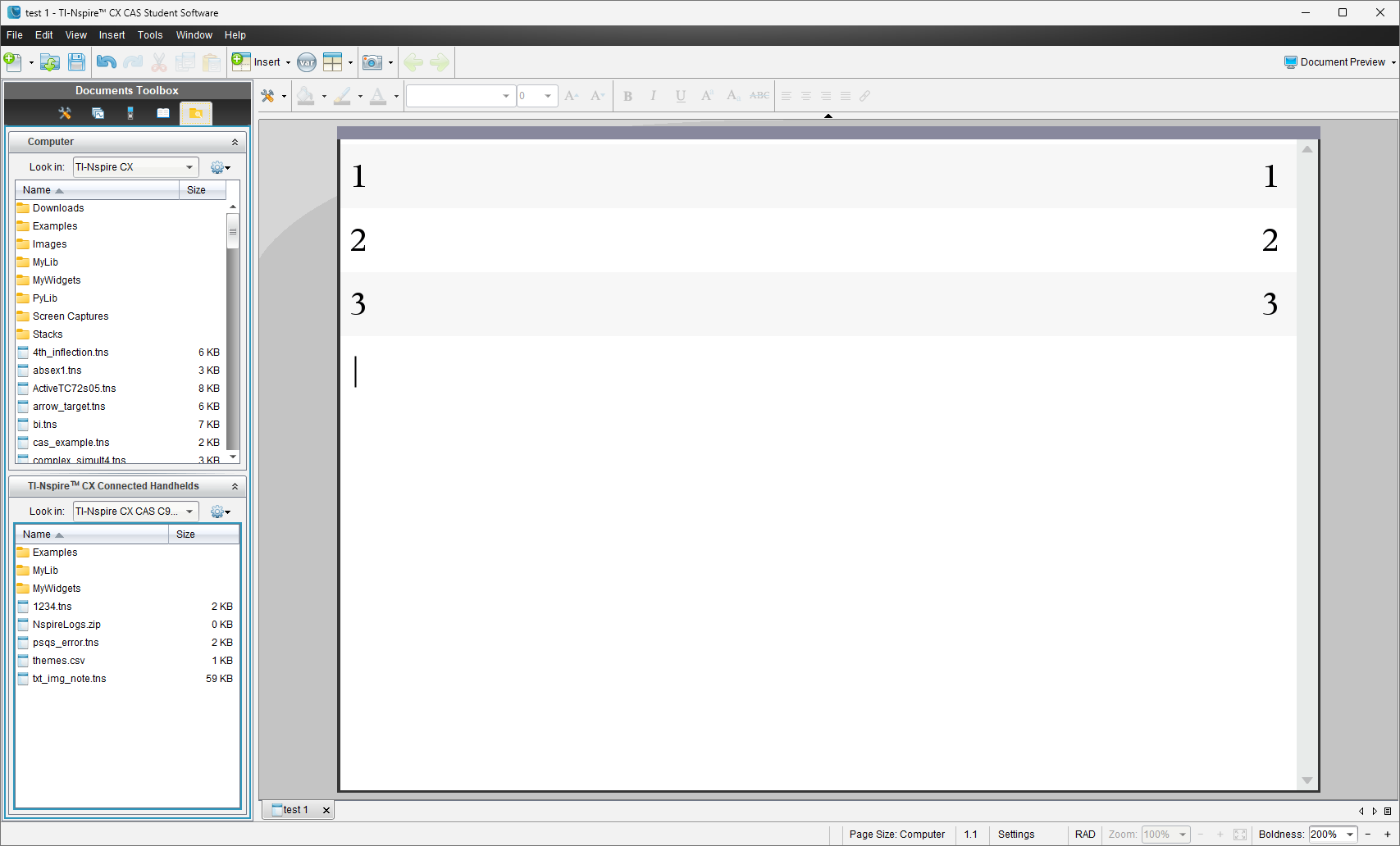
Library 파일이라면 MyLib 폴더로 옮기면 되고,
일반 파일이라면 Root(제일 상위 폴더)에 옮기시면 됩니다.
필요하다면, 폴더를 만들고 거기 넣으셔도 됩니다.
4. 전송 에러
계산기는 특정 확장자의 파일만 전송이 가능합니다.
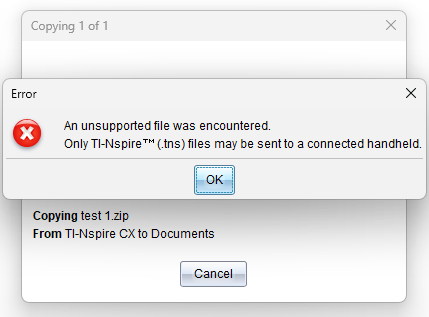
zip, pdf, txt, jpg, hwp, xls 다 안되고,
오직 tns 만 전송 가능하다고 생각하시면 됩니다.
-
25
세상의모든계산기 님의 최근 댓글
아 그렇네요. 감사합니다. ^^ 2026 04.28 정적분 구간에 미지수가 있고, solve 를 사용할 수 없을 때 그 값을 확인하려면? https://allcalc.org/57087 `SOLVE` 기능 내에 `∫(적분)` 기호를 사용할 수 없을 때 뉴튼-랩슨법을 직접 사용하는 방법 2026 04.15 뉴턴-랩슨 적분 방정식 시각화 v1.0 body { font-family: 'Pretendard', -apple-system, BlinkMacSystemFont, "Segoe UI", Roboto, Helvetica, Arial, sans-serif; display: flex; flex-direction: column; align-items: center; background: #f8f9fa; padding: 40px 20px; margin: 0; color: #333; } .container { background: white; padding: 40px; border-radius: 20px; box-shadow: 0 15px 35px rgba(0,0,0,0.08); max-width: 900px; width: 100%; } header { border-bottom: 2px solid #f1f3f4; margin-bottom: 30px; padding-bottom: 20px; } h1 { color: #1a73e8; margin: 0 0 10px 0; font-size: 1.8em; } p.subtitle { color: #5f6368; margin: 0; font-size: 1.1em; } .equation-box { background: #f1f3f4; padding: 15px; border-radius: 10px; text-align: center; margin-bottom: 30px; font-size: 1.3em; } canvas { border: 1px solid #e0e0e0; border-radius: 12px; background: #fff; width: 100%; height: auto; display: block; } .controls { margin-top: 30px; display: flex; gap: 15px; align-items: center; justify-content: center; flex-wrap: wrap; } button { padding: 12px 25px; border: none; border-radius: 8px; background: #1a73e8; color: white; cursor: pointer; font-weight: 600; font-size: 1em; transition: all 0.2s; box-shadow: 0 2px 5px rgba(26,115,232,0.3); } button:hover { background: #1557b0; transform: translateY(-1px); box-shadow: 0 4px 8px rgba(26,115,232,0.4); } button:active { transform: translateY(0); } button.secondary { background: #5f6368; box-shadow: 0 2px 5px rgba(0,0,0,0.2); } button.secondary:hover { background: #4a4e52; } .status-badge { background: #e8f0fe; color: #1967d2; padding: 8px 15px; border-radius: 20px; font-weight: bold; font-size: 0.9em; } .explanation { margin-top: 40px; padding: 25px; background: #fff8e1; border-left: 5px solid #ffc107; border-radius: 8px; line-height: 1.8; } .explanation h3 { margin-top: 0; color: #856404; } .math-symbol { font-family: 'Times New Roman', serif; font-style: italic; font-weight: bold; color: #d93025; } .code-snippet { background: #202124; color: #e8eaed; padding: 2px 6px; border-radius: 4px; font-family: monospace; } 📊 Newton-Raphson 적분 방정식 시뮬레이터 미분적분학의 기본 정리(FTC)를 이용한 수치해석 시각화 목표 방정식: ∫₀ᴬ (2√x) dx = 20 을 만족하는 A를 찾아라! 계산 시작 (A 추적) 초기화 현재 반복: 0회 💡 시각적 동작 원리 (Newton-Raphson & FTC) Step 1 (오차 측정): 현재 A까지 쌓인 파란색 면적이 목표치(20)와 얼마나 차이나는지 계산합니다. Step 2 (FTC의 마법): 면적의 변화율(미분)은 그 지점의 그래프 높이 f(A)와 같습니다. Step 3 (보정): 다음 A = 현재 A - (면적 오차 / 현재 높이) 공식을 사용하여 A를 이동시킵니다. 결론: 오차를 현재 높이로 나누면, 오차를 메우기 위해 필요한 가로 길이(ΔA)가 나옵니다. 이 과정을 반복하면 정답에 도달합니다! const canvas = document.getElementById('graphCanvas'); const ctx = canvas.getContext('2d'); const iterText = document.getElementById('iterText'); // 수학 설정 const targetArea = 20; const f = (x) => Math.sqrt(x) * 2; // 피적분 함수 f(x) = 2√x const F = (x) => (4/3) * Math.pow(x, 1.5); // 정적분 결과 F(x) = ∫ 2√x dx = 4/3 * x^(3/2) let A = 1.5; // 초기값 let iteration = 0; let animating = false; // 그래프 드로잉 설정 const scale = 50; const offsetX = 60; const offsetY = 380; function drawGrid() { ctx.strokeStyle = '#f1f3f4'; ctx.lineWidth = 1; ctx.beginPath(); for(let i=0; i 2026 04.11 참값 : A = ±2√5 근사값 : A≈±4.472135954999579392818347 2026 04.10 fx-570 ES 입력 결과 초기값 입력 반복 수식 입력 반복 결과 2026 04.10