
- TI nspire
[TI-nspire] (프로그램) 보간법 (선형, 다항식) Linear & Polynomial Interpolation
-

- 2024.06.26 - 09:44 2015.01.15 - 22:05 14986 10
Linear & Polynomial Interpolation for TI-Nspire
Ver 1.2
by allcalc.org
-----
Usage
1. Input each x1,y1,x2,y2... var_x and var_y alternately
or matrix (2*n) type DATA at prompt for DATA.x
2. When you finished to insert DATA, type "end" at prompt for DATA.x
3. If there's no error with DATA sets, function i.linear() and i.polynomial() will be created.
4. Use functions to find unkown value "y"
5. Additionally, data.sub(matrix) and data.subx,data.suby(list) will be made too.
Caution
To stop a program that contains a Request command inside an infinite loop:
• Handheld: Hold down the "on" key and press "enter" repeatedly.
• Windows?: Hold down the "F12" key and press "Enter" repeatedly.
• Macintosh?: Hold down the "F5" key and press "Enter" repeatedly.
1. 기능
기본 데이터를 입력하여 선형 보간법에 따른 조각함수(Piecewise Function) i.linear(x) 와 다항식 보간법(라그랑주)에 따른 함수 i.polynomial(x) 를 생성합니다.
생성된 함수를 이용하여 특정 값(x)에서의, 보간법 예상치(y)를 구합니다.
2. 사용법
2-a. 기본 데이터 입력
- 프로그램의 실행 : inter()
- 기본 DATA 입력
방법 1 : 번갈아 입력 : x1, y1, x2, y2, x3, y3... , (입력이 끝나면 e 또는 end 를 입력)
혹은
방법 2 : 2×N 행렬을 한꺼번에 입력 : x값 입력시에 입력 - DATA 입력시
 주의사항
주의사항
* x 는 크기 순서로 입력할 필요 없음 (자동 sort 됨)
* (x,y) 데이터 쌍이 중복 되어도 괜찮으나, 하나의 x값에 둘 이상의 y값이 존재하면 에러 발생
2-b. 결과 함수의 이용
- 2-a의 입력이 끝나면 결과함수로 사용할 변수명을 물어봄
- 결과함수를 이용하여 추정값을 구함
ex) i.linear(3) 【Enter】 : x=3일 때의 추정값을 구함
2-c. 생성된 함수의 확인 http://www.allcalc.org/5752
- 【MENU】 【1】 【2】 (Action - Recall Definition) 명령으로 사용자 함수에 현재 정의되어 있는 내용을 확인할 수 있습니다.
3. 결과
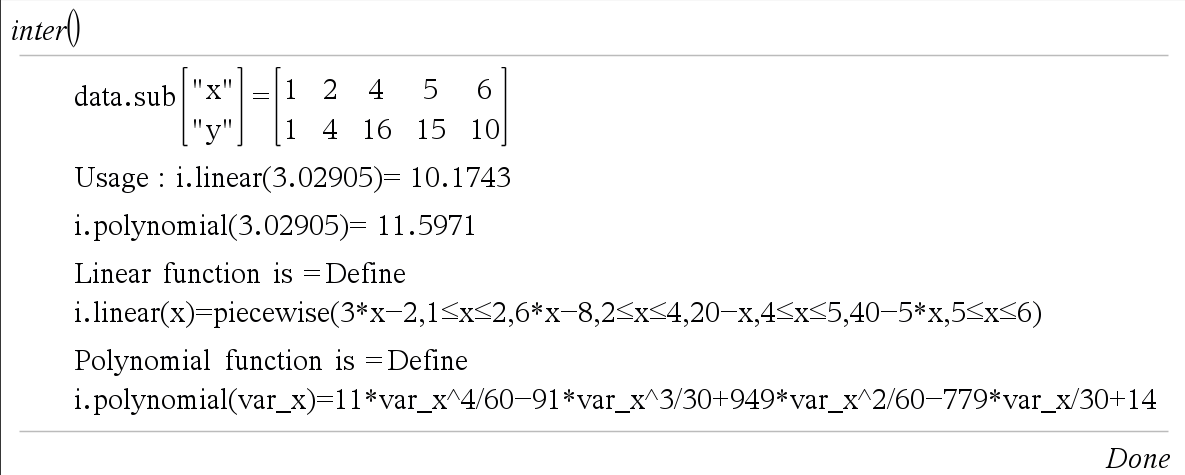
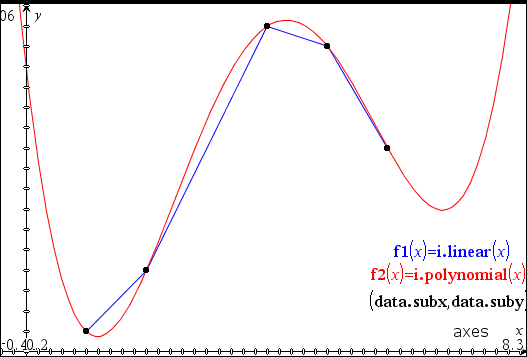
4. 소스코드
Define LibPub inter()=
Prgm
:© Linear and Polynomial Interpolation for TI-nspire
:© Ver 1.2
:© by allcalc (allcalc.org)
:
:© Part A: Input DATA
:
:Local n,data.x,data.y,data
:n:=0
:Loop
:  Request "data.x or matrix(2×n) or END",data.x,0
:
:© Exit Loop Condition
:  If string(data.x)="end" or string(data.x)="END" or string(data.x)="e" Then
:    Exit
:  EndIf
:
:© Adding Data
:  n+1→n
:© Adding Data with Matrix
:  If getType(data.x)="MAT" Then
:    n+dim(data.x)[2]-1→n
:    If n=dim(data.x)[2] Then
:      data.x→data
:    Else
:      augment(data,data.x)→data
:    EndIf
:© Adding Each Data Pair
:  Else
:    Request "data.y for x="&string(data.x),data.y,0
:    If string(data.y)="end" or string(data.y)="END" Then
:      Exit
:    EndIf
:    If n=1 Then
:[[data.x][data.y]]→data
:    Else
:      augment(data,[[data.x][data.y]])→data
:    EndIf
:  EndIf
:EndLoop
:
:© Part B : Data Processing
:
:© Part B1 : Data Processing
:Local data.listx,data.listy
:mat▶list(data[1])→data.listx
:mat▶list(data[2])→data.listy
:SortA data.listx,data.listy
:colAugment(list▶mat(data.listx),list▶mat(data.listy))→data
:
:© Part B2 : Section Verification&Consolidation and Slope
:© Verification
:Local i,j,dup
:newList(n)→dup
:For i,1,n-1
:  If data[1,i]=data[1,i+1] Then
:    1→dup[i+1]
:    If data[2,i]≠data[2,i+1] Then
:      Disp "Data Error : ",[["x"]["y"]],"=",subMat(data,1,i,2,i+1)
:      Stop
:    EndIf
:  EndIf
:EndFor
:
:© Consolidation
:© Local data.sub : Make data.sub global var
:subMat(data,1,1,2,1)→data.sub
:For i,2,n
:  If dup[i]=0 Then
:    augment(data.sub,subMat(data,1,i,2,i))→data.sub
:  EndIf
:EndFor
:
:mat▶list(data.sub[1])→data.subx
:mat▶list(data.sub[2])→data.suby
:Disp "data.sub",[["x"]["y"]],"=",data.sub
:
:© Slope for Linear Interpolation
:Local sub.slope,sub.n
:dim(data.sub)[2]→sub.n
:newList(sub.n-1)→sub.slope
:For i,1,sub.n-1
:((data.sub[2,i+1]-data.sub[2,i])/(data.sub[1,i+1]-data.sub[1,i]))→sub.slope[i]
:EndFor
:
:
:© Part C1 : Out Polynomial Function as i.polynomial(x)
:Local poly,f_name
:"i"→f_name
:Request "Input Function name",f_name,0
:If getType(f_name)="NUM" Then
:"i"&string(f_name)→f_name
:Else
:  If getType(f_name)≠"STR" Then
:    string(f_name)→f_name
:  EndIf
:EndIf
:
:"Define "&f_name&".polynomial(var_x)="&string(∑(data.sub[2,i]*∏(when(i≠j,((var_x-data.sub[1,j])/(data.sub[1,i]-data.sub[1,j])),1),j,1,sub.n),i,1,sub.n))→poly
:expr(poly)
:
:© Part C2 : Out Piecewise Linear Interpolation Function as i.linear(x)
:
:Local pf,random.x
:"Define "&f_name&".linear(x)=piecewise("→pf
:For i,1,sub.n-1
:  pf&string(sub.slope[i]*(x-data.sub[1,i])+data.sub[2,i])&","&string(data.sub[1,i]≤x≤data.sub[1,i+1])&","→pf
:EndFor
:left(pf,dim(pf)-1)&")"→pf
:expr(pf)
:
:© Part C3 : Display functions usage
:rand()*(data.sub[1,sub.n]-data.sub[1,1])+data.sub[1,1]→random.x
:Disp "Usage : "&f_name&".linear("&string(random.x)&")=",#(f_name&".linear")(random.x)
:Disp f_name&".polynomial("&string(random.x)&")=",#(f_name&".polynomial")(random.x)
:
:Disp "Linear function is =",pf
:Disp "Polynomial function is =",poly
:EndPrgm
-
25
댓글10
-
세상의모든계산기
이 프로그램은 선형 보간법과 라그랑주 보간법을 동시에 구하는 프로그램입니다.
간단하게 선형 보간법의 결과만 필요한 경우에는
별도의 프로그램 파일 혹은 라이브러리를 사용하기보다 statistics(통계) 의 Linear Regression 기능을 이용하는 것이 편합니다.(예제 : http://www.allcalc.org/7826 )
- 1
-
세상의모든계산기
예를 들어
http://www.allcalc.org/2387 의 댓글에 있는 예제를 푼다면
【inter()】
【200】【1250】
【300】【1890】
【e】【Enter】
순으로 DATA 입력을 마치고【i.linear(250)】
으로 목표값을 찾습니다.* 이렇게 DATA 가 2쌍 뿐인 경우에는 i.linear() 함수와 i.polynomial() 함수가 동일한 결과값을 출력합니다.
(단, linear() 함수는 조각함수라서 데이터 범위 안쪽의 값만을 구할 수 있습니다.) - 1
- 2
- 3
- 4
-
3
세상의모든계산기
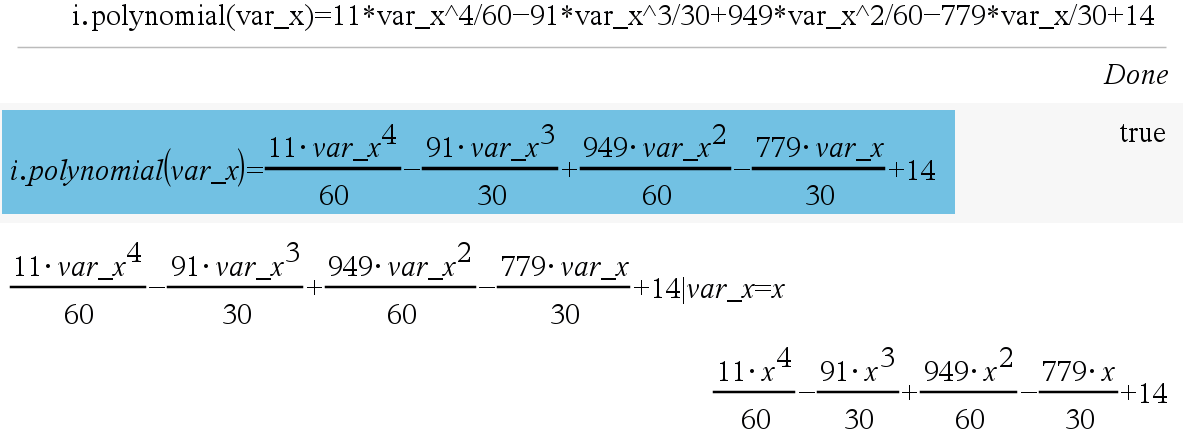
inter() 함수 결과에 생성된 함수를 출력하는 명령(Disp)을 추가했습니다.
한 줄 표기되어서 알아보기 어렵다고 느끼실 때는
- Menu - Action - Recall Definition
- 아니면 한 줄 표기된 결과를 선택해서 입력창에 붙여넣기 하신 다음 [enter] 하시면 입체적 표현으로 바뀝니다.
세상의모든계산기 님의 최근 댓글
2) 고정기준값 41에 대한 오차 제곱합 계산방법 이건 통계메뉴에서는 딱히 방법이 떠오르지 않네요. 질문하신 것과 같이 적은 갯수의 data라면 직접 입력하시는게 최선입니다. 하지만 DATA 갯수가 수십개 이상이라면? ㄴ 스프레드시트 기능을 이용하시는게 좋겠습니다. 【MENU】【8】 A열에 DATA 입력하고 B로 이동한 후 OPTN 【1】 Fill Formula 【ALPHA】키 방향키 숫자키 등을 이용해 수식 완성 C로 이동후 Formula 수식 입력 D의 빈공간으로 이동 후 OPTN 방향키 아래 누르다보면 Sum 보임 ALPHA 키 이용해서 수식 완성. : 기호는 MENU 버튼 바로 아래 있음 (ALPHA키로 입력) 【=】입력하면 최종결과 확인 * 주의 (B열, C열과 달리) D1 셀은 계산 결과인 951이 직접 입력된 상태이므로 DATA 수정후 recalculation 하여도 자동계산되지 않음. 자동계산을 위해서는 formula 형식으로 입력해야 함. 2026 10.27 1) 통계적 편차제곱합(평균 50.25기준) 입력 방법 【MENU】 【6】 【1】 로 1-var Stat 모드로 진입하여 【48】 【=】 【66】 【=】 【32】 【=】 【55】【=】 DATA 입력 【OPTN】 【3】 【▼】 【▼】 fx-570EX 기종에도 편차제곱합을 바로 보여주진 않습니다. 본문에 나온 것처럼 앞서 계산되어 저장된 각종 변수를 이용해 계산합니다. 【AC】【OPTN】【4】Statistics Calc 이 화면에서 다시 OPTN 하고 (메뉴가 3개로 줄어 있죠?) 여기서 방향키로 【▼】 아래를 내려보면 추가 메뉴가 있습니다. 4개 메뉴에는 각각 아래 하위 메뉴가 있습니다. 이 중에서 필요로 하는 것을 골라 계산하시면 되겠습니다. Variable 에 있는 값을 이용하면 다른 공식을 쓰셔도 됩니다. 2026 10.27 질문자님, 48,66,32,55 네 개 DATA 의 평균은 50.25라서 41은 평균이 아닙니다. 그래서 식을 두 가지로 나눠서 봐야 합니다. 1) 통계적 편차제곱합(평균 50.25기준)이면 답은 608.75 입니다. 2) 만약 41이라는 고정 기준값에 대한 제곱합을 구하시는 거면 식은 (48-41)²+... 이고 답은 951입니다. 원문에 +로 쓰신 건 -의 오타로 보입니다. 2026 10.27 본문의 변환 위젯에 사용된 전서체 폰트는 대만의 최고 학술 연구 기관인 중앙연구원(Academia Sinica)에서 제공하는 ‘숭희전체(崇羲篆體)’로 전통 한자 서체인 소전(小篆)을 현대 컴퓨터 폰트(글꼴)로 구축한 오픈소스 프로젝트로 개발되었습니다. https://xiaoxue.iis.sinica.edu.tw/chongxi/download.htm 2026 10.20 예제1) 예제2) 예제3) 추가옵션 2026 10.18