
- TI nspire
[TI-nspire] 계산기 입력 한계를 넘는 큰 숫자의 계산
-

- 2025.02.26 - 23:57 2015.01.28 - 16:59 5278 1
1. 계산식
$ 100 \times \left(e^{-4000} \times \left(3 \times e^{2000} - 5\right)^2\right) $
2. [TI-nspire] 계산기 계산결과
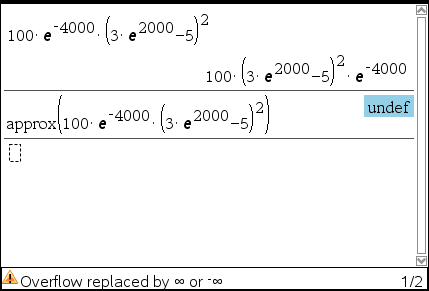
3. [Wolfram-Alpha] 계산 결과
4. TI-nspire 분석
괄호 안의 계산을 마친 후에 괄호 밖을 계산하도록 설계된 듯 함.
괄호 안이 계산기 허용 한계치를 넘음  ∞ 로 반환되어 overflow 발생 다음 계산 불가능
5. 해결 방법
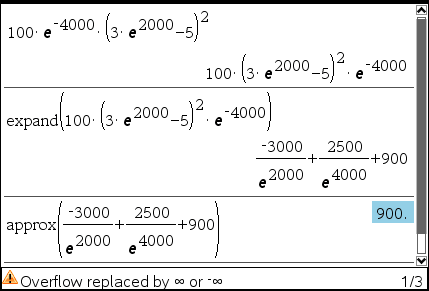
- 지수부분을 처리하기 전에 expand 명령으로 적당히 분리시킴
- 분리 부분이 1/∞ 꼴이 되어 0이 되도록 만듦
- 모든 경우에 통용되는 방법은 아닐 듯
-
25


세상의모든계산기 님의 최근 댓글
- claude AI는 l-c*r^2 을 1-c*r^2 으로 잘못 읽고 표시하고 있습니다. - TI-nspire CAS 계산기에 l-c*r^2 ≥0 을 조건에 추가해 계산해 보아도 결과는 바뀌지 않습니다. 2026 07.20 ⚠️ 경고가 바로 두 번째 방법이 "성공"한 이유와 정확히 연결되어 있습니다. 경고의 의미 "Domain of the result might be larger than the domain of the input"는 CAS가 절댓값(모듈러스)을 계산하는 과정에서 원래 식보다 정의역이 더 넓은 형태로 단순화했다는 뜻입니다. 구체적으로 이 계산은 내부적으로 대략 이런 과정을 거칩니다. $$\left|\frac{er}{e\cdot r}\right| = \sqrt{\left(\frac{er}{e\cdot r}\right)\cdot\overline{\left(\frac{er}{e\cdot r}\right)}}$$ 즉 원래 식(복소수)과 그 켤레복소수를 곱해서 실수부·허수부 제곱합을 만들고, 거기에 다시 제곱근을 씌우는 과정입니다. 이 과정에서 √(x²) → x 또는 √a·√b → √(ab) 같은 규칙들이 쓰이는데, 이런 규칙들은 x가 실수이고 0 이상일 때만 엄밀하게 성립합니다. CAS는 이 조건들을 일일이 다 추적하지 않고 넘어가면서, 원래는 (e≠0, r+l·ω·i ≠ 0 등) 복소수 특유의 좁은 정의역을 가진 식을, r, l, ω가 어떤 실수여도(부호 무관하게) 정의되는 1/√(r²+l²·ω²)라는 더 넓은 정의역의 식으로 바꿔버린 것입니다. CAS는 이 손실을 감지하고 경고를 띄운 것입니다. 이게 왜 조건 대입 성공과 연결되는가 정리하면, 이 경고는 사실상 이런 뜻입니다. "나는 이 결과를 만들면서 원래 식이 가지고 있던 정의역 제약 정보(부호 조건, i 관련 조건 등)를 이미 버렸다." 바로 이 "정의역 정보를 버린" 상태가 이후 con_1 대입을 매끄럽게 만드는 원인입니다. 첫 번째 시도에서는 i가 살아있는 원래 식에 조건을 대입했기 때문에, CAS가 √(1-c·r²)이 실수인지(정의역 조건: 1-c·r² ≥ 0) 계속 추적하려고 했고, 그 정보가 con에 없어서 더 이상 정리를 못 하고 멈췄습니다. 두 번째 시도에서는 절댓값 계산 단계에서 이미 그런 세밀한 정의역 추적을 CAS 스스로 포기(단순화)했기 때문에, 이후 ω에 무리식을 대입해도 "이게 실수가 맞나?" 하는 검증 절차 없이 그냥 대수적으로 치환·정리해 버립니다. 그래서 깔끔하게 √c/√l이 나온 겁니다. 한 줄 요약 절댓값 계산 시 뜬 "정의역이 넓어졌을 수 있다"는 경고는, CAS가 그 순간에 원래 식의 엄밀한 조건(정의역)을 놓쳤다는 신호이고, 바로 그 "조건을 놓친 상태"이기 때문에 뒤에 이어지는 조건식 대입이 막힘없이 진행된 것입니다. 다만 그 대가로, 결과인 1/√(r²+l²·ω²)이나 최종 √c/√l이 원래 회로 조건(i≠0이 되는 경계, 분모가 0이 되는 경우 등)에서는 엄밀히 성립하지 않을 수 있다는 점은 감안하셔야 합니다. 실제 물리적으로는 r, l, c > 0이고 결과도 물리적으로 타당한 형태라 문제없어 보이지만, 수학적 엄밀성 측면에서는 "정의역이 넓어진 근사적 결과"라는 꼬리표가 붙어있는 셈입니다. 2026 07.20 Claude AI 답변 TI-Nspire CAS의 | (such that / 조건대입) 연산자는 대입 시점의 수식 형태를 그대로 두고 기호만 치환하는 연산입니다. 대입 후에 처음부터 다시 "실수부/허수부 분리, 유리화" 같은 재간소화를 자동으로 수행하지 않습니다. 이 차이가 지금 보신 결과 차이의 핵심입니다. 첫 번째 경우 (|er/(e·r)| | con_1 and con → 실패) 이 시점의 식은 아직 r + l·ω·i 형태의 복소수 그대로입니다 (i가 살아있음). 여기에 con_1: ω = √(1-c·r²)/(√c·l)을 대입하면, 분모 안에 i · √(1-c·r²) 라는 항이 새로 생깁니다. 문제는 CAS가 √(1-c·r²)이 실수인지(즉 1-c·r² ≥ 0인지) 판단할 근거가 없다는 겁니다. 저장해 두신 con 조건은 c>0, l>0, r>0뿐이고, 1-c·r²≥0이라는 조건은 포함되어 있지 않습니다. 그래서 CAS는 i와 이 무리식을 더 정리(유리화, 실수부·허수부 재결합)하지 못하고 있는 그대로 남겨둡니다. 결과에 여전히 i가 보이는 이유입니다. 두 번째 경우 (결과값 1/√(r²+l²·ω²)에 대입 → 성공) |er/(e·r)| (절댓값/모듈러스) 연산은 그 자체로 이미 "복소수 → 실수" 변환을 완료한 결과입니다. 즉 1/√(r²+l²·ω²)에는 더 이상 i가 없고, 순수하게 r, l, ω로만 이루어진 실수식입니다. 이 식에 ω = con_1을 대입하는 것은 그냥 실수 대수식에 실수 대입하는 것이므로, i와 무리식이 뒤엉키는 문제 자체가 발생하지 않습니다. 그래서 바로 깔끔하게 √c/√l로 정리됩니다. 정리하면 절댓값(모듈러스) 계산은 "이 값들이 실수다"라는 가정을 이미 내부적으로 써서 i를 제거하는 연산입니다. 그 연산을 조건 대입 이전에 해두면, 이후 대입은 단순 실수 대입이라 문제없이 정리됩니다. 반대로 i가 남아있는 식에 무리식을 포함한 조건을 먼저 대입하면, 그 무리식의 실수성/부호에 대한 가정이 없어서 CAS가 i를 소거하는 재간소화를 못 하고 멈춰버립니다. 실용적 팁: 복소식에 조건을 대입해야 할 때는 가능하면 절댓값·실수화(유리화) 등을 먼저 끝내서 i를 없앤 뒤 조건을 대입하거나, 대입 후 결과에 다시 simplify/expand/combine 같은 명령을 한 번 더 걸어주면 (필요한 도메인 조건과 함께) 정리가 되는 경우가 많습니다. 2026 07.19 저도 어림잡아 추측할 뿐이지 정확한 이유를 알지는 못합니다. 질문하신 사진을 그대로 (Gemini 3.5 Flash / ChatGPT / Claude Sonnet 5) AI에 넣어 보니 claude AI 가 제일 합리적인 답변을 주어서 이를 붙여 넣습니다. 2026 07.19 아 그렇네요. 감사합니다. ^^ 2026 04.28