
- 세상의 모든 계산기 자유(질문) 게시판 일반 ()
구글 Cloud TPU v3
-

- 2019.01.29 - 17:16 2019.01.28 - 11:18 4357 2
1. TPU v3
3세대 프로세서(processor)는 2세대(v2)에 비해 2배 빨라짐.
pod 당 칩 개수는 4배 증가. pod 단위로 비교하면 8배(=2*4) 빨라짐.
https://en.wikipedia.org/wiki/Tensor_processing_unit


ㄴ 1년마다 버전 업?
2. Pod ? Board(X)

Board는 TPU 프로세서가 박힌 기판(1. 사진참고)
Shelf 는 사진상 하나의 층이라고 보면 될 듯
Rack 은 Shelves 의 묶음 (프레임, 전원, 쿨러 등 포함)

ㄴ V3(우)는 수냉식 채용(아래 저것은 물통인가? 펌프인가?)

Pod는 Rack 의 묶음

ㄴ 상단(v2 pod=4 Racks) 하단(Cloud TPUv3 pod=8 Racks)
이상 사진 출처 : https://www.nextplatform.com/2018/05/10/tearing-apart-googles-tpu-3-0-ai-coprocessor/
3. 가격은?
| 기본 | 선점형 | |
| 단일 TPU v2 | 4.5$/(1TPU*시간) | 1.35$/(1TPU*시간) |
| 단일 TPU v3(베타) | 8$/(1TPU*시간) | 2.4$/(1TPU*시간) |
| TPU v2*32 | 24$/(슬라이스*시간) | |
| TPU v2*512 | 384$/(슬라이스*시간) |
* 출처 : https://cloud.google.com/tpu/docs/pricing?hl=ko
* 선점형 : 문구는 더 강력할 것 같지만 반대인 건가? Cloud TPU가 다른 작업을 위해 리소스에 액세스할 경우 언제든지 종료(선점)할 수 있는 TPU. (할당량은 선점형이 더 많긴 한데...)
* VM instance 가격은 별도임.
* 1초 단위로 청구
-
25
댓글2
-
세상의모든계산기
Edge TPU
구글은 TPU 를 클라우드 뿐 아니라, 개별 단말에서도 사용할 수 있도록 유닛화하여 판매할 계획인 듯.
명칭은 엣지 TPU.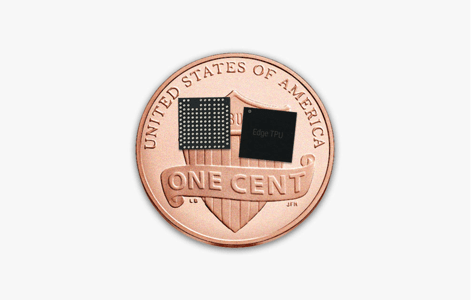
https://cloud.google.com/edge-tpu/
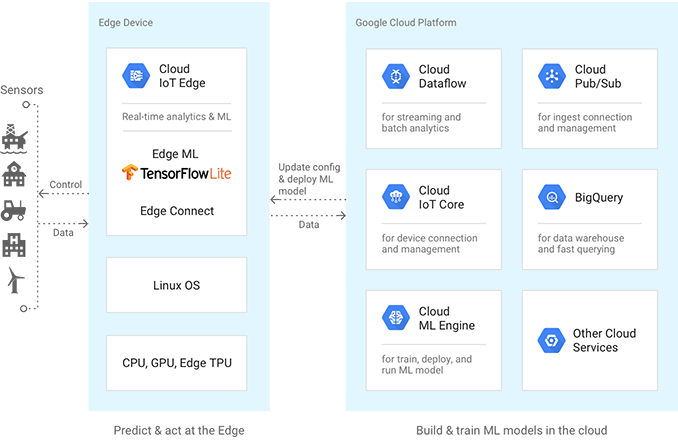
단말이라고 하지만 PC를 위한 것은 아닌 것 같고 IoT 기기를 위한 것으로 보임.
데이터 학습등은 cloud에서 하고, 실시간 적용은 말단에서?Edge(Devices/nodes, Gateways, Servers)Google Cloud Tasks ML inference ML training and inference Software, services Cloud IoT Edge, Linux OS Cloud ML Engine, Kubernetes Engine, Compute Engine, Cloud IoT CoreML frameworks TensorFlow Lite, NN API TensorFlow, scikit-learn,XGBoost, KerasHardware accelerators Edge TPU, GPU, CPU Cloud TPU, GPU, and CPU Edge TPU features
This ASIC is the first step in a roadmap that will leverage Google's AI expertise to follow and reflect in hardware the rapid evolution of AI.
Type Inference Accelerator Performance Example Edge TPU enables users to concurrently execute multiple state-of-the-art AI models per frame, on a high-resolution video, at 30 frames per second, in a power-efficient manner. Numerics Int8, Int16 IO Interface PCIe, USB
세상의모든계산기 님의 최근 댓글
- claude AI는 l-c*r^2 을 1-c*r^2 으로 잘못 읽고 표시하고 있습니다. - TI-nspire CAS 계산기에 l-c*r^2 ≥0 을 조건에 추가해 계산해 보아도 결과는 바뀌지 않습니다. 2026 07.20 ⚠️ 경고가 바로 두 번째 방법이 "성공"한 이유와 정확히 연결되어 있습니다. 경고의 의미 "Domain of the result might be larger than the domain of the input"는 CAS가 절댓값(모듈러스)을 계산하는 과정에서 원래 식보다 정의역이 더 넓은 형태로 단순화했다는 뜻입니다. 구체적으로 이 계산은 내부적으로 대략 이런 과정을 거칩니다. $$\left|\frac{er}{e\cdot r}\right| = \sqrt{\left(\frac{er}{e\cdot r}\right)\cdot\overline{\left(\frac{er}{e\cdot r}\right)}}$$ 즉 원래 식(복소수)과 그 켤레복소수를 곱해서 실수부·허수부 제곱합을 만들고, 거기에 다시 제곱근을 씌우는 과정입니다. 이 과정에서 √(x²) → x 또는 √a·√b → √(ab) 같은 규칙들이 쓰이는데, 이런 규칙들은 x가 실수이고 0 이상일 때만 엄밀하게 성립합니다. CAS는 이 조건들을 일일이 다 추적하지 않고 넘어가면서, 원래는 (e≠0, r+l·ω·i ≠ 0 등) 복소수 특유의 좁은 정의역을 가진 식을, r, l, ω가 어떤 실수여도(부호 무관하게) 정의되는 1/√(r²+l²·ω²)라는 더 넓은 정의역의 식으로 바꿔버린 것입니다. CAS는 이 손실을 감지하고 경고를 띄운 것입니다. 이게 왜 조건 대입 성공과 연결되는가 정리하면, 이 경고는 사실상 이런 뜻입니다. "나는 이 결과를 만들면서 원래 식이 가지고 있던 정의역 제약 정보(부호 조건, i 관련 조건 등)를 이미 버렸다." 바로 이 "정의역 정보를 버린" 상태가 이후 con_1 대입을 매끄럽게 만드는 원인입니다. 첫 번째 시도에서는 i가 살아있는 원래 식에 조건을 대입했기 때문에, CAS가 √(1-c·r²)이 실수인지(정의역 조건: 1-c·r² ≥ 0) 계속 추적하려고 했고, 그 정보가 con에 없어서 더 이상 정리를 못 하고 멈췄습니다. 두 번째 시도에서는 절댓값 계산 단계에서 이미 그런 세밀한 정의역 추적을 CAS 스스로 포기(단순화)했기 때문에, 이후 ω에 무리식을 대입해도 "이게 실수가 맞나?" 하는 검증 절차 없이 그냥 대수적으로 치환·정리해 버립니다. 그래서 깔끔하게 √c/√l이 나온 겁니다. 한 줄 요약 절댓값 계산 시 뜬 "정의역이 넓어졌을 수 있다"는 경고는, CAS가 그 순간에 원래 식의 엄밀한 조건(정의역)을 놓쳤다는 신호이고, 바로 그 "조건을 놓친 상태"이기 때문에 뒤에 이어지는 조건식 대입이 막힘없이 진행된 것입니다. 다만 그 대가로, 결과인 1/√(r²+l²·ω²)이나 최종 √c/√l이 원래 회로 조건(i≠0이 되는 경계, 분모가 0이 되는 경우 등)에서는 엄밀히 성립하지 않을 수 있다는 점은 감안하셔야 합니다. 실제 물리적으로는 r, l, c > 0이고 결과도 물리적으로 타당한 형태라 문제없어 보이지만, 수학적 엄밀성 측면에서는 "정의역이 넓어진 근사적 결과"라는 꼬리표가 붙어있는 셈입니다. 2026 07.20 Claude AI 답변 TI-Nspire CAS의 | (such that / 조건대입) 연산자는 대입 시점의 수식 형태를 그대로 두고 기호만 치환하는 연산입니다. 대입 후에 처음부터 다시 "실수부/허수부 분리, 유리화" 같은 재간소화를 자동으로 수행하지 않습니다. 이 차이가 지금 보신 결과 차이의 핵심입니다. 첫 번째 경우 (|er/(e·r)| | con_1 and con → 실패) 이 시점의 식은 아직 r + l·ω·i 형태의 복소수 그대로입니다 (i가 살아있음). 여기에 con_1: ω = √(1-c·r²)/(√c·l)을 대입하면, 분모 안에 i · √(1-c·r²) 라는 항이 새로 생깁니다. 문제는 CAS가 √(1-c·r²)이 실수인지(즉 1-c·r² ≥ 0인지) 판단할 근거가 없다는 겁니다. 저장해 두신 con 조건은 c>0, l>0, r>0뿐이고, 1-c·r²≥0이라는 조건은 포함되어 있지 않습니다. 그래서 CAS는 i와 이 무리식을 더 정리(유리화, 실수부·허수부 재결합)하지 못하고 있는 그대로 남겨둡니다. 결과에 여전히 i가 보이는 이유입니다. 두 번째 경우 (결과값 1/√(r²+l²·ω²)에 대입 → 성공) |er/(e·r)| (절댓값/모듈러스) 연산은 그 자체로 이미 "복소수 → 실수" 변환을 완료한 결과입니다. 즉 1/√(r²+l²·ω²)에는 더 이상 i가 없고, 순수하게 r, l, ω로만 이루어진 실수식입니다. 이 식에 ω = con_1을 대입하는 것은 그냥 실수 대수식에 실수 대입하는 것이므로, i와 무리식이 뒤엉키는 문제 자체가 발생하지 않습니다. 그래서 바로 깔끔하게 √c/√l로 정리됩니다. 정리하면 절댓값(모듈러스) 계산은 "이 값들이 실수다"라는 가정을 이미 내부적으로 써서 i를 제거하는 연산입니다. 그 연산을 조건 대입 이전에 해두면, 이후 대입은 단순 실수 대입이라 문제없이 정리됩니다. 반대로 i가 남아있는 식에 무리식을 포함한 조건을 먼저 대입하면, 그 무리식의 실수성/부호에 대한 가정이 없어서 CAS가 i를 소거하는 재간소화를 못 하고 멈춰버립니다. 실용적 팁: 복소식에 조건을 대입해야 할 때는 가능하면 절댓값·실수화(유리화) 등을 먼저 끝내서 i를 없앤 뒤 조건을 대입하거나, 대입 후 결과에 다시 simplify/expand/combine 같은 명령을 한 번 더 걸어주면 (필요한 도메인 조건과 함께) 정리가 되는 경우가 많습니다. 2026 07.19 저도 어림잡아 추측할 뿐이지 정확한 이유를 알지는 못합니다. 질문하신 사진을 그대로 (Gemini 3.5 Flash / ChatGPT / Claude Sonnet 5) AI에 넣어 보니 claude AI 가 제일 합리적인 답변을 주어서 이를 붙여 넣습니다. 2026 07.19 아 그렇네요. 감사합니다. ^^ 2026 04.28