
- TI 89
[TI-89] 설정 - 표시 자릿수 Display Digits 설정과 유효 자릿수 Significant Digits
-

- 2016.04.03 - 23:58 2015.10.14 - 09:08 6648 2
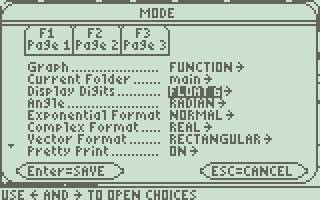
 출처 : https://epsstore.ti.com/OA_HTML/csksxvm.jsp?nSetId=96167
| Solution 12130: Difference Between the FIX and FLOAT Display Digits Mode Settings on the TI-89 Family, TI-92 Family and Voyage™ 200 Graphing Calculators. |
 |
|
|
|
|
What is the difference between the FIX and FLOAT Display Digits mode settings on the TI-89 Family, TI-92 Family and Voyage 200?
By default, the Display Digits mode setting is FLOAT 6, which means that results are rounded to a maximum of six digits. The [MODE] key can be used to select different settings which will apply to all exponential formats. Internally, the device calculates and retains all decimal results with up to 14 significant digits (although a maximum of 12 are displayed).
Note: Regardless of the Display Digits setting, the full value is used for internal floating-point calculations to ensure maximum accuracy. Note: A result is automatically shown in scientific notation if its magnitude cannot be displayed in the selected number of digits. For additional information on mode settings, refer to the online guidebook for your specific calculator model. |
결론
1. Display Digits 설정은 결과값을 보여주는 방식을 지정한 것일 뿐 유효숫자와는 무관하다.
2. 내부적으로는 최대 14개의 (decimal) 유효숫자를 계산하고 저장한다. (정수 제외)
-
25
세상의모든계산기 님의 최근 댓글
링크가 깨졌다고 하시니 404 에러가 나는 아래 링크를 말씀하시는 것 같은데 https://digilander.libero.it/fpirozzi/fourier.zip 이것은 TI-89 / TI-92 용 파일이며 [TI-92][TI-89] Fourier Transform Library https://allcalc.org/52455 링크의 Attached files + 안에 있습니다. 2026 09.11 본문에 사용된 nspire 용 파일은 본문 하단에 Attached files + 안에 있습니다. 클릭하면 표시됩니다. 2026 09.11 이 사이트에 올라와 있는 첨부 파일은 본문 하단에 있는 [Attached files +] 버튼을 눌러야 리스트가 보입니다. 2026 09.07 이렇게 질문하시면 무슨 파일인지 알 수가 없습니다. 해당 글에 댓글을 쓰시는게 최선이며, 권한 문제로 그것이 불가능하면 해당 글의 주소를 붙여넣으시거나, 제목 전체를 복사해 넣으셔야 구분이 됩니다. 2026 09.07 - claude AI는 l-c*r^2 을 1-c*r^2 으로 잘못 읽고 표시하고 있습니다. - TI-nspire CAS 계산기에 l-c*r^2 ≥0 을 조건에 추가해 계산해 보아도 결과는 바뀌지 않습니다. 2026 07.20