
표(Table) 테스트
-

- 2024.06.26 - 09:42 2024.06.25 - 13:52 5791 7
원래 표
| Factorial | ~69! | 70!~449! | 500!~1006! | 1007!~3248! | 3249!~ |
|---|---|---|---|---|---|
| EL-509W | O | X(Error 2) | X | X | X |
| fx-570ES, EX | O | X(Math Error) | X | X | X |
| fx-9860G | O | X(Ma Error) | X | X | X |
| TI-nspire, 89T | O | O | X(500!) | X | X |
| HP Prime | O | O | O | X(∞) | |
| 윈도우10 내장 | O | O | O | O | X(Overflow) |
chatgpt-4o 가 고쳐준 코드
| Factorial | ~69! | 70!~449! | 500!~1006! | 1007!~3248! | 3249!~ |
|---|---|---|---|---|---|
| EL-509W | O | X(Error 2) | X | X | X |
| fx-570ES, EX | O | X(Math Error) | X | X | X |
| fx-9860G | O | X(Ma Error) | X | X | X |
| TI-nspire, 89T | O | O | X(500!) | X | X |
| HP Prime | O | O | O | X(∞) | |
| 윈도우10 내장 | O | O | O | O | X(Overflow) |
-
25
댓글7
-
세상의모든계산기
현재 표기능에 문제가 있습니다. css 충돌? 호환? 문제인 듯 한데...
해결이 되겠죠?
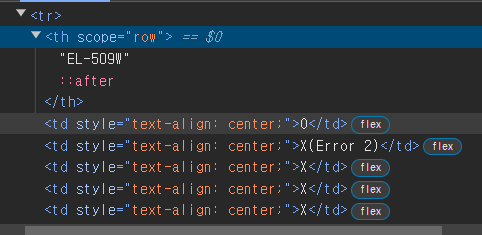
원래 Table tag <table border="1" cellpadding="1" cellspacing="1" style="width: 600px;"> <thead> <tr> <th scope="row">Factorial</th> <th scope="col">~69!</th> <th scope="col">70!~449!</th> <th scope="col">500!~1006!</th> <th scope="col">1007!~3248!</th> <th scope="col">3249!~</th> </tr> </thead> <tbody> <tr> <th scope="row">EL-509W</th> <td style="text-align: center;">O</td> <td style="text-align: center;">X(Error 2)</td> <td style="text-align: center;">X</td> <td style="text-align: center;">X</td> <td style="text-align: center;">X</td> </tr> <tr> <th scope="row">fx-570ES, EX</th> <td style="text-align: center;">O</td> <td style="text-align: center;">X(Math Error)</td> <td style="text-align: center;">X</td> <td style="text-align: center;">X</td> <td style="text-align: center;">X</td> </tr> <tr> <th scope="row">fx-9860G</th> <td style="text-align: center;">O</td> <td style="text-align: center;">X(Ma Error)</td> <td style="text-align: center;">X</td> <td style="text-align: center;">X</td> <td style="text-align: center;">X</td> </tr> <tr> <th scope="row">TI-nspire, 89T</th> <td style="text-align: center;">O</td> <td style="text-align: center;">O</td> <td style="text-align: center;">X(500!)</td> <td style="text-align: center;">X</td> <td style="text-align: center;">X</td> </tr> <tr> <th scope="row">HP Prime</th> <td style="text-align: center;">O</td> <td style="text-align: center;">O</td> <td style="text-align: center;">O</td> <td style="text-align: center;">X(∞)</td> <td style="text-align: center;"> </td> </tr> <tr> <th scope="row">윈도우10 내장</th> <td style="text-align: center;">O</td> <td style="text-align: center;">O</td> <td style="text-align: center;">O</td> <td style="text-align: center;">O</td> <td style="text-align: center;">X(Overflow)</td> </tr> </tbody> </table> chatgpt-4o 가 고쳐준 Table Tag <table border="1" cellpadding="1" cellspacing="1" style="width: 600px;"> <thead> <tr> <th style="display: table-cell; width: 100px;">Factorial</th> <th style="display: table-cell; width: 100px;">~69!</th> <th style="display: table-cell; width: 100px;">70!~449!</th> <th style="display: table-cell; width: 100px;">500!~1006!</th> <th style="display: table-cell; width: 100px;">1007!~3248!</th> <th style="display: table-cell; width: 100px;">3249!~</th> </tr> </thead> <tbody> <tr> <th style="display: table-cell; width: 100px;">EL-509W</th> <td style="display: table-cell; text-align: center; width: 100px;">O</td> <td style="display: table-cell; text-align: center; width: 100px;">X(Error 2)</td> <td style="display: table-cell; text-align: center; width: 100px;">X</td> <td style="display: table-cell; text-align: center; width: 100px;">X</td> <td style="display: table-cell; text-align: center; width: 100px;">X</td> </tr> <tr> <th style="display: table-cell; width: 100px;">fx-570ES, EX</th> <td style="display: table-cell; text-align: center; width: 100px;">O</td> <td style="display: table-cell; text-align: center; width: 100px;">X(Math Error)</td> <td style="display: table-cell; text-align: center; width: 100px;">X</td> <td style="display: table-cell; text-align: center; width: 100px;">X</td> <td style="display: table-cell; text-align: center; width: 100px;">X</td> </tr> <tr> <th style="display: table-cell; width: 100px;">fx-9860G</th> <td style="display: table-cell; text-align: center; width: 100px;">O</td> <td style="display: table-cell; text-align: center; width: 100px;">X(Ma Error)</td> <td style="display: table-cell; text-align: center; width: 100px;">X</td> <td style="display: table-cell; text-align: center; width: 100px;">X</td> <td style="display: table-cell; text-align: center; width: 100px;">X</td> </tr> <tr> <th style="display: table-cell; width: 100px;">TI-nspire, 89T</th> <td style="display: table-cell; text-align: center; width: 100px;">O</td> <td style="display: table-cell; text-align: center; width: 100px;">O</td> <td style="display: table-cell; text-align: center; width: 100px;">X(500!)</td> <td style="display: table-cell; text-align: center; width: 100px;">X</td> <td style="display: table-cell; text-align: center; width: 100px;">X</td> </tr> <tr> <th style="display: table-cell; width: 100px;">HP Prime</th> <td style="display: table-cell; text-align: center; width: 100px;">O</td> <td style="display: table-cell; text-align: center; width: 100px;">O</td> <td style="display: table-cell; text-align: center; width: 100px;">O</td> <td style="display: table-cell; text-align: center; width: 100px;">X(∞)</td> <td style="display: table-cell; text-align: center; width: 100px;"> </td> </tr> <tr> <th style="display: table-cell; width: 100px;">윈도우10 내장</th> <td style="display: table-cell; text-align: center; width: 100px;">O</td> <td style="display: table-cell; text-align: center; width: 100px;">O</td> <td style="display: table-cell; text-align: center; width: 100px;">O</td> <td style="display: table-cell; text-align: center; width: 100px;">O</td> <td style="display: table-cell; text-align: center; width: 100px;">X(Overflow)</td> </tr> </tbody> </table> -
-
세상의모든계산기
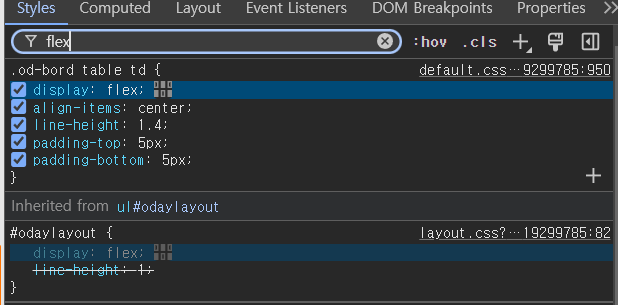
이렇게 찾아가는 거군요.
앗! 저기 체크박스 해제하니까 바로 적용되네요. 굿.
저게 문제 원인이 맞았습니다.
게시판 사이즈에 맞게
테이블 폭을 자동 조절해 주는 기능? 같은데
일단 소스 수정해서 꺼 보겠습니다.
-
세상의모든계산기2024.06.25 - 14:14 #42604
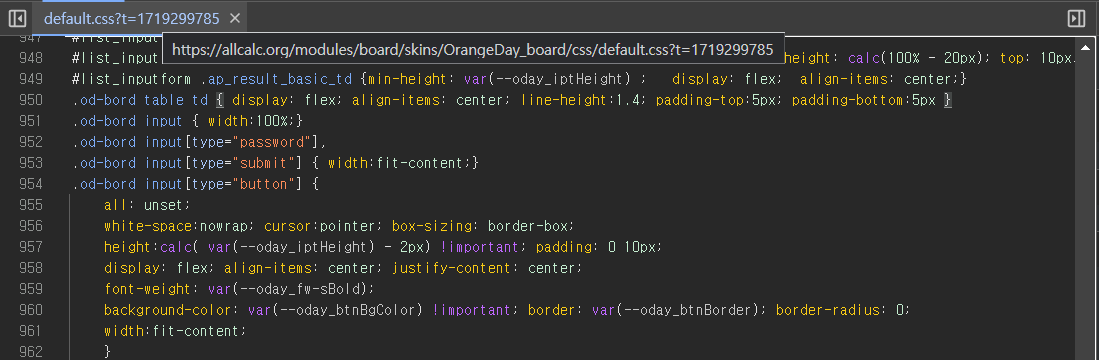
해당 파일 950번 line 에 display: flex; 를 뭘로 바꿔야 하나?
만약 \<td> 셀에 적용된 "display: flex;"를 다른 방식으로 바꾸어야 한다면, 테이블 셀의 기본 레이아웃을 유지하면서 원하는 스타일링을 적용할 수 있는 방법이 필요합니다. \<td>는 기본적으로 테이블 셀을 나타내는 태그이며, 테이블의 행과 열 구조를 유지해야 합니다.
대안으로 다음과 같은 방법들이 있을 수 있습니다:
1. **inline-block 사용**: 테이블 셀에 "display: inline-block;" 속성을 적용하여 요소를 인라인 블록 요소로 설정할 수 있습니다. 이는 테이블 셀이 가로로 배치되도록 하면서, 다른 요소와도 좀 더 적절하게 조화를 이룰 수 있습니다.
```css
.od-bord table td {
display: inline-block;
align-items: center; /* 필요한 경우 */
line-height: 1.4; /* 필요한 경우 */
padding-top: 5px; /* 필요한 경우 */
padding-bottom: 5px; /* 필요한 경우 */
}
```2. **block 사용**: 테이블 셀을 "display: block;"으로 설정하여 블록 요소로 만들 수도 있습니다. 이 경우에는 테이블의 기본 구조를 유지하면서 셀 내부의 내용을 좀 더 자유롭게 배치할 수 있습니다.
```css
.od-bord table td {
display: block;
align-items: center; /* 필요한 경우 */
line-height: 1.4; /* 필요한 경우 */
padding-top: 5px; /* 필요한 경우 */
padding-bottom: 5px; /* 필요한 경우 */
}
```3. **float 사용**: "float: left;" 또는 "float: right;"를 사용하여 테이블 셀을 부유(floating) 상태로 만들어 가로 배치를 조정할 수도 있습니다. 이 방법은 일반적으로 레이아웃을 구성할 때 사용되는 방식입니다.
```css
.od-bord table td {
float: left; /* 또는 float: right; */
align-items: center; /* 필요한 경우 */
line-height: 1.4; /* 필요한 경우 */
padding-top: 5px; /* 필요한 경우 */
padding-bottom: 5px; /* 필요한 경우 */
}
```이러한 방법들 중에서 상황에 맞는 적절한 스타일을 선택하여 \<td> 셀에 적용하면, 테이블 셀이 기대하는 방식대로 배치될 수 있습니다. 선택한 스타일은 다른 요소들과의 조화를 유지하면서도 원하는 디자인을 구현할 수 있도록 도와줄 것입니다.
-
세상의모든계산기
table td
1. Inline-block 적용
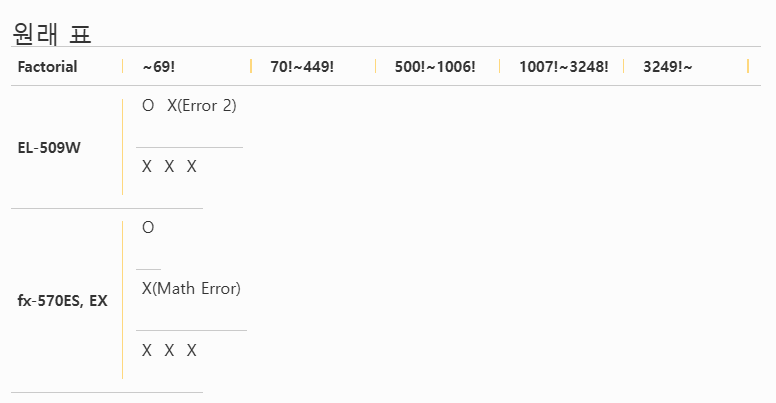
2. block 적용
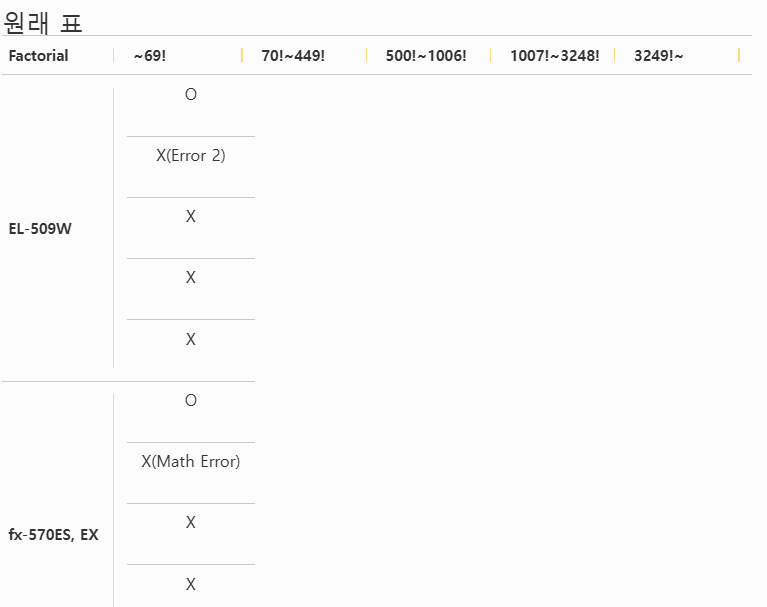
3. display: 적용 안함
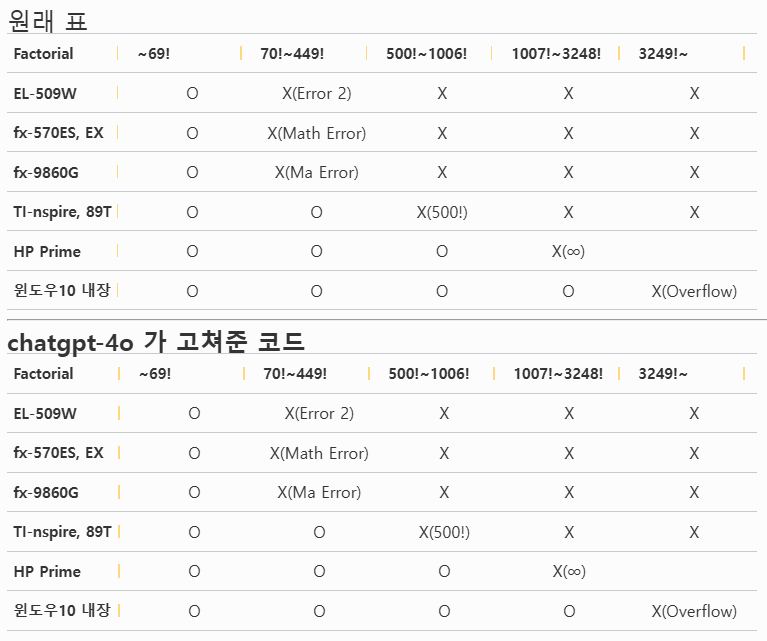
display: float; 인줄 알고 적용했는데, float: left; 이런 식으로 쓰는거네요.
모바일쪽이 좀 깨지지만, 일단 이걸로...
-
세상의모든계산기
https://github.com/OrangeDayCom/rhymix-layout/issues/3#issuecomment-2190435618
임시로 수정하시려고 한다면
/modules/board/skins/OrangeDay_board/css/default.css 에서
라인 950
.od-bord table td { display: flex; align-items: center; line-height:1.4; padding-top:5px; padding-bottom:5px }
을
.od-bord .write_header table td { display: flex; align-items: center; line-height:1.4; padding-top:5px; padding-bottom:5px }
로 수정하면 됩니다. -
세상의모든계산기
CKeditor Table 만들기
1 2 3 4 5 6 7 8 9 10 11 12 <table border="1" cellpadding="1" cellspacing="1" style="width:500px;"> <tbody> <tr> <td>1</td> <td>2</td> <td>3</td> </tr> <tr> <td>4</td> <td>5</td> <td>6</td> </tr> <tr> <td>7</td> <td>8</td> <td>9</td> </tr> <tr> <td>10</td> <td>11</td> <td>12</td> </tr> </tbody> </table>
세상의모든계산기 님의 최근 댓글
본문의 변환 위젯에 사용된 전서체 폰트는 대만의 최고 학술 연구 기관인 중앙연구원(Academia Sinica)에서 제공하는 ‘숭희전체(崇羲篆體)’로 전통 한자 서체인 소전(小篆)을 현대 컴퓨터 폰트(글꼴)로 구축한 오픈소스 프로젝트로 개발되었습니다. https://xiaoxue.iis.sinica.edu.tw/chongxi/download.htm 2026 10.20 예제1) 예제2) 예제3) 추가옵션 2026 10.18 PC 소프트웨어에서 script Editor 로 소스코드를 쉽게 복사 -> AI에게 문의/개선요청 할 수 있습니다. 잘 되거나, 잘 안되는 부분이 있으면 대댓글 남겨주세요. 2026 10.16 AI로 딸깍하니까, lua 프로그램으로 바꿔주네요. 세상 참... 본문의 ti-basic 기반으로 만들었고, 서로 문제를 일으킬 수 있을 듯 하여 별개의 파일로 작성하였습니다. 1.1 Page : 설명 1.2 Page : 그래프 1.3 Page : Calculator 사용법 Root Locus 1+K*N/D=0 EX: (6s^2+5s+2)/(6s^3(s^2+7s+16)) INPUT (Calculator page 1.3 ): rl_num:={6,5,2} rl_den:={6,42,96,0,0,0} or num(6s^2+5s+2) den(6s^3(s^2+7s+16)) optional: rl_T:=10 rl_D:=1 Coeffs are descending powers of s. Back on graph page it refreshes itself, else press [r] or [enter]. KEYS: [+] [-] Kmax zoom, [0] reset, [r] reload MARKS: x=pole, o=zero, red line=real axis, gray dash=asymptote, box=break pt, diamond=j-cross VARS: rl_Kmax rl_sigma rl_r rl_JK rl_Jw 첨부파일 rlocus_lua.tns 2026 10.16 링크가 깨졌다고 하시니 404 에러가 나는 아래 링크를 말씀하시는 것 같은데 https://digilander.libero.it/fpirozzi/fourier.zip 이것은 TI-89 / TI-92 용 파일이며 [TI-92][TI-89] Fourier Transform Library https://allcalc.org/52455 링크의 Attached files + 안에 있습니다. 2026 09.11