
- TI nspire
[TI-nspire] operating system not found. Install OS now. 운영체제 재설치
-

- 2018.11.03 - 20:20 2015.12.01 - 21:16 4251 2
TI‐nspire CAS Touchpad Operating System not found. Install OS now.
Computer to Unit Transfer
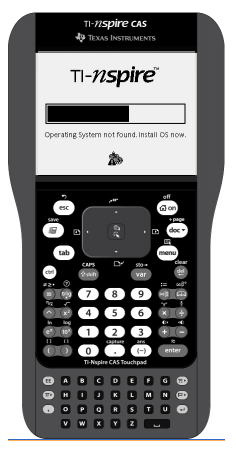
계산기의 화면이 이렇게 바뀌고 아무것도 되지 않는다면, 계산기를 전반적으로 관리하는 OS 가 corrupted(오염)된 상황입니다.
단지 소프트웨어의 문제라면 사용자의 힘으로 문제가 깔끔하게 해결될 수 있겠지만, 하드웨어의 문제 때문에 발생한 상황이라면, 사용자의 힘으로 해결이 안될 수도 있고, 해결된다고 해도 재발할 가능성이 있습니다.
따라서, 무상 AS 기간이 남아있다면 구입처나 수입업체에 문의를 해보시고, 제품을 교체를 받으시는게 좋습니다.
무상 AS가 불가능한 경우에는 유상AS 또는 Self수리를 해야 합니다.
셀프 수리법은 아래 링크(pdf)를 참조하여 OS 를 설치하는 것입니다.
링크 : https://education.ti.com/sites/AUS-NZ/downloads/pdf/TI-Nspire_Touchpad_OS_reinstall_C2H.pdf
미러파일 : https://drive.google.com/file/d/0BzkkoqpratPqVjhPaU5FNmU3blk/view?usp=sharing
기계 다루는 것에 익숙치 않다면 Self 수리를 권장하지 않습니다. (더 잘못될 것이 있나 싶기도 합니다만...)
좋은 결과가 있기를 기원합니다. "Pray for Calc"
-
25
댓글2
-
2016.06.14 - 11:08 #18431ㅠㅠ 세모계님.. ti nspire clickpad cas 버전 사용하면서 꽤 오래전부터 눈팅해왔습니다..
그러다 어제 ndless 설치하기위해 다운그레이드도중 제 nspire가 벽돌이 되어버렸습니다...
증상은 아계 켜지지가 않습니다. 켜지기라도하면 어떻게 해볼텐데 켜지지도 않아서 뭘 해볼수가 없네요.
리셋 연타, 홈 엔터 p 와 on버튼 조합, 건전지 수십번 넣다뺏다하면서 켜보기.. 다안됩니다.
지금은 분해해서 컴퓨터처럼 점퍼키라도 있나 찾아보는데 없네요.. ㅠㅠ
이거 되살릴 방법은 없을까요? 해외포럼 하루종일 뒤져봤는데 답이 안나오네요.. 어떻게 부팅만 하게할수있는방법이라도 없을까요? -
1
세상의모든계산기
ndless 를 깔아보지도 않았고,
벽돌 상태를 경험해보지도 않아서 도움드릴 말씀이 없습니다.
이곳도 보셨는지 모르겠는데, 일단 참고해 보세요.
https://ndlessly.wordpress.com/ndless-troubleshooting/The calculator freezes on boot up with a black and white screen
This issue is not related to Ndless and may happen on a never-Ndlessed TI-Nspire.
Hold Esc+Menu+Minus (Minus near Plus) while pressing the ‘reset’ button to launch the Diagnostic software. It should confirm there is a problem (GPIO error) and will fix it when a key is pressed.
세상의모든계산기 님의 최근 댓글
- claude AI는 l-c*r^2 을 1-c*r^2 으로 잘못 읽고 표시하고 있습니다. - TI-nspire CAS 계산기에 l-c*r^2 ≥0 을 조건에 추가해 계산해 보아도 결과는 바뀌지 않습니다. 2026 07.20 ⚠️ 경고가 바로 두 번째 방법이 "성공"한 이유와 정확히 연결되어 있습니다. 경고의 의미 "Domain of the result might be larger than the domain of the input"는 CAS가 절댓값(모듈러스)을 계산하는 과정에서 원래 식보다 정의역이 더 넓은 형태로 단순화했다는 뜻입니다. 구체적으로 이 계산은 내부적으로 대략 이런 과정을 거칩니다. $$\left|\frac{er}{e\cdot r}\right| = \sqrt{\left(\frac{er}{e\cdot r}\right)\cdot\overline{\left(\frac{er}{e\cdot r}\right)}}$$ 즉 원래 식(복소수)과 그 켤레복소수를 곱해서 실수부·허수부 제곱합을 만들고, 거기에 다시 제곱근을 씌우는 과정입니다. 이 과정에서 √(x²) → x 또는 √a·√b → √(ab) 같은 규칙들이 쓰이는데, 이런 규칙들은 x가 실수이고 0 이상일 때만 엄밀하게 성립합니다. CAS는 이 조건들을 일일이 다 추적하지 않고 넘어가면서, 원래는 (e≠0, r+l·ω·i ≠ 0 등) 복소수 특유의 좁은 정의역을 가진 식을, r, l, ω가 어떤 실수여도(부호 무관하게) 정의되는 1/√(r²+l²·ω²)라는 더 넓은 정의역의 식으로 바꿔버린 것입니다. CAS는 이 손실을 감지하고 경고를 띄운 것입니다. 이게 왜 조건 대입 성공과 연결되는가 정리하면, 이 경고는 사실상 이런 뜻입니다. "나는 이 결과를 만들면서 원래 식이 가지고 있던 정의역 제약 정보(부호 조건, i 관련 조건 등)를 이미 버렸다." 바로 이 "정의역 정보를 버린" 상태가 이후 con_1 대입을 매끄럽게 만드는 원인입니다. 첫 번째 시도에서는 i가 살아있는 원래 식에 조건을 대입했기 때문에, CAS가 √(1-c·r²)이 실수인지(정의역 조건: 1-c·r² ≥ 0) 계속 추적하려고 했고, 그 정보가 con에 없어서 더 이상 정리를 못 하고 멈췄습니다. 두 번째 시도에서는 절댓값 계산 단계에서 이미 그런 세밀한 정의역 추적을 CAS 스스로 포기(단순화)했기 때문에, 이후 ω에 무리식을 대입해도 "이게 실수가 맞나?" 하는 검증 절차 없이 그냥 대수적으로 치환·정리해 버립니다. 그래서 깔끔하게 √c/√l이 나온 겁니다. 한 줄 요약 절댓값 계산 시 뜬 "정의역이 넓어졌을 수 있다"는 경고는, CAS가 그 순간에 원래 식의 엄밀한 조건(정의역)을 놓쳤다는 신호이고, 바로 그 "조건을 놓친 상태"이기 때문에 뒤에 이어지는 조건식 대입이 막힘없이 진행된 것입니다. 다만 그 대가로, 결과인 1/√(r²+l²·ω²)이나 최종 √c/√l이 원래 회로 조건(i≠0이 되는 경계, 분모가 0이 되는 경우 등)에서는 엄밀히 성립하지 않을 수 있다는 점은 감안하셔야 합니다. 실제 물리적으로는 r, l, c > 0이고 결과도 물리적으로 타당한 형태라 문제없어 보이지만, 수학적 엄밀성 측면에서는 "정의역이 넓어진 근사적 결과"라는 꼬리표가 붙어있는 셈입니다. 2026 07.20 Claude AI 답변 TI-Nspire CAS의 | (such that / 조건대입) 연산자는 대입 시점의 수식 형태를 그대로 두고 기호만 치환하는 연산입니다. 대입 후에 처음부터 다시 "실수부/허수부 분리, 유리화" 같은 재간소화를 자동으로 수행하지 않습니다. 이 차이가 지금 보신 결과 차이의 핵심입니다. 첫 번째 경우 (|er/(e·r)| | con_1 and con → 실패) 이 시점의 식은 아직 r + l·ω·i 형태의 복소수 그대로입니다 (i가 살아있음). 여기에 con_1: ω = √(1-c·r²)/(√c·l)을 대입하면, 분모 안에 i · √(1-c·r²) 라는 항이 새로 생깁니다. 문제는 CAS가 √(1-c·r²)이 실수인지(즉 1-c·r² ≥ 0인지) 판단할 근거가 없다는 겁니다. 저장해 두신 con 조건은 c>0, l>0, r>0뿐이고, 1-c·r²≥0이라는 조건은 포함되어 있지 않습니다. 그래서 CAS는 i와 이 무리식을 더 정리(유리화, 실수부·허수부 재결합)하지 못하고 있는 그대로 남겨둡니다. 결과에 여전히 i가 보이는 이유입니다. 두 번째 경우 (결과값 1/√(r²+l²·ω²)에 대입 → 성공) |er/(e·r)| (절댓값/모듈러스) 연산은 그 자체로 이미 "복소수 → 실수" 변환을 완료한 결과입니다. 즉 1/√(r²+l²·ω²)에는 더 이상 i가 없고, 순수하게 r, l, ω로만 이루어진 실수식입니다. 이 식에 ω = con_1을 대입하는 것은 그냥 실수 대수식에 실수 대입하는 것이므로, i와 무리식이 뒤엉키는 문제 자체가 발생하지 않습니다. 그래서 바로 깔끔하게 √c/√l로 정리됩니다. 정리하면 절댓값(모듈러스) 계산은 "이 값들이 실수다"라는 가정을 이미 내부적으로 써서 i를 제거하는 연산입니다. 그 연산을 조건 대입 이전에 해두면, 이후 대입은 단순 실수 대입이라 문제없이 정리됩니다. 반대로 i가 남아있는 식에 무리식을 포함한 조건을 먼저 대입하면, 그 무리식의 실수성/부호에 대한 가정이 없어서 CAS가 i를 소거하는 재간소화를 못 하고 멈춰버립니다. 실용적 팁: 복소식에 조건을 대입해야 할 때는 가능하면 절댓값·실수화(유리화) 등을 먼저 끝내서 i를 없앤 뒤 조건을 대입하거나, 대입 후 결과에 다시 simplify/expand/combine 같은 명령을 한 번 더 걸어주면 (필요한 도메인 조건과 함께) 정리가 되는 경우가 많습니다. 2026 07.19 저도 어림잡아 추측할 뿐이지 정확한 이유를 알지는 못합니다. 질문하신 사진을 그대로 (Gemini 3.5 Flash / ChatGPT / Claude Sonnet 5) AI에 넣어 보니 claude AI 가 제일 합리적인 답변을 주어서 이를 붙여 넣습니다. 2026 07.19 아 그렇네요. 감사합니다. ^^ 2026 04.28