
[HP Prime] Solve 함수 사용법
-

- 2025.10.27 - 15:52 2025.10.20 - 13:53 2152 1
solve 관련 기능은 CAS 모드에서 작동합니다.
1. solve
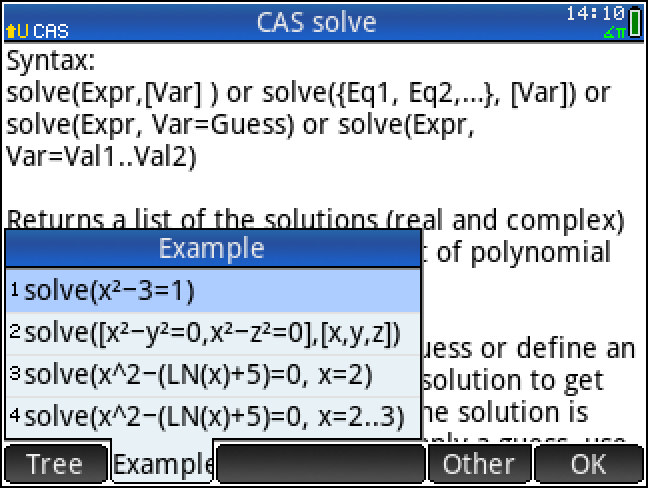
Syntax:
solve(Expr,[Var])
solve({Eq1, Eq2, ...}, [Var])
solve(Expr, Var=Guess)
solve(Expr, Var=Val .. Val2)
Returns a list of the solutions (real and complex) to a polynomial equation or a set of polynomial equations.
Example: solve(x^2‐3=1) returns {‐2,2}
2. 범위 (interval) 인자
pdf 설명서(manual 문서)에는 2개의 인자(Expr, [Var]) 만 나오지만, 3번째 인자로서 interval 내지 guess 를 추가하면 실질 적용됩니다.
계산기 내부 【Help】 화면에서는 이렇게 나옵니다.
The user is advised to supply a guess or define an interval in which to search for a solution to get the best results in cases where the solution is known to be approximate.
To supply a guess, use the syntax Var=Guess.
To supply an interval, use the syntax Var=Val1 .. Val2.
In the latter case, the search is confined to the closed interval [Val1, Val2].
해가 근사치로 알려진 경우 최상의 결과를 얻으려면, 사용자는 해를 탐색할 추정값(guess)을 제공하거나 구간(interval)을 정의하는 것이 좋습니다.
추정값을 제공하려면 Var=Guess 구문을 사용하십시오.
구간을 제공하려면 Var=Val1 .. Val2 구문을 사용하십시오.
후자의 경우(구간을 지정한 경우), 탐색은 닫힌 구간(closed interval) [Val1, Val2] 내로 제한됩니다.
Examples:
solve(x²-3=1) → {-2,2}
solve(x²-y²=0,x²-z²=0],[x,y,z]) → {[x,x,x],[x-x,-x],[x,x,-x],[x,-x,x]}
solve(x²-(LN(x)+5)=0,x=2) → 2.42617293082
solve(x²-(LN(x)+5)=0,x=2..3) → 2.42617293082
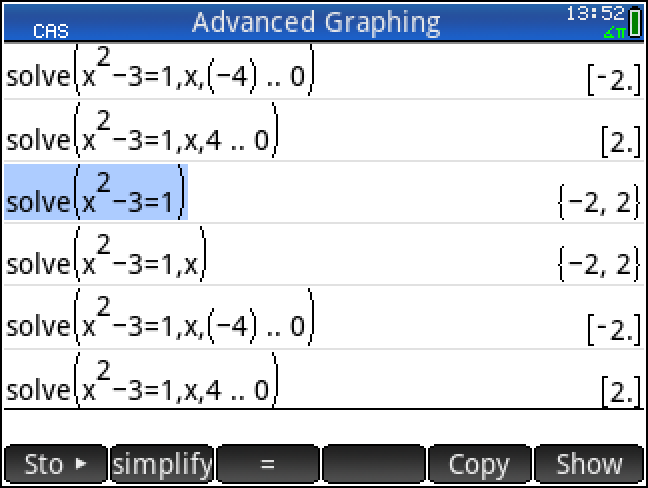
인터벌은 xmin .. xmax 형식으로 입력합니다.
원래는 띄어쓰기가 필요한데, 띄어쓰기가 없으면 자동 추가되는 듯 합니다.
이 때 Ans 형식이 { } 에서 [ ] 로 바뀌는 차이도 있습니다. '닫힌 구간에서 찾았다'는 표시일까요?
3. method, 수치해석 방식 인자?
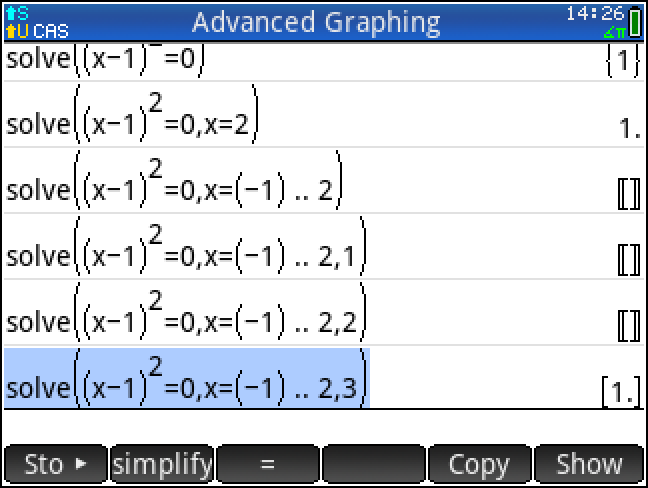
이(바로 위) 예에서는 같은 2차 방정식인데도,
guess만 입력(x=2)하면 해 1 이 찾아지지만,
구간을 지정하면, 적절한 구간(-1 .. 2) 이더라도 해가 찾아지지 않고 빈칸만 나옵니다. [ ]
찾아지지 않는 이유가 정확한 문서로 나와 있는 것은 아닌데,
구간(interval) 입력시 수치해석 방법(method)으로 bisection(이분법) 방식으로 지정되기 때문인 듯 보입니다.
https://allcalc.org:443/board_hp/55715#comment_55751
* 이분법에서는 구간 양단에서 부호가 바뀌지 않으면 해가 찾아질 수 없습니다.
따라서 solve함수의 수치해석 방식을 지정해 주면 해결될 수도 있는데,
그 방식이 설명으로 나오지 않아 "100% 확신"은 없습니다.
그런데 마지막 인자로 ,3을 입력하면 해가 찾아지니
,3 으로 인해 iterative 방식(아마도 newton-raphson's method)이 지정되었다고
아니면 적어도 bisection 방식과는 다른 방식으로 지정되었다고 일단은 이해할 수 있겠습니다.
-
25
댓글1
-
세상의모든계산기
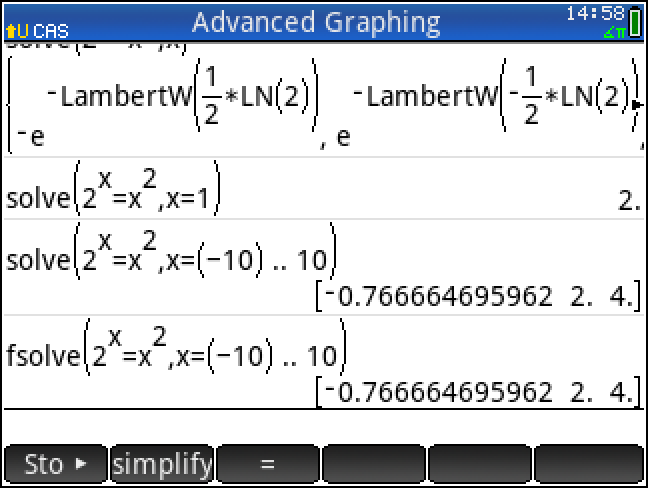
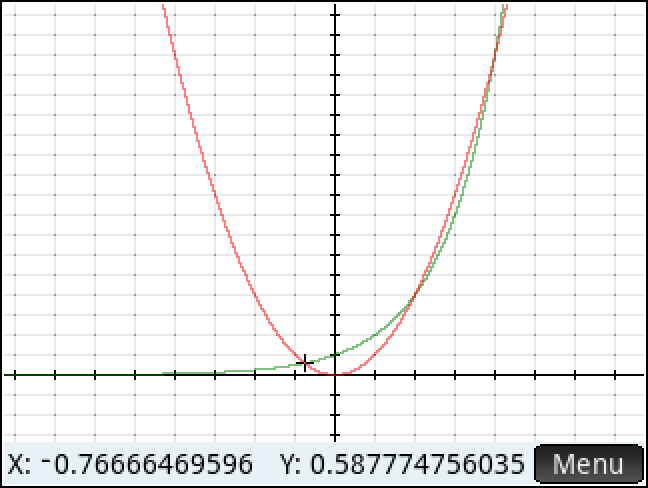
2^x = x^2 의 해
https://h30434.www3.hp.com/t5/Tablets-and-Mobile-Devices-Archive-Read-Only/hp-prime-calculator-Cannot-Solve-simple-equation/td-p/3606687
세상의모든계산기 님의 최근 댓글
본문의 변환 위젯에 사용된 전서체 폰트는 대만의 최고 학술 연구 기관인 중앙연구원(Academia Sinica)에서 제공하는 ‘숭희전체(崇羲篆體)’로 전통 한자 서체인 소전(小篆)을 현대 컴퓨터 폰트(글꼴)로 구축한 오픈소스 프로젝트로 개발되었습니다. https://xiaoxue.iis.sinica.edu.tw/chongxi/download.htm 2026 10.20 예제1) 예제2) 예제3) 추가옵션 2026 10.18 PC 소프트웨어에서 script Editor 로 소스코드를 쉽게 복사 -> AI에게 문의/개선요청 할 수 있습니다. 잘 되거나, 잘 안되는 부분이 있으면 대댓글 남겨주세요. 2026 10.16 AI로 딸깍하니까, lua 프로그램으로 바꿔주네요. 세상 참... 본문의 ti-basic 기반으로 만들었고, 서로 문제를 일으킬 수 있을 듯 하여 별개의 파일로 작성하였습니다. 1.1 Page : 설명 1.2 Page : 그래프 1.3 Page : Calculator 사용법 Root Locus 1+K*N/D=0 EX: (6s^2+5s+2)/(6s^3(s^2+7s+16)) INPUT (Calculator page 1.3 ): rl_num:={6,5,2} rl_den:={6,42,96,0,0,0} or num(6s^2+5s+2) den(6s^3(s^2+7s+16)) optional: rl_T:=10 rl_D:=1 Coeffs are descending powers of s. Back on graph page it refreshes itself, else press [r] or [enter]. KEYS: [+] [-] Kmax zoom, [0] reset, [r] reload MARKS: x=pole, o=zero, red line=real axis, gray dash=asymptote, box=break pt, diamond=j-cross VARS: rl_Kmax rl_sigma rl_r rl_JK rl_Jw 첨부파일 rlocus_lua.tns 2026 10.16 링크가 깨졌다고 하시니 404 에러가 나는 아래 링크를 말씀하시는 것 같은데 https://digilander.libero.it/fpirozzi/fourier.zip 이것은 TI-89 / TI-92 용 파일이며 [TI-92][TI-89] Fourier Transform Library https://allcalc.org/52455 링크의 Attached files + 안에 있습니다. 2026 09.11