
- 세상의 모든 계산기 자유(질문) 게시판 일반 ()
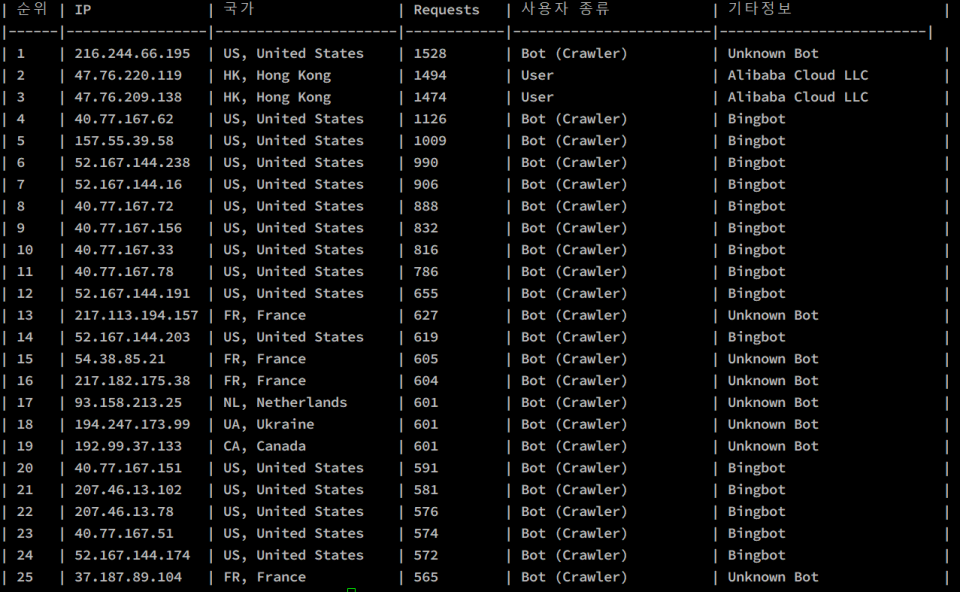
(Nginx) "웹 크롤러 request 순위 확인" 스크립트 (우분투)
-

- 2025.02.15 - 10:57 2025.02.14 - 17:40 3903
#!/bin/bash
# monip.sh
# Nginx access 로그에서 상위 25개 IP를 분석하여
# - Bot (Crawler)인 경우: User-Agent 문자열로 Bot 종류를 추출
# - User인 경우: whois 명령으로 Organization Name 조회
# 그리고 IP별 국가 정보(geoiplookup)를 추가하여 출력함

LOG_FILE="/var/log/nginx/access.log"

if [ ! -f "$LOG_FILE" ]; then
    echo "로그 파일이 존재하지 않습니다: $LOG_FILE"
    exit 1
fi

awk '
  # Bot의 종류를 판별하는 함수
  function get_bot_type(ua,   ua_lower) {
    ua_lower = tolower(ua)
    if(ua_lower ~ /googlebot/)   return "Googlebot"
    if(ua_lower ~ /bingbot/)      return "Bingbot"
    if(ua_lower ~ /slurp/)        return "Yahoo Slurp"
    if(ua_lower ~ /duckduckbot/)  return "DuckDuckBot"
    if(ua_lower ~ /baiduspider/)  return "Baiduspider"
    if(ua_lower ~ /yandex/)       return "YandexBot"
    return "Unknown Bot"
  }

  # User-Agent 문자열을 바탕으로 사용자 종류를 판별
  function classify_user_agent(ua) {
    if(ua == "" || ua == "-") return "알 수 없음"
    ua_lower = tolower(ua)
    if(ua_lower ~ /bot|crawl|spider|slurp|mediapartners/) return "Bot (Crawler)"
    return "User"
  }

  # geoiplookup 명령을 사용하여 IP의 국가 정보를 가져오는 함수
  function get_country(ip,   cmd, result, arr, country) {
    cmd = "geoiplookup " ip " 2>/dev/null"
    if ((cmd | getline result) > 0) {
      # 예: "GeoIP Country Edition: US, United States"
      split(result, arr, ":")
      if(length(arr) > 1) {
        country = arr[2]
        gsub(/^[ \t]+|[ \t]+$/, "", country)
      } else {
        country = "Unknown"
      }
    } else {
      country = "조회 실패"
    }
    close(cmd)
    return country
  }

  {
    # Combined log format 예제:
    # 127.0.0.1 - - [14/Feb/2025:12:00:00 +0000] "GET / HTTP/1.1" 200 612 "-" "Mozilla/5.0 ..."
    regex = "([^ ]*) - ([^ ]*) \\[([^\\]]*)\\] \"([^\"]*)\" ([^ ]*) ([^ ]*) \"([^\"]*)\" \"([^\"]*)\""
    if(match($0, regex, arr)) {
      ip      = arr[1]
      referer = arr[7]
      ua_str  = arr[8]

      count[ip]++                  # IP별 요청 횟수 집계
      ua_stats[ip, ua_str]++        # IP별 User-Agent 빈도 집계
      ref_stats[ip, referer]++      # (참고용) 리퍼러 집계
    }
  }

  END {
    # gawk의 asorti() 함수로 요청 횟수 기준 내림차순 정렬
    n = asorti(count, sorted, "@val_num_desc")

    # 헤더 출력 (순서: 순위 | IP | 국가 | Requests | 사용자 종류 | 기타정보)
    printf("| %-2s | %-15s | %-18s | %-10s | %-17s | %-21s |\n", "순위", "IP", "국가", "Requests", "사용자 종류", "기타정보")
    print("|------|-----------------|----------------------|------------|------------------------|-------------------------|")

    limit = (n < 25 ? n : 25)
    for(i = 1; i <= limit; i++){
      ip = sorted[i]
      req_count = count[ip]

      # 해당 IP의 가장 많이 등장한 User-Agent 선택
      max_ua = ""
      max_ua_count = 0
      for(key in ua_stats) {
        split(key, parts, SUBSEP)
        if(parts[1] == ip) {
          if(ua_stats[key] > max_ua_count) {
            max_ua_count = ua_stats[key]
            max_ua = parts[2]
          }
        }
      }

      user_type = classify_user_agent(max_ua)

      extra = ""
      if(user_type == "User") {
         # User인 경우: whois 명령으로 Organization Name 조회
         cmd = "whois " ip " 2>/dev/null | grep -i -m 1 \"orgname:\""
         org = ""
         if((cmd | getline org) > 0) {
            sub(/^[ \t]+/, "", org)
            split(org, a, ":")
            if(length(a) > 1) {
              org = a[2]
              gsub(/^[ \t]+/, "", org)
            }
         } else {
            org = "조회 실패"
         }
         close(cmd)
         extra = org
      } else if(user_type == "Bot (Crawler)") {
         extra = get_bot_type(max_ua)
      } else {
         extra = "없음"
      }

      # 각 IP의 국가 정보 추가
      country = get_country(ip)

      printf("| %-4d | %-15s | %-20s | %-10d | %-22s | %-25s |\n", i, ip, country, req_count, user_type, extra)
    }
  }
' "$LOG_FILE"
사용 방법
- 스크립트를 파일에 저장 후 실행 권한 부여:
chmod +x monip.sh - 스크립트 실행 (필요한 경우 sudo로):
sudo ./monip.sh
결과
-
25
세상의모든계산기 님의 최근 댓글
아 그렇네요. 감사합니다. ^^ 2026 04.28 정적분 구간에 미지수가 있고, solve 를 사용할 수 없을 때 그 값을 확인하려면? https://allcalc.org/57087 `SOLVE` 기능 내에 `∫(적분)` 기호를 사용할 수 없을 때 뉴튼-랩슨법을 직접 사용하는 방법 2026 04.15 뉴턴-랩슨 적분 방정식 시각화 v1.0 body { font-family: 'Pretendard', -apple-system, BlinkMacSystemFont, "Segoe UI", Roboto, Helvetica, Arial, sans-serif; display: flex; flex-direction: column; align-items: center; background: #f8f9fa; padding: 40px 20px; margin: 0; color: #333; } .container { background: white; padding: 40px; border-radius: 20px; box-shadow: 0 15px 35px rgba(0,0,0,0.08); max-width: 900px; width: 100%; } header { border-bottom: 2px solid #f1f3f4; margin-bottom: 30px; padding-bottom: 20px; } h1 { color: #1a73e8; margin: 0 0 10px 0; font-size: 1.8em; } p.subtitle { color: #5f6368; margin: 0; font-size: 1.1em; } .equation-box { background: #f1f3f4; padding: 15px; border-radius: 10px; text-align: center; margin-bottom: 30px; font-size: 1.3em; } canvas { border: 1px solid #e0e0e0; border-radius: 12px; background: #fff; width: 100%; height: auto; display: block; } .controls { margin-top: 30px; display: flex; gap: 15px; align-items: center; justify-content: center; flex-wrap: wrap; } button { padding: 12px 25px; border: none; border-radius: 8px; background: #1a73e8; color: white; cursor: pointer; font-weight: 600; font-size: 1em; transition: all 0.2s; box-shadow: 0 2px 5px rgba(26,115,232,0.3); } button:hover { background: #1557b0; transform: translateY(-1px); box-shadow: 0 4px 8px rgba(26,115,232,0.4); } button:active { transform: translateY(0); } button.secondary { background: #5f6368; box-shadow: 0 2px 5px rgba(0,0,0,0.2); } button.secondary:hover { background: #4a4e52; } .status-badge { background: #e8f0fe; color: #1967d2; padding: 8px 15px; border-radius: 20px; font-weight: bold; font-size: 0.9em; } .explanation { margin-top: 40px; padding: 25px; background: #fff8e1; border-left: 5px solid #ffc107; border-radius: 8px; line-height: 1.8; } .explanation h3 { margin-top: 0; color: #856404; } .math-symbol { font-family: 'Times New Roman', serif; font-style: italic; font-weight: bold; color: #d93025; } .code-snippet { background: #202124; color: #e8eaed; padding: 2px 6px; border-radius: 4px; font-family: monospace; } 📊 Newton-Raphson 적분 방정식 시뮬레이터 미분적분학의 기본 정리(FTC)를 이용한 수치해석 시각화 목표 방정식: ∫₀ᴬ (2√x) dx = 20 을 만족하는 A를 찾아라! 계산 시작 (A 추적) 초기화 현재 반복: 0회 💡 시각적 동작 원리 (Newton-Raphson & FTC) Step 1 (오차 측정): 현재 A까지 쌓인 파란색 면적이 목표치(20)와 얼마나 차이나는지 계산합니다. Step 2 (FTC의 마법): 면적의 변화율(미분)은 그 지점의 그래프 높이 f(A)와 같습니다. Step 3 (보정): 다음 A = 현재 A - (면적 오차 / 현재 높이) 공식을 사용하여 A를 이동시킵니다. 결론: 오차를 현재 높이로 나누면, 오차를 메우기 위해 필요한 가로 길이(ΔA)가 나옵니다. 이 과정을 반복하면 정답에 도달합니다! const canvas = document.getElementById('graphCanvas'); const ctx = canvas.getContext('2d'); const iterText = document.getElementById('iterText'); // 수학 설정 const targetArea = 20; const f = (x) => Math.sqrt(x) * 2; // 피적분 함수 f(x) = 2√x const F = (x) => (4/3) * Math.pow(x, 1.5); // 정적분 결과 F(x) = ∫ 2√x dx = 4/3 * x^(3/2) let A = 1.5; // 초기값 let iteration = 0; let animating = false; // 그래프 드로잉 설정 const scale = 50; const offsetX = 60; const offsetY = 380; function drawGrid() { ctx.strokeStyle = '#f1f3f4'; ctx.lineWidth = 1; ctx.beginPath(); for(let i=0; i 2026 04.11 참값 : A = ±2√5 근사값 : A≈±4.472135954999579392818347 2026 04.10 fx-570 ES 입력 결과 초기값 입력 반복 수식 입력 반복 결과 2026 04.10