
표(Table) 테스트
-

- 2024.06.26 - 09:42 2024.06.25 - 13:52 4446 7
원래 표
| Factorial | ~69! | 70!~449! | 500!~1006! | 1007!~3248! | 3249!~ |
|---|---|---|---|---|---|
| EL-509W | O | X(Error 2) | X | X | X |
| fx-570ES, EX | O | X(Math Error) | X | X | X |
| fx-9860G | O | X(Ma Error) | X | X | X |
| TI-nspire, 89T | O | O | X(500!) | X | X |
| HP Prime | O | O | O | X(∞) | |
| 윈도우10 내장 | O | O | O | O | X(Overflow) |
chatgpt-4o 가 고쳐준 코드
| Factorial | ~69! | 70!~449! | 500!~1006! | 1007!~3248! | 3249!~ |
|---|---|---|---|---|---|
| EL-509W | O | X(Error 2) | X | X | X |
| fx-570ES, EX | O | X(Math Error) | X | X | X |
| fx-9860G | O | X(Ma Error) | X | X | X |
| TI-nspire, 89T | O | O | X(500!) | X | X |
| HP Prime | O | O | O | X(∞) | |
| 윈도우10 내장 | O | O | O | O | X(Overflow) |
-
25
댓글7
-
세상의모든계산기
현재 표기능에 문제가 있습니다. css 충돌? 호환? 문제인 듯 한데...
해결이 되겠죠?
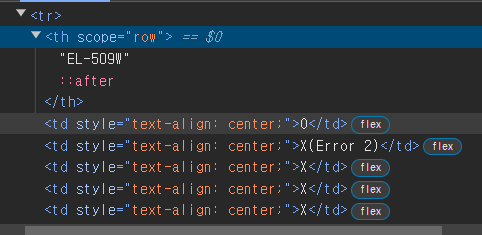
원래 Table tag <table border="1" cellpadding="1" cellspacing="1" style="width: 600px;"> <thead> <tr> <th scope="row">Factorial</th> <th scope="col">~69!</th> <th scope="col">70!~449!</th> <th scope="col">500!~1006!</th> <th scope="col">1007!~3248!</th> <th scope="col">3249!~</th> </tr> </thead> <tbody> <tr> <th scope="row">EL-509W</th> <td style="text-align: center;">O</td> <td style="text-align: center;">X(Error 2)</td> <td style="text-align: center;">X</td> <td style="text-align: center;">X</td> <td style="text-align: center;">X</td> </tr> <tr> <th scope="row">fx-570ES, EX</th> <td style="text-align: center;">O</td> <td style="text-align: center;">X(Math Error)</td> <td style="text-align: center;">X</td> <td style="text-align: center;">X</td> <td style="text-align: center;">X</td> </tr> <tr> <th scope="row">fx-9860G</th> <td style="text-align: center;">O</td> <td style="text-align: center;">X(Ma Error)</td> <td style="text-align: center;">X</td> <td style="text-align: center;">X</td> <td style="text-align: center;">X</td> </tr> <tr> <th scope="row">TI-nspire, 89T</th> <td style="text-align: center;">O</td> <td style="text-align: center;">O</td> <td style="text-align: center;">X(500!)</td> <td style="text-align: center;">X</td> <td style="text-align: center;">X</td> </tr> <tr> <th scope="row">HP Prime</th> <td style="text-align: center;">O</td> <td style="text-align: center;">O</td> <td style="text-align: center;">O</td> <td style="text-align: center;">X(∞)</td> <td style="text-align: center;"> </td> </tr> <tr> <th scope="row">윈도우10 내장</th> <td style="text-align: center;">O</td> <td style="text-align: center;">O</td> <td style="text-align: center;">O</td> <td style="text-align: center;">O</td> <td style="text-align: center;">X(Overflow)</td> </tr> </tbody> </table> chatgpt-4o 가 고쳐준 Table Tag <table border="1" cellpadding="1" cellspacing="1" style="width: 600px;"> <thead> <tr> <th style="display: table-cell; width: 100px;">Factorial</th> <th style="display: table-cell; width: 100px;">~69!</th> <th style="display: table-cell; width: 100px;">70!~449!</th> <th style="display: table-cell; width: 100px;">500!~1006!</th> <th style="display: table-cell; width: 100px;">1007!~3248!</th> <th style="display: table-cell; width: 100px;">3249!~</th> </tr> </thead> <tbody> <tr> <th style="display: table-cell; width: 100px;">EL-509W</th> <td style="display: table-cell; text-align: center; width: 100px;">O</td> <td style="display: table-cell; text-align: center; width: 100px;">X(Error 2)</td> <td style="display: table-cell; text-align: center; width: 100px;">X</td> <td style="display: table-cell; text-align: center; width: 100px;">X</td> <td style="display: table-cell; text-align: center; width: 100px;">X</td> </tr> <tr> <th style="display: table-cell; width: 100px;">fx-570ES, EX</th> <td style="display: table-cell; text-align: center; width: 100px;">O</td> <td style="display: table-cell; text-align: center; width: 100px;">X(Math Error)</td> <td style="display: table-cell; text-align: center; width: 100px;">X</td> <td style="display: table-cell; text-align: center; width: 100px;">X</td> <td style="display: table-cell; text-align: center; width: 100px;">X</td> </tr> <tr> <th style="display: table-cell; width: 100px;">fx-9860G</th> <td style="display: table-cell; text-align: center; width: 100px;">O</td> <td style="display: table-cell; text-align: center; width: 100px;">X(Ma Error)</td> <td style="display: table-cell; text-align: center; width: 100px;">X</td> <td style="display: table-cell; text-align: center; width: 100px;">X</td> <td style="display: table-cell; text-align: center; width: 100px;">X</td> </tr> <tr> <th style="display: table-cell; width: 100px;">TI-nspire, 89T</th> <td style="display: table-cell; text-align: center; width: 100px;">O</td> <td style="display: table-cell; text-align: center; width: 100px;">O</td> <td style="display: table-cell; text-align: center; width: 100px;">X(500!)</td> <td style="display: table-cell; text-align: center; width: 100px;">X</td> <td style="display: table-cell; text-align: center; width: 100px;">X</td> </tr> <tr> <th style="display: table-cell; width: 100px;">HP Prime</th> <td style="display: table-cell; text-align: center; width: 100px;">O</td> <td style="display: table-cell; text-align: center; width: 100px;">O</td> <td style="display: table-cell; text-align: center; width: 100px;">O</td> <td style="display: table-cell; text-align: center; width: 100px;">X(∞)</td> <td style="display: table-cell; text-align: center; width: 100px;"> </td> </tr> <tr> <th style="display: table-cell; width: 100px;">윈도우10 내장</th> <td style="display: table-cell; text-align: center; width: 100px;">O</td> <td style="display: table-cell; text-align: center; width: 100px;">O</td> <td style="display: table-cell; text-align: center; width: 100px;">O</td> <td style="display: table-cell; text-align: center; width: 100px;">O</td> <td style="display: table-cell; text-align: center; width: 100px;">X(Overflow)</td> </tr> </tbody> </table> -
-
세상의모든계산기
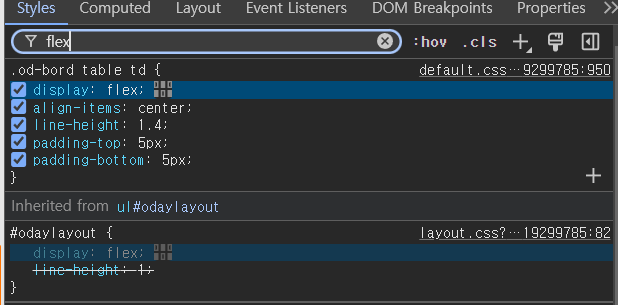
이렇게 찾아가는 거군요.
앗! 저기 체크박스 해제하니까 바로 적용되네요. 굿.
저게 문제 원인이 맞았습니다.
게시판 사이즈에 맞게
테이블 폭을 자동 조절해 주는 기능? 같은데
일단 소스 수정해서 꺼 보겠습니다.
-
세상의모든계산기2024.06.25 - 14:14 #42604
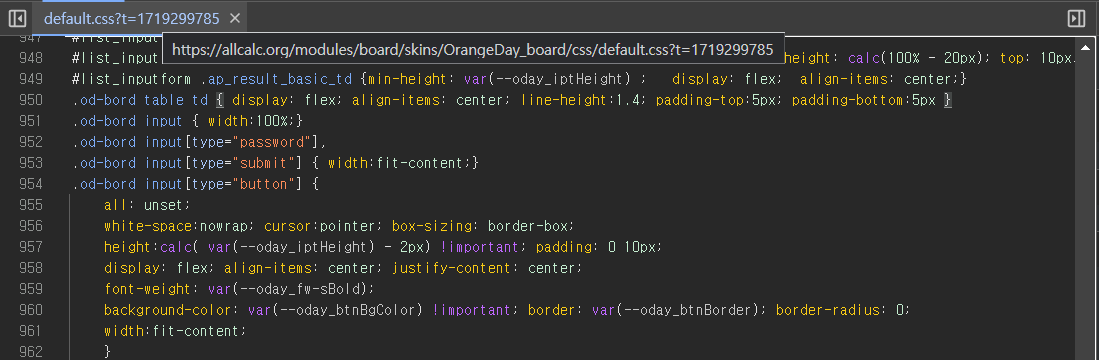
해당 파일 950번 line 에 display: flex; 를 뭘로 바꿔야 하나?
만약 \<td> 셀에 적용된 "display: flex;"를 다른 방식으로 바꾸어야 한다면, 테이블 셀의 기본 레이아웃을 유지하면서 원하는 스타일링을 적용할 수 있는 방법이 필요합니다. \<td>는 기본적으로 테이블 셀을 나타내는 태그이며, 테이블의 행과 열 구조를 유지해야 합니다.
대안으로 다음과 같은 방법들이 있을 수 있습니다:
1. **inline-block 사용**: 테이블 셀에 "display: inline-block;" 속성을 적용하여 요소를 인라인 블록 요소로 설정할 수 있습니다. 이는 테이블 셀이 가로로 배치되도록 하면서, 다른 요소와도 좀 더 적절하게 조화를 이룰 수 있습니다.
```css
.od-bord table td {
display: inline-block;
align-items: center; /* 필요한 경우 */
line-height: 1.4; /* 필요한 경우 */
padding-top: 5px; /* 필요한 경우 */
padding-bottom: 5px; /* 필요한 경우 */
}
```2. **block 사용**: 테이블 셀을 "display: block;"으로 설정하여 블록 요소로 만들 수도 있습니다. 이 경우에는 테이블의 기본 구조를 유지하면서 셀 내부의 내용을 좀 더 자유롭게 배치할 수 있습니다.
```css
.od-bord table td {
display: block;
align-items: center; /* 필요한 경우 */
line-height: 1.4; /* 필요한 경우 */
padding-top: 5px; /* 필요한 경우 */
padding-bottom: 5px; /* 필요한 경우 */
}
```3. **float 사용**: "float: left;" 또는 "float: right;"를 사용하여 테이블 셀을 부유(floating) 상태로 만들어 가로 배치를 조정할 수도 있습니다. 이 방법은 일반적으로 레이아웃을 구성할 때 사용되는 방식입니다.
```css
.od-bord table td {
float: left; /* 또는 float: right; */
align-items: center; /* 필요한 경우 */
line-height: 1.4; /* 필요한 경우 */
padding-top: 5px; /* 필요한 경우 */
padding-bottom: 5px; /* 필요한 경우 */
}
```이러한 방법들 중에서 상황에 맞는 적절한 스타일을 선택하여 \<td> 셀에 적용하면, 테이블 셀이 기대하는 방식대로 배치될 수 있습니다. 선택한 스타일은 다른 요소들과의 조화를 유지하면서도 원하는 디자인을 구현할 수 있도록 도와줄 것입니다.
-
세상의모든계산기
table td
1. Inline-block 적용
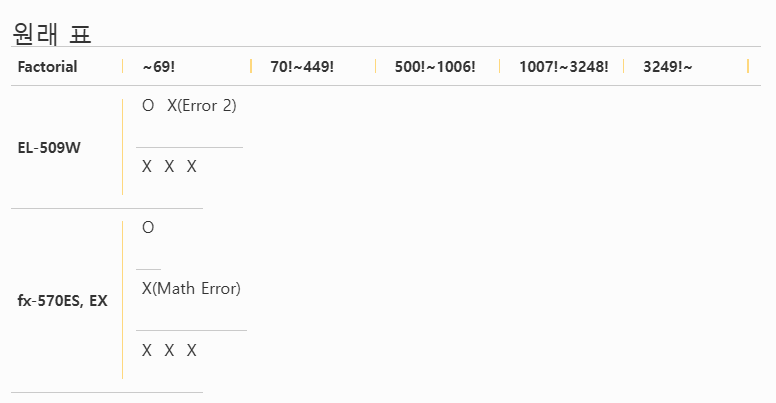
2. block 적용
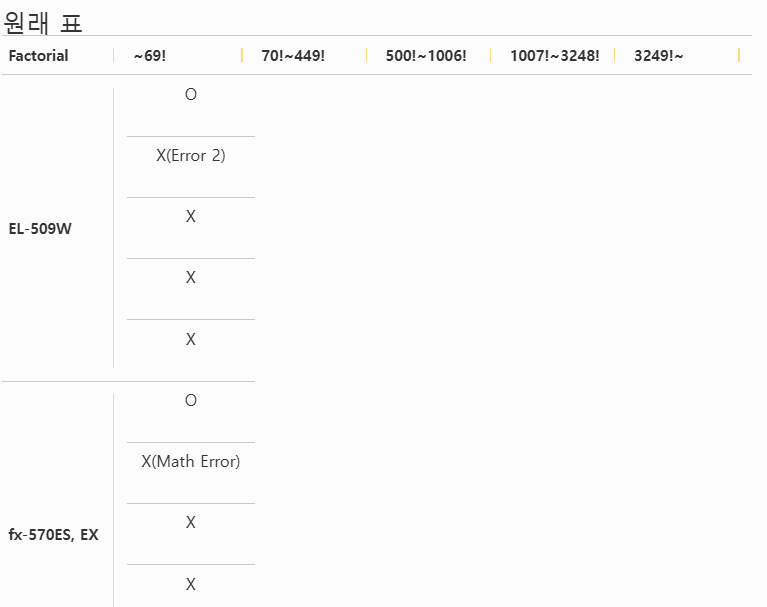
3. display: 적용 안함
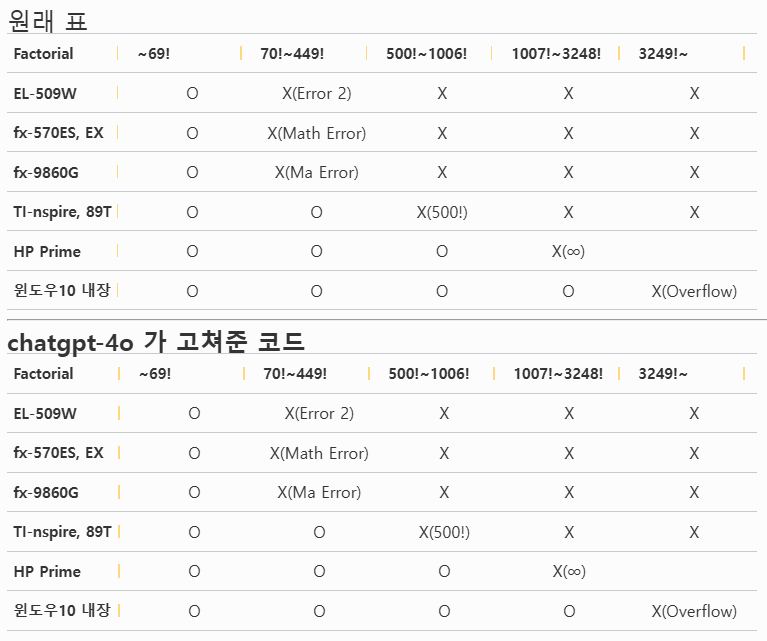
display: float; 인줄 알고 적용했는데, float: left; 이런 식으로 쓰는거네요.
모바일쪽이 좀 깨지지만, 일단 이걸로...
-
세상의모든계산기
https://github.com/OrangeDayCom/rhymix-layout/issues/3#issuecomment-2190435618
임시로 수정하시려고 한다면
/modules/board/skins/OrangeDay_board/css/default.css 에서
라인 950
.od-bord table td { display: flex; align-items: center; line-height:1.4; padding-top:5px; padding-bottom:5px }
을
.od-bord .write_header table td { display: flex; align-items: center; line-height:1.4; padding-top:5px; padding-bottom:5px }
로 수정하면 됩니다. -
세상의모든계산기
CKeditor Table 만들기
1 2 3 4 5 6 7 8 9 10 11 12 <table border="1" cellpadding="1" cellspacing="1" style="width:500px;"> <tbody> <tr> <td>1</td> <td>2</td> <td>3</td> </tr> <tr> <td>4</td> <td>5</td> <td>6</td> </tr> <tr> <td>7</td> <td>8</td> <td>9</td> </tr> <tr> <td>10</td> <td>11</td> <td>12</td> </tr> </tbody> </table>
세상의모든계산기 님의 최근 댓글
링크가 깨졌다고 하시니 404 에러가 나는 아래 링크를 말씀하시는 것 같은데 https://digilander.libero.it/fpirozzi/fourier.zip 이것은 TI-89 / TI-92 용 파일이며 [TI-92][TI-89] Fourier Transform Library https://allcalc.org/52455 링크의 Attached files + 안에 있습니다. 2026 09.11 본문에 사용된 nspire 용 파일은 본문 하단에 Attached files + 안에 있습니다. 클릭하면 표시됩니다. 2026 09.11 이 사이트에 올라와 있는 첨부 파일은 본문 하단에 있는 [Attached files +] 버튼을 눌러야 리스트가 보입니다. 2026 09.07 이렇게 질문하시면 무슨 파일인지 알 수가 없습니다. 해당 글에 댓글을 쓰시는게 최선이며, 권한 문제로 그것이 불가능하면 해당 글의 주소를 붙여넣으시거나, 제목 전체를 복사해 넣으셔야 구분이 됩니다. 2026 09.07 - claude AI는 l-c*r^2 을 1-c*r^2 으로 잘못 읽고 표시하고 있습니다. - TI-nspire CAS 계산기에 l-c*r^2 ≥0 을 조건에 추가해 계산해 보아도 결과는 바뀌지 않습니다. 2026 07.20