
역삼각함수 (inverse trigonometric function)
-

- 2024.07.20 - 14:16 2015.02.27 - 19:07 40479 12
1. 역삼각함수란?
역삼각함수(inverse trigonometric function)는 삼각함수의 역함수를 말한다.
2. 역삼각함수의 특징
삼각함수는 단사함수가 아니기 때문에 이의 역함수를 정의하려면 정의역과 치역을 제한하는 것이 필요하다.
아래는 역삼각함수들의 정의와 표기법, 정의역과 치역들을 나타낸 표이다.
| 이름 | 표기법 | 정의 | 정의역 | 치역 |
|---|---|---|---|---|
| 아크사인 | y = arcsin x 또는 y = sin-1 x | x = sin y | −1부터 +1 | −π/2 ≤ y ≤ π/2 |
| 아크코사인 | y = arccos x 또는 y = cos-1 x | x = cos y | −1부터 +1 | 0 ≤ y ≤ π |
| 아크탄젠트 | y = arctan x 또는 y = tan-1 x | x = tan y | 모든 실수 | −π/2 < y < π/2 |
| 아크코탄젠트 | y = arccot x 또는 y = cot-1 x | x = cot y | 모든 실수 | 0 < y < π |
| 아크시컨트 | y = arcsec x 또는 y = sec-1 x | x = sec y | −∞부터 −1과 1부터 ∞ | 0 ≤ y < π/2 or π/2 < y ≤ π |
| 아크코시컨트 | y = arccsc x 또는 y = csc-1 x | x = csc y | −∞부터 −1과 1부터 ∞ | −π/2 ≤ y < 0 or 0 < y ≤ π/2 |
정의역을 복소수로 두게되면 위에서 치역의 범위는 실수부의 범위가 된다.
출처 : http://ko.wikipedia.org/wiki/역삼각함수
영문판 : https://en.wikipedia.org/wiki/Inverse_trigonometric_functions
3. 주의 사항
- y = sin-1 x 의 -1을 를 지수로 해석해서, 곱하기 역수인 y = {sin(x)}-1 = (1 ÷ ((sin(x))) 로 계산하면 안된다.
- 삼각함수 및 역삼각함수를 손으로 정확하게 구하는 방법은 없다. 따라서 삼각함수표나 공학용 계산기를 이용해야만 한다.
(특수한 경우 테일러 급수 등을 이용해 근사값을 빠르게 구하는 방법은 있습니다만...
참고 : http://jjycjnmath.tistory.com/32 ) - 역삼각함수의 치역 범위(=결과값의 범위)를 잘 따져야 한다.
-
25
댓글12
-
세상의모든계산기
키 입력 방법
역삼각함수는 대부분의 공학용 계산기에 기본으로 내장되어 있습니다.
컴퓨터에서 쌍시옷 누르려면 【SHIFT】+【ㅅ】 누르는 것처럼 키의 조합으로 입력할 수 있습니다.
다만, 【SHIFT】에 해당하는 키를 누른 채로 유지할 필요는 없고, 순서대로만 누르시면 됩니다.


 ArcSin
 ArcCos
 ArcTan
SHIFT 에 해당하는 버튼은 보통 좌측 최상단에 위치하고 있고, 계산기마다 이름이 다른데 【SHIFT】, 【2nd F】, 【Ctrl】등으로 사용합니다.
-
세상의모든계산기
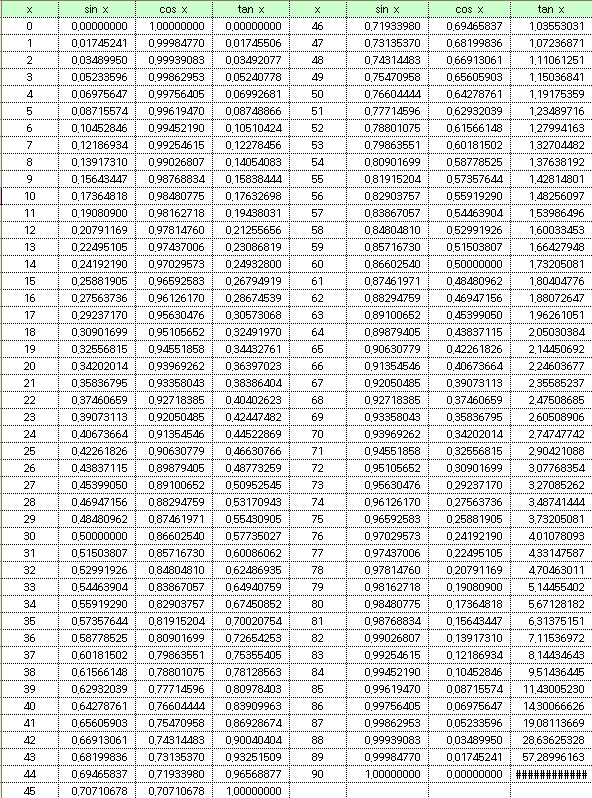
삼각함수표
( 출처 : http://netp.tistory.com/6)
-
세상의모든계산기
윈도우 공학용 계산기
버튼을 누르면 역삼각함수가 나옵니다.
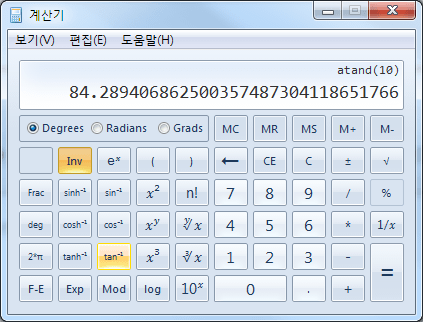
ex) arctan(10) 의 계산


-
세상의모든계산기
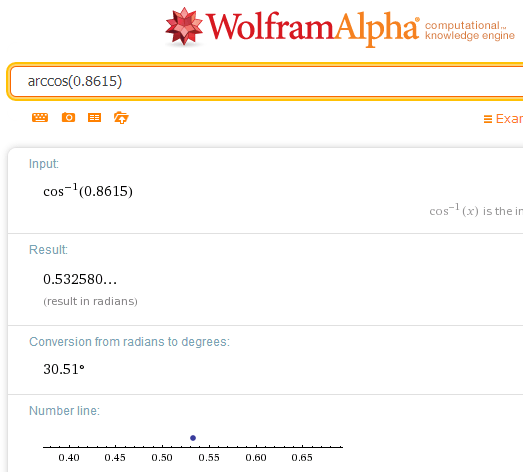
울프람 알파(Web)
http://www.wolframalpha.com/input/?i=arccos%280.8615%29
-
세상의모든계산기
각도 설정
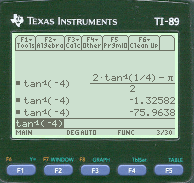
역삼각함수는 출력 결과값이 각도 단위이기 때문에,
계산기의 Setting - Angle(각도) 사전 설정값에 따라 결과가 radian / degree 로 선택되어 출력됩니다.
http://www.allcalc.org/4217 -
세상의모든계산기2016.03.07 - 23:26 #15666Knowledge Base
Home > Product Usage > TI-73 Explorer™ Family > > Solution 11693
Solution 11693: Algorithm for Solving Trigonometric Functions (Sine, Cosine and Tangent) on Texas Instruments' Graphing Calculators.
Type Question and Answer
Last Updated 07-DEC-2007 09:01:14
How does TI graphing calculators compute values for sine, cosine and tangent?
Texas Instruments uses the CORDIC algorithm method to compute trigonometric and other transcendental functions. A recent thread on Graph-TI asks about the internal methods used to compute trigonometric and other transcendental functions.
Most practical algorithms in use for transcendental functions are either polynomial approximations or the CORDIC method. TI calculators have almost always used CORDIC, the exceptions being the CC-40, TI-74 and TI-95 which used polynomial approximations.
In the PC world, the popular Intel math co-processors like the 8087 use CORDIC methods, while the Cyrix 83D87 uses polynomial methods. There are pros and cons to both methods. References 1 and 2 give some information on these devices but not down to the detailed algorithm level.
The polynomial approximations, however, are not usually familiar ones like a Taylor's series, but more related to Chebyshev polynomials. Early work on this topic was done by Hastings (ref 3) which is a fascinating book that represents a lot of tedious work in an age when "computers" were still likely to be people!
A more recent standard reference for constructing these polynomials is Hart (ref 4). A thorough treatment of the minor details one has to deal with in implementing the full algorithms for elementary functions (like binary versus decimal number representations and ranging for general arguments) is in Cody(ref 5).
The CORDIC algorithm is a super example of an approach that is quite different from traditional math and which is very efficient. One often sees a very specialized problem solution like this in many areas of engineering and science, which makes exposure to ideas of this type valuable in education, at least for advanced students.
CORDIC is an acronym for COrdinate Rotation DIgital Computer and was developed by J.E. Volder in 1959 (ref 6). Additional articles and one book chapter covering the technique are given in references 7 - 10. All these articles are complete enough to give the essentials of the method but each one reveals interesting variations. To give you a flavor for the idea and some material to work with without tracking down these references, we will give a worked example and a general description of the principle.
The concept of CORDIC is to take an angle theta and "rotate" a vector over this angle towards zero in a series of steps such that the sum of all the steps taken equals theta and we can accumulate corresponding X and Y increments for each step such that when we complete the process, Y/X = tan(theta). Variations of this basic concept can result in all the forward and inverse trigs as well as square root, hyperbolic trigs, and the exponential and logarithm functions.
Please see the graphing calculator guidebooks for more information and examples on using the sine, cosine and tangent functions. -
세상의모든계산기
atan2(y,x)
atan() 함수의 치역이 -pi/2 ~ pi/2 이기 때문에, 이 결과만으로는 좌표평면상 두 점의 위치관계를 정확하게 알기 어렵다.
이를 해결하기 위해 atan2(y,x) 가 필요함. 이 함수의 치역은 -pi ~ pi 로 정확한 방향을 특정할 수 있다.https://en.wikipedia.org/wiki/Atan2
https://www.medcalc.org/manual/atan2_function.php
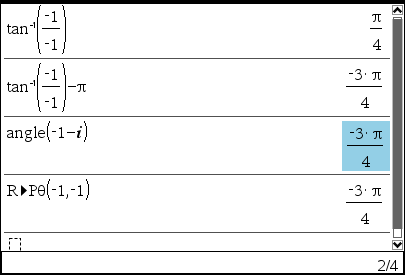
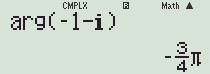
복소수 취급이 불가능한 계산기는 arg() 함수가 없습니다. 대신 pol(x,y) 함수를 이용해 각도값을 찾을 수 있습니다.
세상의모든계산기 님의 최근 댓글
링크가 깨졌다고 하시니 404 에러가 나는 아래 링크를 말씀하시는 것 같은데 https://digilander.libero.it/fpirozzi/fourier.zip 이것은 TI-89 / TI-92 용 파일이며 [TI-92][TI-89] Fourier Transform Library https://allcalc.org/52455 링크의 Attached files + 안에 있습니다. 2026 09.11 본문에 사용된 nspire 용 파일은 본문 하단에 Attached files + 안에 있습니다. 클릭하면 표시됩니다. 2026 09.11 이 사이트에 올라와 있는 첨부 파일은 본문 하단에 있는 [Attached files +] 버튼을 눌러야 리스트가 보입니다. 2026 09.07 이렇게 질문하시면 무슨 파일인지 알 수가 없습니다. 해당 글에 댓글을 쓰시는게 최선이며, 권한 문제로 그것이 불가능하면 해당 글의 주소를 붙여넣으시거나, 제목 전체를 복사해 넣으셔야 구분이 됩니다. 2026 09.07 - claude AI는 l-c*r^2 을 1-c*r^2 으로 잘못 읽고 표시하고 있습니다. - TI-nspire CAS 계산기에 l-c*r^2 ≥0 을 조건에 추가해 계산해 보아도 결과는 바뀌지 않습니다. 2026 07.20