
- CASIO 350
[fx-350] 직교좌표 ↔ 극좌표 변환 함수 Pol(), Rec() Coordinate Conversion
[fx-350] 기종은 복소수를 직접 취급할 수 없기 때문에, 복소수(페이저) 연산을 할 수 없고, 형식을 바꿔볼 수도 없습니다. 다만, 직교좌표(Rectangular) ↔ 극좌표(Polar) 값을 서로 변환하는 함수 Pol(), Rec() 를 사용할 수는 있습니다.
예시 : [fx-350 ES], [fx-82 ES]
- (주의!) 각도 단위를 설정을 확인합니다. (Degree or Radian)
- 직교좌표 ▶ 극좌표 : Pol(x,y)
결과 (r, θ)
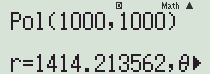
【SHIFT】【+】【x좌표값】【SHIFT】【)】【y좌표값】【)】【=】
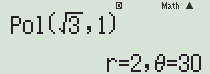
└ 결과값 r은 변수 X에, θ는 변수 Y에 저장됩니다.
- 극좌표 ▶ 직교좌표 : Rec(r, θ)
결과 (x,y)
【SHIFT】【-】【r값】【SHIFT】【)】【θ값】【)】【=】
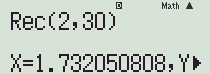
└ 결과값 X, Y는 변수 X, Y에 저장됩니다.
[fx-350 MS] 기종은 ES 기종과 사용법이 조금 다릅니다.
- 【Pol(】 (Pol()) 또는 【SHIFT】【Pol(】 (Rect()) 버튼으로 해당 함수를 부릅니다.
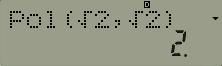
- 컴마는 【,】 버튼을 직접 사용합니다.
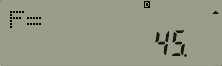
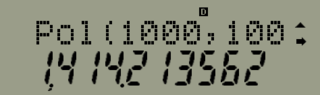
- 결과값은 번갈아가며 확인할 수 있습니다.
【RCL】【cos】(E)
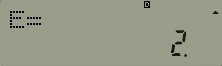
【RCL】【tan】(F)
댓글6
-
세상의모든계산기
대각 계산?
http://kin.naver.com/qna/detail.nhn?d1id=1&dirId=10601&docId=283767183
http://kin.naver.com/qna/detail.nhn?d1id=11&dirId=1126&docId=287564332
[fx-350 MS] 모델【Pol(】【1000】【,】【1000】【)】【=】
[fx-350 ES] 모델【SHIFT】【+】【1000】【SHIFT】【)】【1000】【)】【=】
-
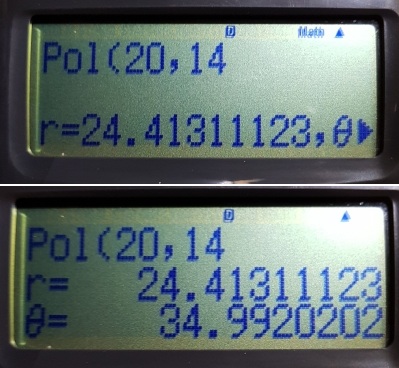
350ES나 570ES나 REC , POL 키를 쓰면 불편한 점이
답란에 1열로 쭉 나와서 방향키로 넘겨야 볼수 있는점인데
기능 살피다가 570EX처럼 2열로 표현 되게도 할수 있다는걸 알았습니다.
셋업에서 2.LineIO 으로 설정하고 키를 먹이면 2열로 표현되네요.
단점은 분수표현이 역 L 로 표시되는게 단점.. ㅎ
세상의모든계산기 님의 최근 댓글
뉴턴-랩슨 적분 방정식 시각화 v1.0 body { font-family: 'Pretendard', -apple-system, BlinkMacSystemFont, "Segoe UI", Roboto, Helvetica, Arial, sans-serif; display: flex; flex-direction: column; align-items: center; background: #f8f9fa; padding: 40px 20px; margin: 0; color: #333; } .container { background: white; padding: 40px; border-radius: 20px; box-shadow: 0 15px 35px rgba(0,0,0,0.08); max-width: 900px; width: 100%; } header { border-bottom: 2px solid #f1f3f4; margin-bottom: 30px; padding-bottom: 20px; } h1 { color: #1a73e8; margin: 0 0 10px 0; font-size: 1.8em; } p.subtitle { color: #5f6368; margin: 0; font-size: 1.1em; } .equation-box { background: #f1f3f4; padding: 15px; border-radius: 10px; text-align: center; margin-bottom: 30px; font-size: 1.3em; } canvas { border: 1px solid #e0e0e0; border-radius: 12px; background: #fff; width: 100%; height: auto; display: block; } .controls { margin-top: 30px; display: flex; gap: 15px; align-items: center; justify-content: center; flex-wrap: wrap; } button { padding: 12px 25px; border: none; border-radius: 8px; background: #1a73e8; color: white; cursor: pointer; font-weight: 600; font-size: 1em; transition: all 0.2s; box-shadow: 0 2px 5px rgba(26,115,232,0.3); } button:hover { background: #1557b0; transform: translateY(-1px); box-shadow: 0 4px 8px rgba(26,115,232,0.4); } button:active { transform: translateY(0); } button.secondary { background: #5f6368; box-shadow: 0 2px 5px rgba(0,0,0,0.2); } button.secondary:hover { background: #4a4e52; } .status-badge { background: #e8f0fe; color: #1967d2; padding: 8px 15px; border-radius: 20px; font-weight: bold; font-size: 0.9em; } .explanation { margin-top: 40px; padding: 25px; background: #fff8e1; border-left: 5px solid #ffc107; border-radius: 8px; line-height: 1.8; } .explanation h3 { margin-top: 0; color: #856404; } .math-symbol { font-family: 'Times New Roman', serif; font-style: italic; font-weight: bold; color: #d93025; } .code-snippet { background: #202124; color: #e8eaed; padding: 2px 6px; border-radius: 4px; font-family: monospace; } 📊 Newton-Raphson 적분 방정식 시뮬레이터 미분적분학의 기본 정리(FTC)를 이용한 수치해석 시각화 목표 방정식: ∫₀ᴬ (2√x) dx = 20 을 만족하는 A를 찾아라! 계산 시작 (A 추적) 초기화 현재 반복: 0회 💡 시각적 동작 원리 (Newton-Raphson & FTC) Step 1 (오차 측정): 현재 A까지 쌓인 파란색 면적이 목표치(20)와 얼마나 차이나는지 계산합니다. Step 2 (FTC의 마법): 면적의 변화율(미분)은 그 지점의 그래프 높이 f(A)와 같습니다. Step 3 (보정): 다음 A = 현재 A - (면적 오차 / 현재 높이) 공식을 사용하여 A를 이동시킵니다. 결론: 오차를 현재 높이로 나누면, 오차를 메우기 위해 필요한 가로 길이(ΔA)가 나옵니다. 이 과정을 반복하면 정답에 도달합니다! const canvas = document.getElementById('graphCanvas'); const ctx = canvas.getContext('2d'); const iterText = document.getElementById('iterText'); // 수학 설정 const targetArea = 20; const f = (x) => Math.sqrt(x) * 2; // 피적분 함수 f(x) = 2√x const F = (x) => (4/3) * Math.pow(x, 1.5); // 정적분 결과 F(x) = ∫ 2√x dx = 4/3 * x^(3/2) let A = 1.5; // 초기값 let iteration = 0; let animating = false; // 그래프 드로잉 설정 const scale = 50; const offsetX = 60; const offsetY = 380; function drawGrid() { ctx.strokeStyle = '#f1f3f4'; ctx.lineWidth = 1; ctx.beginPath(); for(let i=0; i 2026 04.11 참값 : A = ±2√5 근사값 : A≈±4.472135954999579392818347 2026 04.10 fx-570 ES 입력 결과 초기값 입력 반복 수식 입력 반복 결과 2026 04.10 파이썬 코드 검증 결과 초기값: 5.0 반복 1회차: 4.5000000000 반복 2회차: 4.4722222222 반복 3회차: 4.4721359558 반복 4회차: 4.4721359550 반복 5회차: 4.4721359550 초기값: 10.0 반복 1회차: 6.0000000000 반복 2회차: 4.6666666667 반복 3회차: 4.4761904762 반복 4회차: 4.4721377913 반복 5회차: 4.4721359550 2026 04.10 감사합니다. 주말 잘 보내세요. 2026 03.06