
- TI 89
[TI-89] 설정 - 표시 자릿수 Display Digits 설정과 유효 자릿수 Significant Digits
-

- 2016.04.03 - 23:58 2015.10.14 - 09:08 8252 2
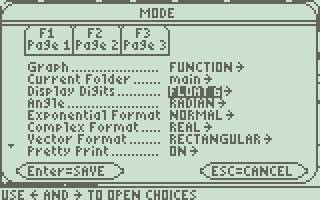
 출처 : https://epsstore.ti.com/OA_HTML/csksxvm.jsp?nSetId=96167
| Solution 12130: Difference Between the FIX and FLOAT Display Digits Mode Settings on the TI-89 Family, TI-92 Family and Voyage™ 200 Graphing Calculators. |
 |
|
|
|
|
What is the difference between the FIX and FLOAT Display Digits mode settings on the TI-89 Family, TI-92 Family and Voyage 200?
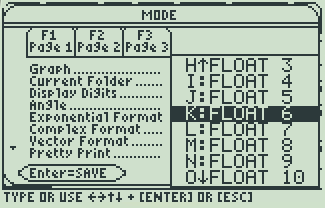
By default, the Display Digits mode setting is FLOAT 6, which means that results are rounded to a maximum of six digits. The [MODE] key can be used to select different settings which will apply to all exponential formats. Internally, the device calculates and retains all decimal results with up to 14 significant digits (although a maximum of 12 are displayed).
Note: Regardless of the Display Digits setting, the full value is used for internal floating-point calculations to ensure maximum accuracy. Note: A result is automatically shown in scientific notation if its magnitude cannot be displayed in the selected number of digits. For additional information on mode settings, refer to the online guidebook for your specific calculator model. |
결론
1. Display Digits 설정은 결과값을 보여주는 방식을 지정한 것일 뿐 유효숫자와는 무관하다.
2. 내부적으로는 최대 14개의 (decimal) 유효숫자를 계산하고 저장한다. (정수 제외)
-
25
세상의모든계산기 님의 최근 댓글
2) 고정기준값 41에 대한 오차 제곱합 계산방법 이건 통계메뉴에서는 딱히 방법이 떠오르지 않네요. 질문하신 것과 같이 적은 갯수의 data라면 직접 입력하시는게 최선입니다. 하지만 DATA 갯수가 수십개 이상이라면? ㄴ 스프레드시트 기능을 이용하시는게 좋겠습니다. 【MENU】【8】 A열에 DATA 입력하고 B로 이동한 후 OPTN 【1】 Fill Formula 【ALPHA】키 방향키 숫자키 등을 이용해 수식 완성 C로 이동후 Formula 수식 입력 D의 빈공간으로 이동 후 OPTN 방향키 아래 누르다보면 Sum 보임 ALPHA 키 이용해서 수식 완성. : 기호는 MENU 버튼 바로 아래 있음 (ALPHA키로 입력) 【=】입력하면 최종결과 확인 * 주의 (B열, C열과 달리) D1 셀은 계산 결과인 951이 직접 입력된 상태이므로 DATA 수정후 recalculation 하여도 자동계산되지 않음. 자동계산을 위해서는 formula 형식으로 입력해야 함. 2026 10.27 1) 통계적 편차제곱합(평균 50.25기준) 입력 방법 【MENU】 【6】 【1】 로 1-var Stat 모드로 진입하여 【48】 【=】 【66】 【=】 【32】 【=】 【55】【=】 DATA 입력 【OPTN】 【3】 【▼】 【▼】 fx-570EX 기종에도 편차제곱합을 바로 보여주진 않습니다. 본문에 나온 것처럼 앞서 계산되어 저장된 각종 변수를 이용해 계산합니다. 【AC】【OPTN】【4】Statistics Calc 이 화면에서 다시 OPTN 하고 (메뉴가 3개로 줄어 있죠?) 여기서 방향키로 【▼】 아래를 내려보면 추가 메뉴가 있습니다. 4개 메뉴에는 각각 아래 하위 메뉴가 있습니다. 이 중에서 필요로 하는 것을 골라 계산하시면 되겠습니다. Variable 에 있는 값을 이용하면 다른 공식을 쓰셔도 됩니다. 2026 10.27 질문자님, 48,66,32,55 네 개 DATA 의 평균은 50.25라서 41은 평균이 아닙니다. 그래서 식을 두 가지 경우로 나누어 설명하겠습니다. 1) 통계적 편차제곱합(평균 50.25기준)이면 답은 608.75 입니다. 2) 만약 41이라는 고정 기준값에 대한 제곱합을 구하시는 거면 식은 (48-41)²+... 이고 답은 951입니다. 원문에 +로 쓰신 건 -의 오타로 보입니다. 2026 10.27 본문의 변환 위젯에 사용된 전서체 폰트는 대만의 최고 학술 연구 기관인 중앙연구원(Academia Sinica)에서 제공하는 ‘숭희전체(崇羲篆體)’로 전통 한자 서체인 소전(小篆)을 현대 컴퓨터 폰트(글꼴)로 구축한 오픈소스 프로젝트로 개발되었습니다. https://xiaoxue.iis.sinica.edu.tw/chongxi/download.htm 2026 10.20 예제1) 예제2) 예제3) 추가옵션 2026 10.18