
- 세상의 모든 계산기 자유(질문) 게시판 팁 & 정보 ()
DNS Benchmark 프로그램
-

- 2019.01.18 - 12:30 2015.12.23 - 22:33 5404 1
1. DNS?
DNS란 Domain Name System 의 약자로서 도메인 주소에 대한 IP 주소를 매칭하여 알려주는 시스템(서버)입니다.
대부분의 사람들이 그러하듯 그냥 신경 안쓰고 자동(Auto)으로 두면, OS는 자기가 속한 ISP 의 DNS Server 를 선택합니다. 공유기를 사용한다면 공유기를 DNS Server로 선택하기도 합니다. 공유기는 Default 로 자기가 속한 ISP 의 DNS Server 에서 DNS 정보를 가져오니까 거기서 거기라고 볼 수도 있겠네요.
그런데 DNS 서버마다 반응속도가 다를 수도 있고, (의도적이거나/비의도적이거나) 잘못된 IP주소를 주는 경우도 있습니다. 그래서 DNS Server를 잘 선택하는 것은 생각보다 중요한 문제일 수도 있습니다.
2. DNS Benchmark 프로그램
그래서 DNS 성능을 알아보려고 하는데... DNS Server 주소를 하나씩 바꿔 가면서 테스트 해볼 수는 없는 노릇이고... 그런데 웹을 뒤적여 보니 쓸만한 프로그램이 하나 있습니다.
https://www.grc.com/dns/benchmark.htm
Gibson Research Corporation 이라는 곳에서 만든 프로그램인데, 개인 프리랜서 같기도 하고... 잘은 모르겠네요.
일단 Virustotal.com 의 검사 결과로는 문제없는 파일로 보입니다.
3. Benchmark 실행 결과
※ Nameservers
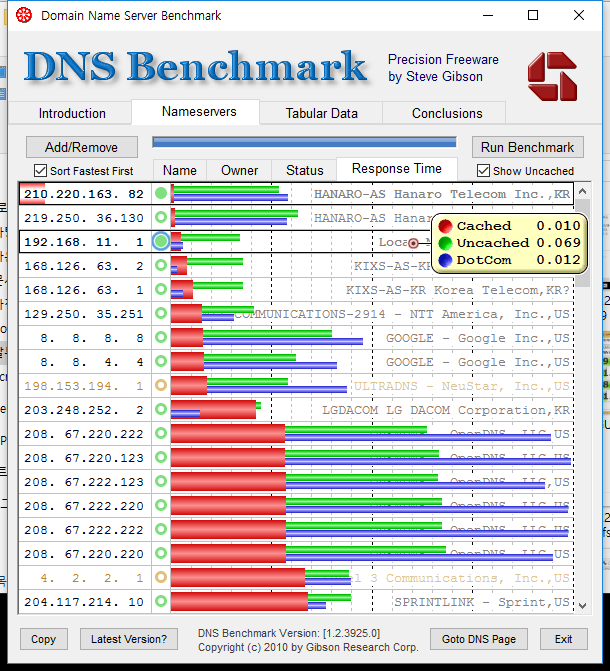
국내 ISP 의 DNS Server 들이 포함되어 있지 않아서 Add로 주소들을 추가해 주고 Run Benchmark
※ 결과 해석
- 벤치마크 걸린 시간 : 대략 4분
- 그래프가 짧을 수록 빠름(=좋음)
- 빨강=Cached(이미 있는 정보) / 초록=Uncached(신규 정보, Sub-domain) / 파랑=DotCom(??)
Dotcom lookups – the time to consult the nameserver's chosen dotcom resolver(s) for a dotcom name. - Sort Fastest First 체크하니 빨강이 짧은 순서대로 나열이 됩니다.
- 공유기와 KT DNS 가 상위권을 차지하였습니다.
- 의외로 Hanaro DNS 가 1위를 차지하였습니다. 이유는 잘 모르겠습니다.
※ Tabular Data
여기를 클릭하면 상세한 정보가 나옵니다.
Final benchmark results, sorted by nameserver performance:
(average cached name retrieval speed, fastest to slowest)
210.220.163. 82 | Min | Avg | Max |Std.Dev|Reliab%|
----------------+-------+-------+-------+-------+-------+
- Cached Name | 0.002 | 0.003 | 0.004 | 0.000 | 100.0 |
- Uncached Name | 0.005 | 0.107 | 0.286 | 0.064 | 95.9 |
- DotCom Lookup | 0.006 | 0.116 | 0.204 | 0.062 | 100.0 |
---<-------->---+-------+-------+-------+-------+-------+
bns1.hananet.net
HANARO-AS Hanaro Telecom Inc.,KR
219.250. 36.130 | Min | Avg | Max |Std.Dev|Reliab%|
----------------+-------+-------+-------+-------+-------+
- Cached Name | 0.003 | 0.004 | 0.005 | 0.001 | 100.0 |
- Uncached Name | 0.005 | 0.126 | 0.298 | 0.083 | 100.0 |
- DotCom Lookup | 0.007 | 0.115 | 0.176 | 0.062 | 100.0 |
---<-------->---+-------+-------+-------+-------+-------+
bns2.hananet.net
HANARO-AS Hanaro Telecom Inc.,KR
192.168. 11. 1 | Min | Avg | Max |Std.Dev|Reliab%|
----------------+-------+-------+-------+-------+-------+
+ Cached Name | 0.001 | 0.010 | 0.123 | 0.021 | 100.0 |
+ Uncached Name | 0.004 | 0.069 | 0.206 | 0.048 | 100.0 |
+ DotCom Lookup | 0.003 | 0.012 | 0.112 | 0.024 | 100.0 |
---<OOOO---->---+-------+-------+-------+-------+-------+
dd-g300n
Local Network Nameserver
168.126. 63. 2 | Min | Avg | Max |Std.Dev|Reliab%|
----------------+-------+-------+-------+-------+-------+
- Cached Name | 0.001 | 0.016 | 0.145 | 0.039 | 100.0 |
- Uncached Name | 0.003 | 0.072 | 0.218 | 0.052 | 100.0 |
- DotCom Lookup | 0.002 | 0.006 | 0.116 | 0.016 | 100.0 |
---<-------->---+-------+-------+-------+-------+-------+
kns2.kornet.net
KIXS-AS-KR Korea Telecom,KR
168.126. 63. 1 | Min | Avg | Max |Std.Dev|Reliab%|
----------------+-------+-------+-------+-------+-------+
- Cached Name | 0.001 | 0.022 | 0.216 | 0.047 | 100.0 |
- Uncached Name | 0.002 | 0.072 | 0.190 | 0.051 | 100.0 |
- DotCom Lookup | 0.003 | 0.012 | 0.117 | 0.027 | 100.0 |
---<-------->---+-------+-------+-------+-------+-------+
kns.kornet.net
KIXS-AS-KR Korea Telecom,KR?
※ Conclusion
여기에서는 비록 영어긴 하지만, DNS 서버 설정관련한 추천(Recommendation)을 해 주고 있습니다.
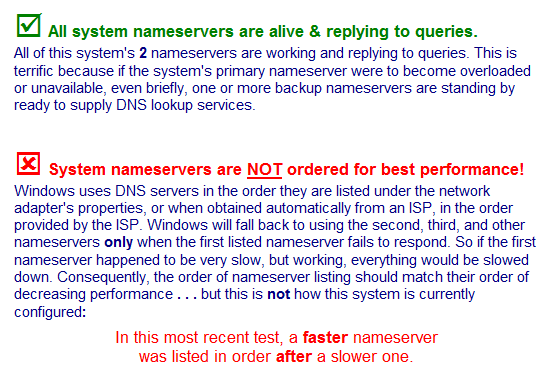
괜찮은 항목은 [V] 표시가 뜨고, 문제(또는 개선의 여지)가 있는 항목은 저렇게 [X] 표시가 뜹니다.
자신의 컴퓨터 환경에 관심이 있는 한번 해볼만한 테스트인 것 같습니다.
-
25
세상의모든계산기 님의 최근 댓글
뉴턴-랩슨 적분 방정식 시각화 v1.0 body { font-family: 'Pretendard', -apple-system, BlinkMacSystemFont, "Segoe UI", Roboto, Helvetica, Arial, sans-serif; display: flex; flex-direction: column; align-items: center; background: #f8f9fa; padding: 40px 20px; margin: 0; color: #333; } .container { background: white; padding: 40px; border-radius: 20px; box-shadow: 0 15px 35px rgba(0,0,0,0.08); max-width: 900px; width: 100%; } header { border-bottom: 2px solid #f1f3f4; margin-bottom: 30px; padding-bottom: 20px; } h1 { color: #1a73e8; margin: 0 0 10px 0; font-size: 1.8em; } p.subtitle { color: #5f6368; margin: 0; font-size: 1.1em; } .equation-box { background: #f1f3f4; padding: 15px; border-radius: 10px; text-align: center; margin-bottom: 30px; font-size: 1.3em; } canvas { border: 1px solid #e0e0e0; border-radius: 12px; background: #fff; width: 100%; height: auto; display: block; } .controls { margin-top: 30px; display: flex; gap: 15px; align-items: center; justify-content: center; flex-wrap: wrap; } button { padding: 12px 25px; border: none; border-radius: 8px; background: #1a73e8; color: white; cursor: pointer; font-weight: 600; font-size: 1em; transition: all 0.2s; box-shadow: 0 2px 5px rgba(26,115,232,0.3); } button:hover { background: #1557b0; transform: translateY(-1px); box-shadow: 0 4px 8px rgba(26,115,232,0.4); } button:active { transform: translateY(0); } button.secondary { background: #5f6368; box-shadow: 0 2px 5px rgba(0,0,0,0.2); } button.secondary:hover { background: #4a4e52; } .status-badge { background: #e8f0fe; color: #1967d2; padding: 8px 15px; border-radius: 20px; font-weight: bold; font-size: 0.9em; } .explanation { margin-top: 40px; padding: 25px; background: #fff8e1; border-left: 5px solid #ffc107; border-radius: 8px; line-height: 1.8; } .explanation h3 { margin-top: 0; color: #856404; } .math-symbol { font-family: 'Times New Roman', serif; font-style: italic; font-weight: bold; color: #d93025; } .code-snippet { background: #202124; color: #e8eaed; padding: 2px 6px; border-radius: 4px; font-family: monospace; } 📊 Newton-Raphson 적분 방정식 시뮬레이터 미분적분학의 기본 정리(FTC)를 이용한 수치해석 시각화 목표 방정식: ∫₀ᴬ (2√x) dx = 20 을 만족하는 A를 찾아라! 계산 시작 (A 추적) 초기화 현재 반복: 0회 💡 시각적 동작 원리 (Newton-Raphson & FTC) Step 1 (오차 측정): 현재 A까지 쌓인 파란색 면적이 목표치(20)와 얼마나 차이나는지 계산합니다. Step 2 (FTC의 마법): 면적의 변화율(미분)은 그 지점의 그래프 높이 f(A)와 같습니다. Step 3 (보정): 다음 A = 현재 A - (면적 오차 / 현재 높이) 공식을 사용하여 A를 이동시킵니다. 결론: 오차를 현재 높이로 나누면, 오차를 메우기 위해 필요한 가로 길이(ΔA)가 나옵니다. 이 과정을 반복하면 정답에 도달합니다! const canvas = document.getElementById('graphCanvas'); const ctx = canvas.getContext('2d'); const iterText = document.getElementById('iterText'); // 수학 설정 const targetArea = 20; const f = (x) => Math.sqrt(x) * 2; // 피적분 함수 f(x) = 2√x const F = (x) => (4/3) * Math.pow(x, 1.5); // 정적분 결과 F(x) = ∫ 2√x dx = 4/3 * x^(3/2) let A = 1.5; // 초기값 let iteration = 0; let animating = false; // 그래프 드로잉 설정 const scale = 50; const offsetX = 60; const offsetY = 380; function drawGrid() { ctx.strokeStyle = '#f1f3f4'; ctx.lineWidth = 1; ctx.beginPath(); for(let i=0; i 2026 04.11 참값 : A = ±2√5 근사값 : A≈±4.472135954999579392818347 2026 04.10 fx-570 ES 입력 결과 초기값 입력 반복 수식 입력 반복 결과 2026 04.10 파이썬 코드 검증 결과 초기값: 5.0 반복 1회차: 4.5000000000 반복 2회차: 4.4722222222 반복 3회차: 4.4721359558 반복 4회차: 4.4721359550 반복 5회차: 4.4721359550 초기값: 10.0 반복 1회차: 6.0000000000 반복 2회차: 4.6666666667 반복 3회차: 4.4761904762 반복 4회차: 4.4721377913 반복 5회차: 4.4721359550 2026 04.10 감사합니다. 주말 잘 보내세요. 2026 03.06