
[공학용 계산기] 계산 명령의 우선 순위 (Order of Evaluation)
-

- 2024.11.05 - 22:47 2015.12.14 - 21:37 4247 2
1. TI-nspire
Equation Operating System (EOS™)
숫자와, 변수, 그리고 함수는 간략하고, 직관적인 순서로 입력됩니다.
EOS™ 소프트웨어는 아래에 기술된 우선순위와 괄호묶음을 이용하여 수식과 방정식을 계산합니다.
|
Level |
Operator |
|
1 |
Parentheses ( ), brackets [ ], braces { } |
|
2 |
Indirection (#) |
|
3 |
Function calls |
|
4 |
Post operators: degrees-minutes-seconds (°,',"), factorial (!), percentage (%), radian (r), subscript ([ ]), transpose (T) |
|
5 |
Exponentiation, power operator (^) |
|
6 |
Negation (⁻) |
|
7 |
String concatenation (&) |
|
8 |
Multiplication (•), division (/) |
|
9 |
Addition (+), subtraction (-) |
|
10 |
10 Equality relations: equal (=), not equal (≠ or /=), less than (<), less than or equal (≤ or <=), greater than (>), greater than or equal (≥ or >=) |
|
11 |
Logical not |
|
12 |
Logical and |
|
13 |
Logical or |
|
14 |
xor, nor, nand |
|
15 |
Logical implication (⇒) |
|
16 |
Logical double implication, XNOR (⇔) |
|
17 |
Constraint operator (“|”) |
|
18 |
Store (→) |
2. CASIO [fx-9860G]
계산 우선 순위 (출처 : 사용자 설명서)
본 기기는 대수법칙에 따라 아래의 우선 순위대로 적용합니다.
| ① |
Type A 함수
|
| ② |
Type B 함수
|
| ③ | 누승/누승근 ^, 【xy】, 【x√】 |
| ④ | 분수 【a b/c】 |
| ⑤ | π나 메모리 이름, 변수 이름 직전 곱셈 생략 2π, 5A, Xmin, F Start, etc. |
| ⑥ | Type C 함수 (Type B와 입력순서 반대) 함수키를 누르고 값을 입력합니다. √, 3√, log, In, ex, 10x, sin, cos, tan, sin-1, cos-1, tan-1,sinh, cosh, tanh, sinh-1, cosh-1,tanh-1, (-), d, h, b, o, Neg, Not, Det, Trn, Dim, Identity, Ref, Rref, Sum, Prod, Cuml, Percent, List, Abs, Int, Frac, Intg, Arg, Conjg, ReP, ImP |
| ⑦ | Type A, Type C 함수, 괄호 앞의 곱셈 생략 2√3, Alog2, etc. |
| ⑧ | 균열, 조합 nPr, nCr |
| ⑨ | 단위 변환 명령어 |
| ⑩ | × , ÷ , Int ÷ , Rnd |
| ⑪ | +, - |
| ⑫ | 관계 연산자 =, ≠, >, <, ≤, ≥ |
| ⑬ | And(논리 연산자), and(비트 연산자) |
| ⑭ | Or(논리 연산자), or, xor, xnor (비트 연산자) |
*1 복합함수의 함수 메모리(fn), 그래프 메모리(Yn, rn, Xtn, Ytn, Xn)의 내용을 같이 사용할 수 있습니다.
예를 들면, 복합함수 fn1◦fn2의 결과를 fn1(fn2)로 정하십시오.(페이지5-7을 참조) 복합 함수는 5개의 함수로 이루어집니다.
예시 :
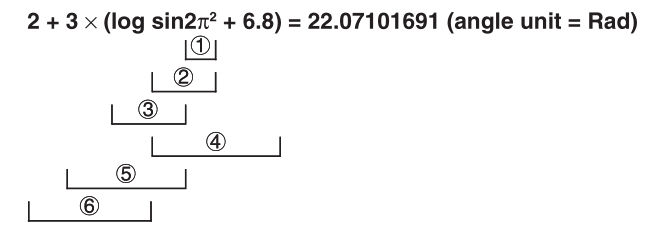
- RndFix 계산식 내에서 미분, 2차미분, 적분, ∑계산, Min, Max, Solve, RndFix, logba 등을 사용할 수 없습니다.
- 우선순위가 같은 경우, 오른쪽에서 왼쪽으로 계산이 실행됩니다.
exln√120 → ex {ln(√(120))} - 그렇지 않으면, 왼쪽에서 오른쪽으로 실행됩니다.
- 복합 함수는 오른쪽에서 왼쪽으로 실행됩니다.
- 무조건 괄호가 가장 높은 우선 순위를 가집니다.
3. SHARP EL-9950
When solving a mathematical expression, this calculator internally looks for the following figures and methods (sorted in the order of evaluation):
| ① | Fractions (1/4, a/b, , etc.) |
| ② | Complex angles (∠) |
| ③ | Single calculation functions where the numerical value occurs before the function (X2, X-1, !, “°”, “r”, and “ g ”) |
| ④ | Exponential functions (ab, a , etc) |
| ⑤ | Multiplications between a value and a stored variable/constant, with “×” abbreviated (2π, 2A, etc.) |
| ⑥ | Single calculation functions where the numerical value occurs after the function (sin, cos, tan, sin-1, cos-1, tan-1, log, 10x, ln, ex, √¯, abs, int, ipart, fpart, (-), not, neg, etc.) |
| ⑦ | Multiplications between a number and a function in #6 (3cos20, etc. “cos20” is evaluated first) |
| ⑧ | Permutations and combinations (nPr, nCr) |
| ⑨ | ×, ÷ |
| ⑩ | +, - |
| ⑪ | and |
| ⑫ | or, xor xnor |
| ⑬ | Equalities and nonequalities (<, ≤, >, ≥, ≠, =, →deg, →dms, etc.) |
-
25
댓글2
-
세상의모든계산기
음수,빼기 vs 지수연산

ㄴ TI-nspire 【(-)】 음수기호도 지수계산보다 계산순서가 낮음.


ㄴ [CASIO fx-570 ES] 빼기【-】도 음수기호【(-)】도 모두 지수보다 계산순서가 낮음.

ㄴ [EL-W506T] 【(-)】 역시 마찬가지
세상의모든계산기 님의 최근 댓글
링크가 깨졌다고 하시니 404 에러가 나는 아래 링크를 말씀하시는 것 같은데 https://digilander.libero.it/fpirozzi/fourier.zip 이것은 TI-89 / TI-92 용 파일이며 [TI-92][TI-89] Fourier Transform Library https://allcalc.org/52455 링크의 Attached files + 안에 있습니다. 2026 09.11 본문에 사용된 nspire 용 파일은 본문 하단에 Attached files + 안에 있습니다. 클릭하면 표시됩니다. 2026 09.11 이 사이트에 올라와 있는 첨부 파일은 본문 하단에 있는 [Attached files +] 버튼을 눌러야 리스트가 보입니다. 2026 09.07 이렇게 질문하시면 무슨 파일인지 알 수가 없습니다. 해당 글에 댓글을 쓰시는게 최선이며, 권한 문제로 그것이 불가능하면 해당 글의 주소를 붙여넣으시거나, 제목 전체를 복사해 넣으셔야 구분이 됩니다. 2026 09.07 - claude AI는 l-c*r^2 을 1-c*r^2 으로 잘못 읽고 표시하고 있습니다. - TI-nspire CAS 계산기에 l-c*r^2 ≥0 을 조건에 추가해 계산해 보아도 결과는 바뀌지 않습니다. 2026 07.20