
- TI nspire
[function] part() // nspire 레퍼런스 가이드북에 없는 함수
-

- 2024.06.22 - 12:21 2024.06.21 - 22:17 595 7
1. part()
"Error: Argument must be a Boolean expression or integer"
1.1 part(data) ⇒ (number) index
- data 에서 (계산 우선순위상) 처음 실행되는 function(기능) 이 포함하고 있는 요소(argument) 의 갯수를 반환함.
- data==list,
list 의 element 갯수 - data==matrix,
matrix 열(row) 갯수 - data==expression,
수식에 포함된 기능(연산자(+ - × ÷ ^...) / 함수(cos()...) / "and" / "or" 등등) 중에서, 뭐가 됐든 우선순위가 제일 높은 것에 필요한 요소(argument)의 갯수를 반환함.
1.2 part(data, index)
- index==0 일 때,
data에 포함된 기능을 string 형식으로 반환합니다.
예) "{", "or", "+", "/" - data==list,
list 의 index에 해당하는 요소를 반환 - data==matrix,
matrix index에 해당하는 열(row) 를 list 형식으로 반환 - data==expression,
기능에 사용되는 요소를 순서대로 반환
2. 사용 예시
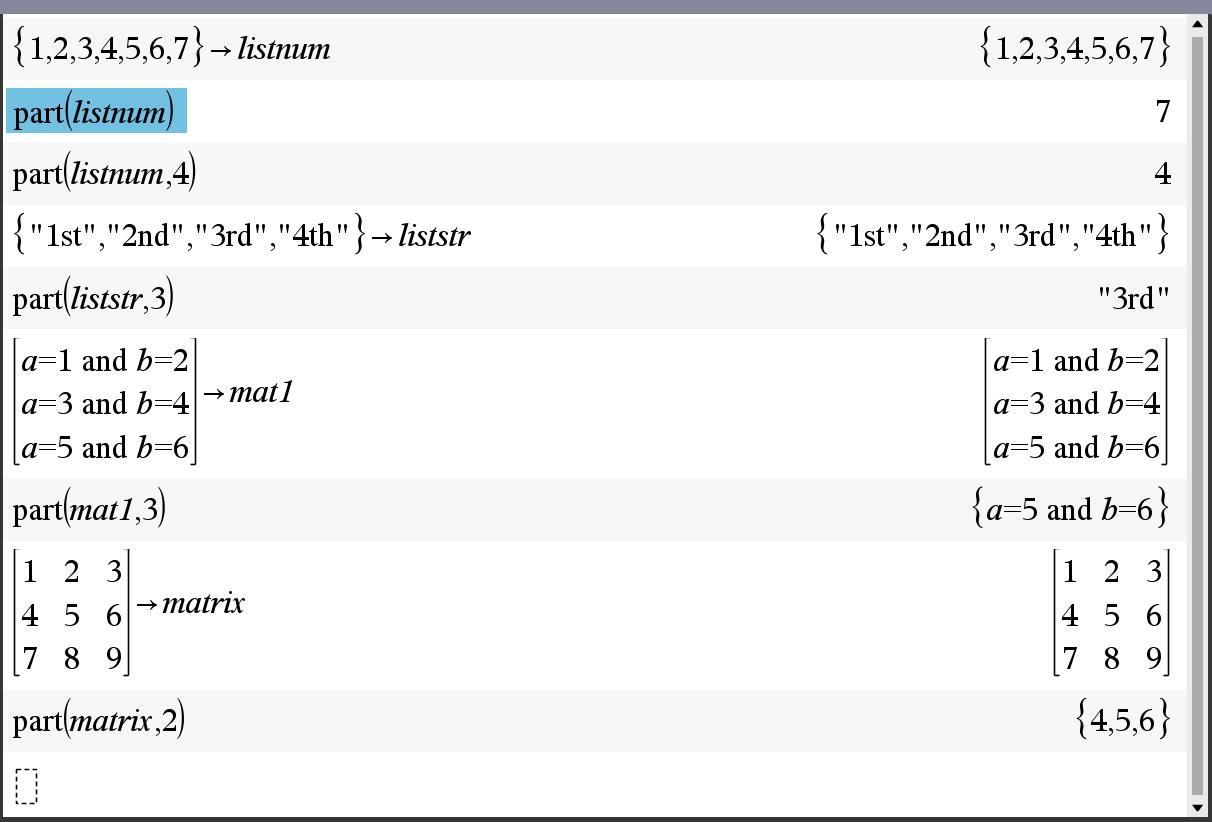
ㄴ 리스트나, 매트릭스는 이해하기 쉽습니다.
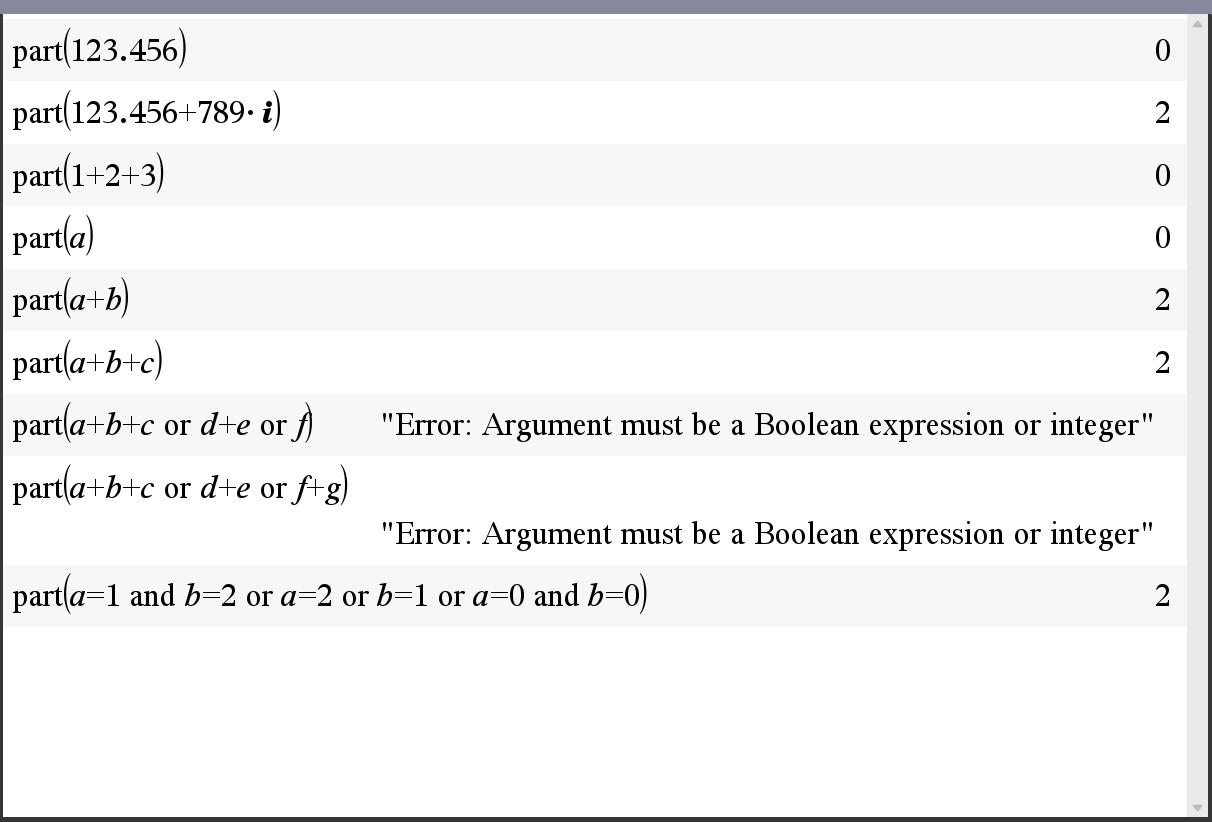
ㄴ 실수나 순허수의 연산자가 없고 자기 자신이 "실수" "순허수"로 기능에 해당합니다. 따라서 요소arguments=0 이 되는 거구요.
ㄴ 순허수가 아닌 복소수는 실수+순허수와 같이 표현되므로 연산자 "+"가 기능에 해당하고, 실수와 순허수가 요소에 해당하여 arguments=2 가 됩니다.
ㄴ 유리수는... 조금 특별한데, 1/2 은 기능이 "1/2"로서 argument=0 이고, √2/2 는 기능이 "/" 이고 arguments=2 입니다.
ㄴ 수식에 연산자가 있더라도 계산에 의해 즉시 단순화되는 경우(1+2+3 = 6) 단순화된 결과를 기준으로 part() 가 실행됩니다.
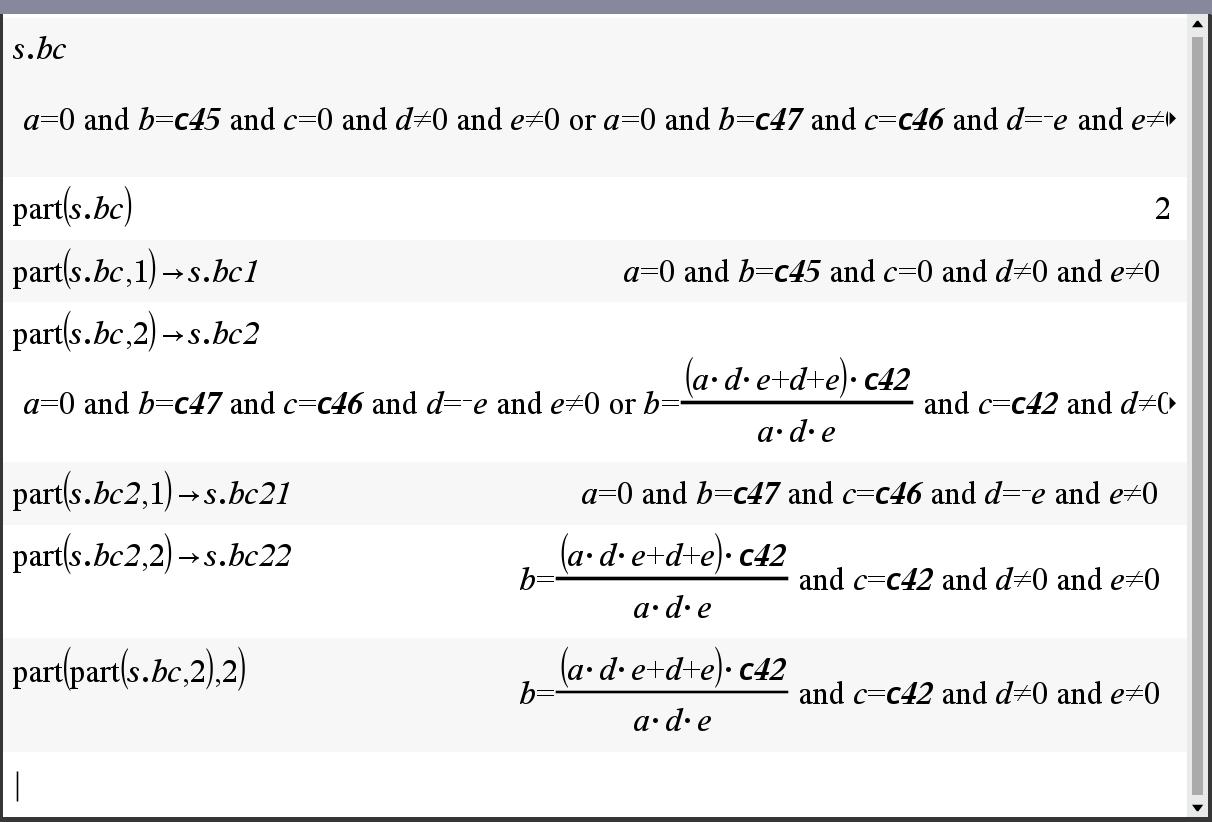
ㄴ and 와 or 가 나열되어 있는 경우, or 연산자가 우선순위를 갖습니다.
ㄴ or 연산자가 여러개 있을 경우 왼쪽부터 실행됩니다. (and도 동일)
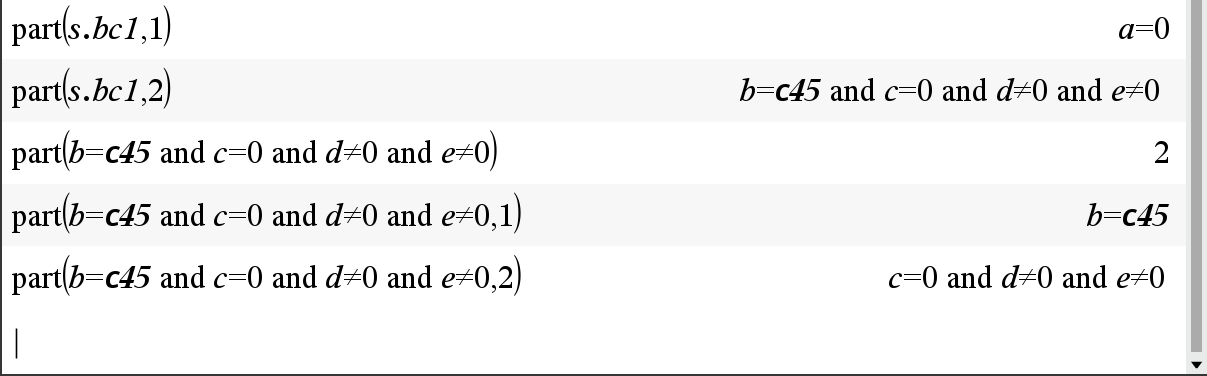
ㄴ or 연산자는 or 를 기준으로 왼쪽과 오른쪽 두개의 요소로 기능이 구현 됩니다. arguments=2 (and도 동일)
-
25
댓글7
- 1
- 2
-
3
FireCraft
part처럼 연산자나 함수를 뽑아주는 명령어가 그 cas에 없다면 그게 cas라고 부를 수 있나? 생각됩니다.
전 split( )함수를 구현하면서 (저도 split이란 이름을 붙였습니다) 코드를
split(v1)=func
if part(v1,0)="or"
return augment({part(v1,1)}, {split(part(v2,2))})
return {v1}
end func
이런 방식으로 짰습니다. (이해하기 쉽게 흐름만 보인 것으로 실제 코드는 아닙니다)
솔직히 아랫글 보고 좀 놀란게 part명령어를 일부러 숨겨놓은 것 같은데 part명령어가 없이 기능들을 짤 수 있을까? 생각해 보았습니다 그러면 식을 string으로 잡아서 거기서 찾아내는 방법을 써야되겠다. 와, 근대 그렇게 짜라고? 이런 생각을 했었는데 제가 생각한 방식 그대로 코드가 되어 있어서였습니다 -
세상의모든계산기
[TI-89, 92 plus guidebook] p.477 에 멀쩡하게 나와 있네요.
제가 nspire part() 로만 검색해서 도통 안나왔었나봅니다.
part() CATALOG
part(expression1[,nonNegativeInteger])
This advanced programming function lets you identify and extract all of the subexpressions in the simplified result of expression1.
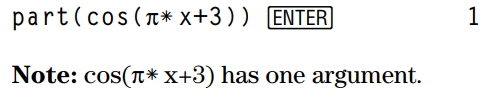
For example, if expression1 simplifies to cos(π* x+3):
• The cos() function has one argument: (π* x+3).
• The sum of (π* x+3) has two operands: π* x and 3.
• The number 3 has no arguments or operands.
• The product π* x has two operands: p and x.
• The variable x and the symbolic constant p have no arguments or operands.
If x has a numeric value and you press diamond enter, the numeric value of π* x is calculated, the result is added to 3, and then the cosine is calculated.
cos() is the top-level operator because it is applied last.
part(expression1) ⇒ number
Simplifies expression1 and returns the number of top-level arguments or operands. This returns 0 if expression1 is a number, variable, or symbolic constant such as π, e, i, or ∞.
part(expression1, 0) ⇒ string
Simplifies expression1 and returns a string that contains the top-level function name or operator. This returns string(expression1) if expression1 is a number, variable, or symbolic constant such as π, e, i, or ∞.

part(expression1, n) ⇒ expression
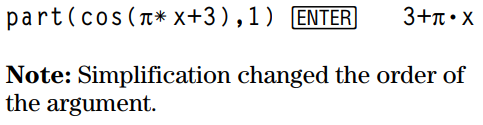
Simplifies expression1 and returns the nth argument or operand, where n is > 0 and ≤ the number of top-level arguments or operands returned by part(expression1). Otherwise, an error is returned.
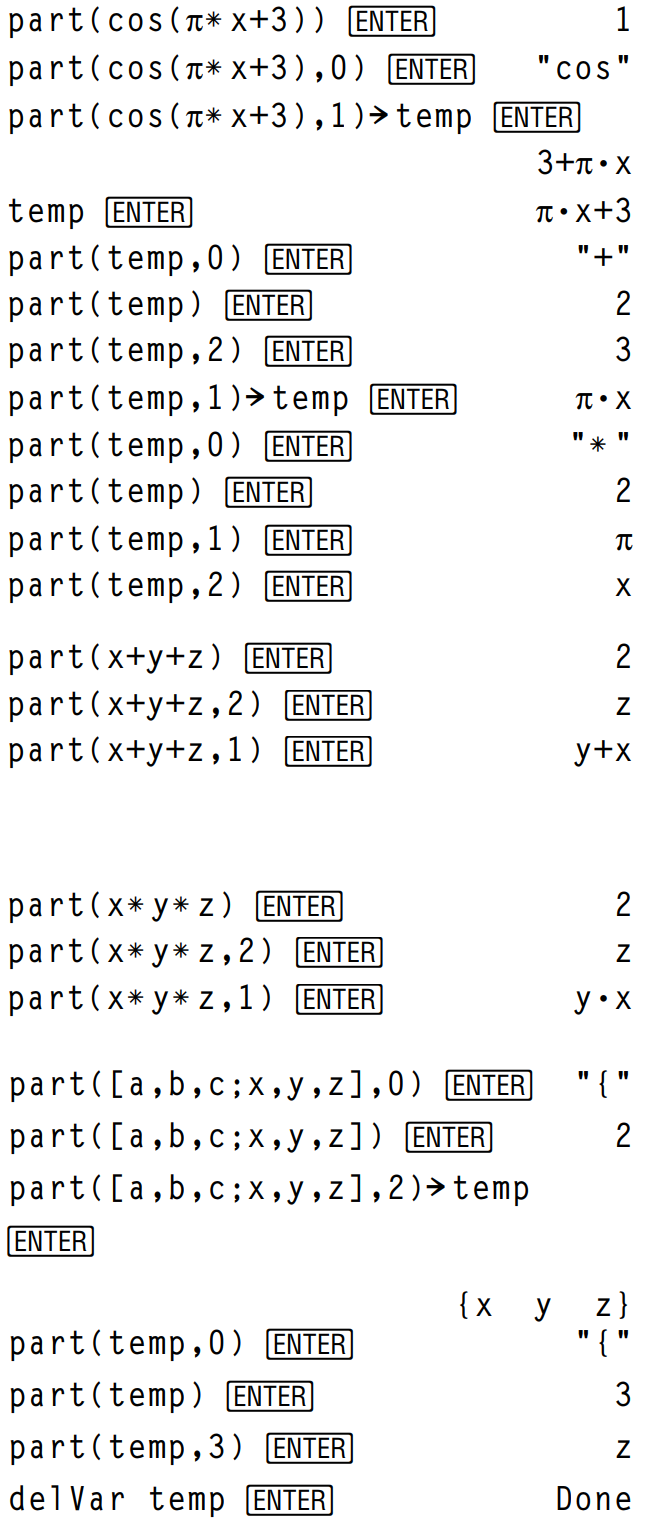
By combining the variations of part(), you can extract all of the sub-expressions in the simplified result of expression1. As shown in the example to the right, you can store an argument or operand and then use part() to extract further sub-expressions.
Note: When using part(), do not rely on any particular order in sums and products.
Expressions such as (x+y+z) and (x-y-z) are represented internally as (x+y)+z and (x-y)-z. This affects the values returned for the first and second argument. There are technical reasons why part(x+y+z,1) returns y+x instead of x+y.
Similarly, x*y*z is represented internally as (x*y)*z. Again, there are technical reasons why the first argument is returned as y•x instead of x•y.
When you extract sub-expressions from a matrix, remember that matrices are stored as lists of lists, as illustrated in the example to the right.
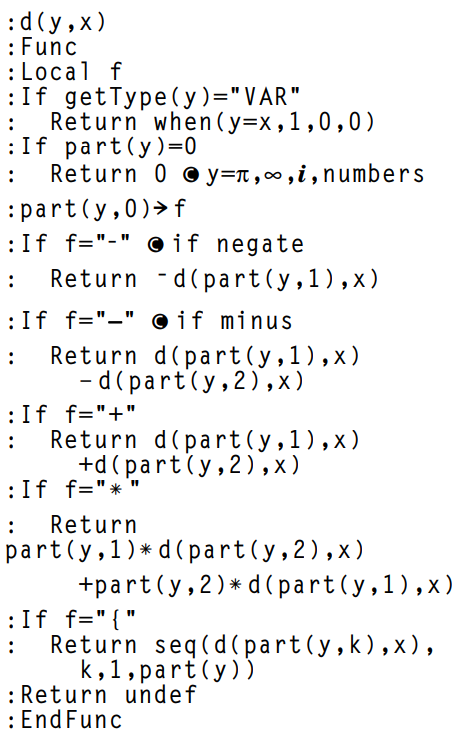
The example Program Editor function to the right uses getType() and part() to partially implement symbolic differentiation. Studying and completing this function can help teach you how to differentiate manually. You could even include functions that the TI-89 / TI-92 Plus cannot differentiate, such as Bessel functions.
- 1

세상의모든계산기 님의 최근 댓글
일반 계산기는 일반적으로 세팅이나 리셋기능이 따로 없기 때문에, 다른 요인에 영향을 받을 가능성은 없어 보이구요. '원래는 잘 되었는데, 지금은 설정 값이 날아간다'면 메모리 값을 유지할만큼 배터리가 꾸준하게 공급되지 않기 때문일 가능성이 높다고 봐야겠습니다. - 태양광이 있을 때는 계산은 가능하지만, 서랍등에 넣으면 배터리가 없어서 리셋 https://blog.naver.com/potatoyamyam/223053309120 (교체 사진 참조) 1. 배터리 준비: * 다이소 등에서 LR54 (LR1130) 배터리를 구매합니다. (보통 4개 들이 1,000원에 판매됩니다. LR44와 높이가 다르니 혼동하시면 안됩니다.) 2. 준비물: * 작은 십자드라이버 (계산기 뒷면 나사용. 이것도 없으시면 다이소에서...) 3. 커버 분해: * 계산기 뒷면의 나사를 풀고, 머리 부분(윗부분)의 커버를 조심스럽게 분해합니다. (참고해주신 블로그 사진을 보시면 이해가 빠르실 겁니다.) 4. 배터리 교체: * 기존 배터리를 빼냅니다. * 새 LR54 배터리의 '+'극 방향을 정확히 확인하여 제자리에 넣어줍니다. (대부분의 경우 '+'극이 위로 보이도록 넣습니다.) 5. 조립: * 커버를 다시 닫고 나사를 조여줍니다. * 블로그 사진을 보니 배터리 연결선 등이 눌려서 씹혀 있네요. 원래 씹히도록 설계를 안하는데, 원래 그렇게 만들어 놓은 건지? 모르겠네요. 여튼 씹히면 단선될 가능성이 있으니, 잘 보시고 플라스틱 틈새 등으로 적절히 배치해서 안씹히게 하는 것이 좋습니다. 6. TAX 재설정: * 계산기의 전원을 켜고 TAX 요율을 10%로 다시 설정합니다. 2025 12.10 TI-nspire 입력 방법 solve({x+a+b=5,x)|a=1 and b=2 2025 12.01 질문하실 때는 항상 계산기 모델명을 정확하게 적으셔야 합니다. 2025 12.01 참고 - [공학용 계산기] 로그의 입력 (log, ln) (feat. 밑 입력이 안되는 계산기는?) https://allcalc.org/14995 2025 11.14 HP-39gII 에 ExistOS 설치하기 https://allcalc.org/38526 2025 11.07